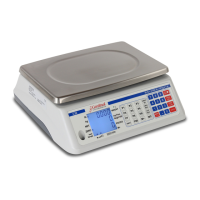
The Cardinal Detecto MSB-25 Series is a ruggedized, fully-electronic digital weight indicator designed for general-purpose weighing, sampling, and counting operations. It features a single-point load cell, a stainless steel weighing platform, digital electronics, and a full-travel keypad. The scale provides a twenty-character alphanumeric dot matrix display with 7/16 inch high characters and LED annunciators to indicate the current scale mode. Operating instructions are conveniently located on a pull-out placard.
Function Description
The MSB-25 scale is designed to perform several key functions:
- General Purpose Weighing: It can weigh mailable objects up to 25 pounds.
- Weight Display: It displays the weight of a single mailpiece, the number of mailpieces per pound, or the total number of pieces on the scale after a sample of identical pieces has been weighed.
- Tare Functionality: Users can manually enter a known tare weight via the keyboard or automatically zero off an unknown container tare weight, allowing for net weight measurements.
- Unit Display: The scale can display weight digitally in either pounds and ounces (pp pounds 00.00 ounces) or in pounds only (pp.ppp pounds).
- Remote Operation: All functions can be performed with input from a remotely located weighing device.
- Data Output: It provides direct output of data to a printer or other external device via a serial interface.
Principles of Operation
The scale can display either gross weight or net weight (gross minus tare). Tare weights can be entered via the keyboard or zeroed off. For counting, an average weight per piece is determined from a known sample quantity. The sample quantity must total at least 0.2 lbs. The default sample quantity is 10 pieces, but this can be adjusted via the keyboard. The scale can display the weight per piece, pieces per weight, or the total number of pieces (count).
Important Technical Specifications
- Capacity: 25 lb x 0.05 oz (0.005 lb)
- Power Requirements: 110/120 VAC, 60 Hz
- Count Capacity: 999,999
- Weight Resolution: 1 part in 8,000
- Computing Resolution: 1 part in 16 x 10^6 with floating decimal
- Dimensions: 5" H x 17" W x 21" D
- Weight: 28 lb
- Operating Temperature: 32° F - 104° F (0° C - 40° C)
- Weighing Accuracy: Manufactured in accordance with Handbook #44, issued by the United States Department of Commerce, National Institute of Standards and Technology.
Usage Features
- Keypad Functions:
- TARE: Enters a known tare weight or displays the current tare. Illuminates the TARE annunciator.
- WEIGHT: Places the scale in weight display mode, showing gross or net weight. Illuminates the lb or lb-oz indicator.
- ZERO: Sets gross weight to zero and clears tare weight. If in count mode, sets count to zero.
- NUMERIC KEYS (0-9, DECIMAL, CLEAR): Used for entering numeric values, answering YES/NO questions (1 for YES, 0 for NO), selecting scale #1 (local) or scale #2 (remote), and clearing erroneous entries.
- SAMPLE: Used to weigh a specific number of pieces for counting, change sample quantity (steps in multiples of 10 from 10 to 250, or manually entered), and return to sample display mode.
- COUNT: Initiates counting operation after sampling, placing the display in COUNT mode.
- WT/PC: Displays calculated average piece weight or allows entry of a known piece weight for counting.
- PRINT XMIT: Transmits RS-232 data to a printer, including displayed data and descriptive headings.
- 1 / 2 Keys: Selects between the internal scale (SCALE #1, local) or an external weight indicator platform (SCALE #2, remote).
- lb: Selects decimal pounds format (pp.ppp pounds).
- lb-oz: Selects pounds-ounces format (pp pounds 00.00 ounces).
- PC/WT: Displays the calculated number of pieces per pound (reciprocal of WT/PC).
- ENTER: Accepts or terminates data entry in calibration and operational modes.
- TEST (located on bottom): Places the scale in test mode, displaying weight in 0.01 ounce or 0.001 pound graduations to check zero tolerance error.
- LED Indicators:
- MOTION: Indicates unstable weight reading; disables ZERO and PRINT/XMIT functions.
- lb / lb-oz: Indicates weight display mode (decimal pounds or pounds-ounces).
- SAMPLE: Indicates sample mode and displays requested sample quantity.
- COUNT: Indicates count mode and displays count quantity.
- ZERO: Indicates gross weight is within ± 1/4 graduation of true zero.
- GROSS: Indicates gross weight display (when tare is zero).
- NET: Indicates net weight display (gross minus tare).
- TARE: Indicates tare weight entry/display mode.
- WT/PC: Indicates display of average weight per piece.
- PC/WT: Indicates display of pieces per pound.
- Sampling and Counting: Supports standard sampling, adjusting sample quantity, and counting out from a container. Includes a warning for "INSUFFICIENT ADD XXXXXX" if the sample weight is below 0.2 pounds, though counting can be overridden.
- Tare and Zeroing: Allows zeroing the gross weight and entering known tare weights.
- Test Mode: Provides a diagnostic mode to check scale performance against zero tolerance error.
Maintenance Features
- Calibration: The manual provides detailed steps for recalibration, which should be performed by a qualified technician. This involves accessing a calibration switch located on the bottom of the scale, applying a 25-pound test weight, and setting the autozero function.
- Care Instructions:
- Avoid sudden shocks to the commodity tray.
- Do not submerge the scale in water or spray water directly on it. Clean with a damp soft cloth and mild detergent after removing power.
- Do not use abrasive cleaners, acetone, or other volatile solvents.
- Do not replace fuses with the power cord plugged in or use fuses of incorrect sizes (use 3AG 1/4 ASB for 115 VAC).
- Do not use sharp or pointed instruments to depress keys.
- Always follow all warnings and instructions in the manual and on the product.
- Parts Breakdown: Includes an exploded view and a comprehensive parts list for interchangeable components, facilitating field or factory service.

 Need help?







 To Next Page


 General