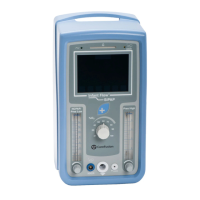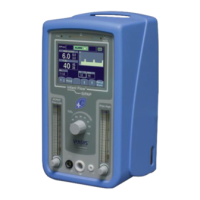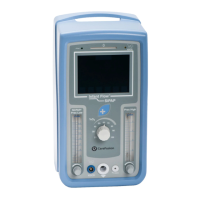
What to do if the CareFusion Infant Flow SiPAP battery is low?
- HHannah GarciaAug 14, 2025
If the battery status indicator changes from green to red, indicating a low battery charge (less than 40%), connect the equipment to an external power source.
What to do if the CareFusion Infant Flow SiPAP battery is low?
If the battery status indicator changes from green to red, indicating a low battery charge (less than 40%), connect the equipment to an external power source.
What to do if AC power is disconnected from CareFusion Infant Flow SiPAP?
If the AC power is disconnected, push the Alarm Mute button for 3 seconds to silence the alarm. Then, reconnect the AC power.
What to do if the %O2 is too high on CareFusion Medical Equipment?
If the %O2 is more than 5% above the set level for 15 seconds, first press the Alarm Mute button to silence the alarm. Then, correct the delivered oxygen concentration if there is a supply gas failure. If there is water trap overflow, press Alarm Reset for 3 seconds to set new limits.
What to do if the %O2 is too low on CareFusion Infant Flow SiPAP?
If the %O2 is more than 5% below the set level for 15 seconds, first press the Alarm Mute button to silence the alarm. Then, correct the delivered oxygen concentration if there is a supply gas failure. If there is water trap overflow, press Alarm Reset for 3 seconds to set new limits.
What to do if the NCPAP/Pres Low is too low on CareFusion Infant Flow SiPAP?
If the NCPAP/Pres Low is too low (CPAP less than 2 cmH2O below the set level for 15 seconds, or less than 1.5 cmH2O at any time), it could be due to a setting change, circuit disconnect/reconnect, or a circuit leak. Push the Alarm Mute button for 3 seconds to silence and reset alarm limits. Reset alarm limits after a setting change or patient circuit disconnect/reconnect. Check for leaks in the patient circuit.
What to do if the NCPAP/Pres Low is too high on CareFusion Medical Equipment?
If the NCPAP/Pres Low is too high (CPAP greater than 3 cmH2O above the set level for 15 seconds), it may be due to a setting change or a circuit disconnect/reconnect. Push the Alarm Mute button for 3 seconds to silence and reset alarm limits. Also, reset the alarm limits after any setting change or patient circuit disconnect/reconnect.
What to do if %O2 is greater than 104% on CareFusion Infant Flow SiPAP?
If the %O2 reading is greater than 104%, it may require recalibration. Restore the FiO2 level to below the maximum limit. Also, press the Alarm Reset button for 3 seconds, and recalibrate O2 as soon as practicable.
What to do if %O2 is less than 18% on CareFusion Infant Flow SiPAP Medical Equipment?
If the %O2 reading is less than 18%, it may require recalibration. Restore the FiO2 level to above the minimum limit. Also, press the Alarm Reset button for 3 seconds and recalibrate O2 as soon as practicable.
What to do if BiPhasic mode fails on CareFusion Infant Flow SiPAP?
If the BiPhasic or BiPhasic tr* mode fails to operate as set, revert to nCPAP mode.
Specifies electromagnetic compatibility requirements and guidance for safe operation.
Warns about potential interference in MRI environments due to electromagnetic components.
Details legal restrictions on device sale and reuse of accessories.
Outlines the device's technical classification and suitability for use.
Highlights the key capabilities and features of the Infant Flow SiPAP system.
Provides step-by-step instructions for assembling the device stand and driver.
Details the procedure for connecting the patient circuit and humidifier to the driver.
Explains the correct method for attaching the abdominal respiratory sensor.
Illustrates the relationship between gas flow and airway pressure for typical performance.
Outlines the essential tests to perform before patient use for safety and functionality.
Describes the automatic system check performed when the device is powered on.
Guides the user through the calibration process for the oxygen sensor.
Details the procedure for testing the patient circuit for leaks.
Provides steps to test the functionality of all audible and visual alarms.
A checklist to document the successful completion of user verification tests.
Identifies and describes the components on the device's front panel.
Details the various connections and labels found on the rear panel of the device.
Explains how to adjust operational parameters and settings on the device.
Describes the function of the buttons used for adjusting parameter values.
Explains how the system manages settings that might conflict with each other.
Details how default parameter values are managed when changing operating modes.
Guides the user on how to initiate a manual breath delivery.
Describes the different screens and their layouts within the device's interface.
Explains how to set and confirm alarm limits for operation.
Guides the user on selecting the desired operating mode for the device.
Details how to adjust specific operational parameters for the selected mode.
Describes the primary display screen showing current status and monitored parameters.
Explains how to view detailed monitored values and active control settings.
Provides detailed instructions for correctly attaching the system generator to the patient.
Outlines the correct procedure for safely powering down the device.
Refers to separate instructions for a related system.
Describes the Nasal CPAP mode and its breath rate monitoring capabilities.
Explains the BiPhasic mode, including time-triggered pressure assists.
Details the BiPhasic tr* mode for patient-triggered pressure assists and apnea backup.
Explains the different priority levels of alarms and how they are indicated.
Describes how to temporarily silence active audible alarms.
Guides the user on how to clear resolved alarms and reset alarm limits.
Details the types of audible tones used for different alarm priorities.
Provides a comprehensive list and description of all alarm conditions.
Explains the status and behavior of the device when the battery is critically low.
Describes how the device operates when external power is lost.
Explains how error codes are displayed and what they signify.
Illustrates and explains the meaning of various visual symbols and indicators on the device.
Provides instructions for cleaning the exterior surfaces of the device and its stand.
Outlines operator-level maintenance requirements and refers to service procedures.
Offers guidance on proper storage of the unit and care for its battery.
Explains the meaning of various symbols found on the device and in its documentation.
Identifies and explains the symbols used for user input on the device's graphical interface.
Lists the operational parameter ranges and defaults for non-US configurations.
Specifies electromagnetic compatibility requirements and guidance for safe operation.
Warns about potential interference in MRI environments due to electromagnetic components.
Details legal restrictions on device sale and reuse of accessories.
Outlines the device's technical classification and suitability for use.
Highlights the key capabilities and features of the Infant Flow SiPAP system.
Provides step-by-step instructions for assembling the device stand and driver.
Details the procedure for connecting the patient circuit and humidifier to the driver.
Explains the correct method for attaching the abdominal respiratory sensor.
Illustrates the relationship between gas flow and airway pressure for typical performance.
Outlines the essential tests to perform before patient use for safety and functionality.
Describes the automatic system check performed when the device is powered on.
Guides the user through the calibration process for the oxygen sensor.
Details the procedure for testing the patient circuit for leaks.
Provides steps to test the functionality of all audible and visual alarms.
A checklist to document the successful completion of user verification tests.
Identifies and describes the components on the device's front panel.
Details the various connections and labels found on the rear panel of the device.
Explains how to adjust operational parameters and settings on the device.
Describes the function of the buttons used for adjusting parameter values.
Explains how the system manages settings that might conflict with each other.
Details how default parameter values are managed when changing operating modes.
Guides the user on how to initiate a manual breath delivery.
Describes the different screens and their layouts within the device's interface.
Explains how to set and confirm alarm limits for operation.
Guides the user on selecting the desired operating mode for the device.
Details how to adjust specific operational parameters for the selected mode.
Describes the primary display screen showing current status and monitored parameters.
Explains how to view detailed monitored values and active control settings.
Provides detailed instructions for correctly attaching the system generator to the patient.
Outlines the correct procedure for safely powering down the device.
Refers to separate instructions for a related system.
Describes the Nasal CPAP mode and its breath rate monitoring capabilities.
Explains the BiPhasic mode, including time-triggered pressure assists.
Details the BiPhasic tr* mode for patient-triggered pressure assists and apnea backup.
Explains the different priority levels of alarms and how they are indicated.
Describes how to temporarily silence active audible alarms.
Guides the user on how to clear resolved alarms and reset alarm limits.
Details the types of audible tones used for different alarm priorities.
Provides a comprehensive list and description of all alarm conditions.
Explains the status and behavior of the device when the battery is critically low.
Describes how the device operates when external power is lost.
Explains how error codes are displayed and what they signify.
Illustrates and explains the meaning of various visual symbols and indicators on the device.
Provides instructions for cleaning the exterior surfaces of the device and its stand.
Outlines operator-level maintenance requirements and refers to service procedures.
Offers guidance on proper storage of the unit and care for its battery.
Explains the meaning of various symbols found on the device and in its documentation.
Identifies and explains the symbols used for user input on the device's graphical interface.
Lists the operational parameter ranges and defaults for non-US configurations.
| Manufacturer | CareFusion |
|---|---|
| Category | Medical Equipment |
| Application | Non-invasive respiratory support for infants |
| Patient Type | Infants |
| FiO2 Range | 21% to 100% |
| Oxygen Concentration | Adjustable |
| Patient Interface | Nasal Prongs, Nasal Masks |
| Power Requirements | 100-240 V AC, 50/60 Hz |
| Type | Infant Respiratory Support System |
| Modes | SiPAP, CPAP |
| Flow Range | 2 to 15 L/min |
| Weight | Approximately 10 kg |