12
ENG
mpxone +0300086EN rel. 2.2 - 13.11.2023
Installation
2. INSTALLATION
2.1 Warnings
Caution: avoid installing the controller in environments with the following characteristics:
• temperature and humidity that do not comply with the ambient operating conditions (see “Technical specifi cations”);
• strong vibrations or knocks;
• exposure to water sprays or condensate;
• exposure to aggressive and polluting atmospheres (e.g.: sulphur and ammonia gases, saline mist, smoke) which may cause
corrosion and/or oxidation;
• strong magnetic and/or radio frequency interference (thus avoid installation near transmitting antennae);
• exposure to direct sunlight and the elements in general;
• wide and rapid fl uctuations in ambient temperature;
• exposure of the controller to dust (formation of corrosive patina with possible oxidation and reduction of insulation);
2.2 Panel version
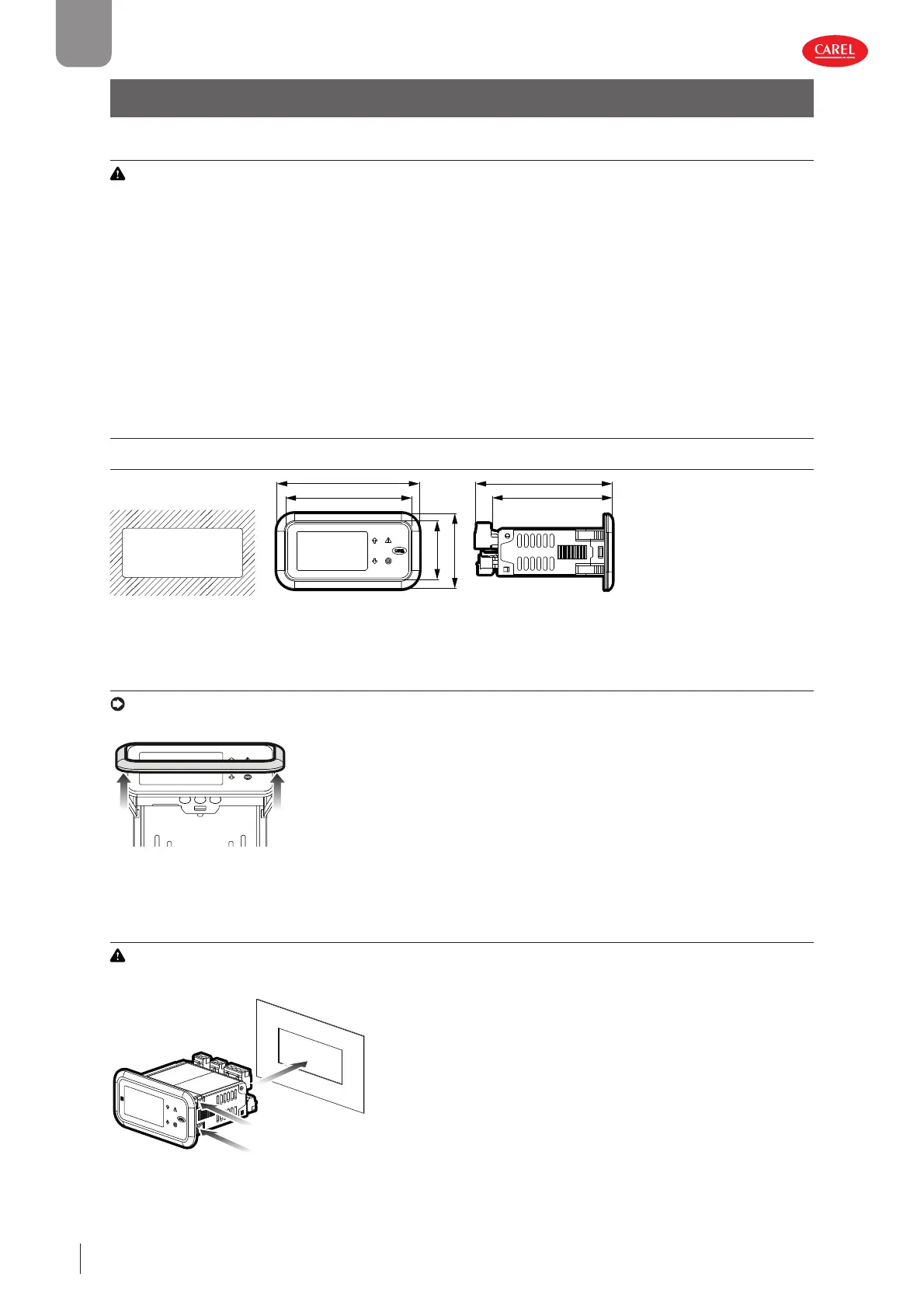
2.2.1 Dimensions - mm (in)
78.5 (3.09)
36.5 (1.44)
46.6 (1.83)
88.6 (3.49)
Drilling template - mm (in)
71x29 (2.79x1.14)
74.7 (2.94)
84.9 (3.34)
300086_029_R01
Fig. 2.a
2.2.2 Removing the frame
Notice: the panel version is supplied with the frame already fi tted. Nonetheless, this can be easily removed without aff ecting
the IP protection rating.
300086_027_R01
Press the frame gently upwards at one of the points indicated by the
arrows in the fi gure until hearing a click, and repeat the operation at
the other points so as to detach the frame.
Fig. 2.b
2.2.3 Assembly
Caution: before carrying out any maintenance, disconnect the controller from the power supply by moving the main sys-
tem switch to “off ”.
300086_026_R01
1. Place the controller in the opening, pressing lightly on the side an-
choring tabs.
2. Then press on the front until fully inserted (the side tabs will bend,
and the catches will attach the controller to the panel).
Fig. 2.c











 To Next Page