24
ENG
mpxone +0300086EN rel. 2.2 - 13.11.2023
User interface
3. USER INTERFACE
3.1 Introduction
The front panel of the user terminal includes the display and the keypad, featuring four buttons that, pressed alone or in combi-
nation, are used to program the controller. The user interface display features three digits with sign and decimal point, a buzzer
for signalling alarms and nine icons. The terminal features wireless connectivity and an NFC (Near Field Communication) or Blue-
tooth interface for interaction with mobile devices (on which the CAREL “Applica” app has been installed, available on Google
Play for the Android operating system and on Apple store for iOS devices, Bluetooth only).
The remote display, available only for the Medium/Advanced versions and comprising the display only, can display the value of
a selectable variable and signal any alarms (it does not feature NFC or Bluetooth connectivity).
Notice:
• the password for accessing the user terminal parameters is 33, and is diff erent from the password for accessing the user levels
(U=User, S=Service, M=Manufacturer) on the APPLICA app. See the parameter table.
• the unit of measure of the displayed values can be changed by setting parameter /5.
Caution: the set of parameters accessible from the user interface is a subset of all the parameters available via the APPLICA
app (mobile & desktop) and SPARK.
Code Description Def. Min Max UoM User User terminal
/5 Unit of measure
0=°C/barg, 1=°F/psig
001- SYES
PDM Manufacturer password 44 0 99 - M NO
PDS Service password 22 0 99 - M NO
PDU User password - 0 99 - S NO
Tab. 3.a
Notice: the user, service and manufacturer passwords can be changed directly by accessing the parameter list in the APPLICA
app, and can contain up to 8 alphanumeric and special characters.
Notice: it is strongly recommended to change the default values of the passwords during commissioning. If the passwords
are forgotten, contact CAREL support.
The buzzer and the keypad can be disabled by setting parameters H8 and H5 respectively.
Code Description Def. Min Max UoM User User terminal
H5 Enable keypad and NFC functions
0=Disabled, 1=Enabled
101- UNO
H8 Buzzer
0=No,1=Yes
101- UNO
Tab. 3.b
The information available on the user terminal and in the Applica app may vary according to the type of profi le, the password
entered and the confi guration parameters set by the manufacturer. See the parameter table.
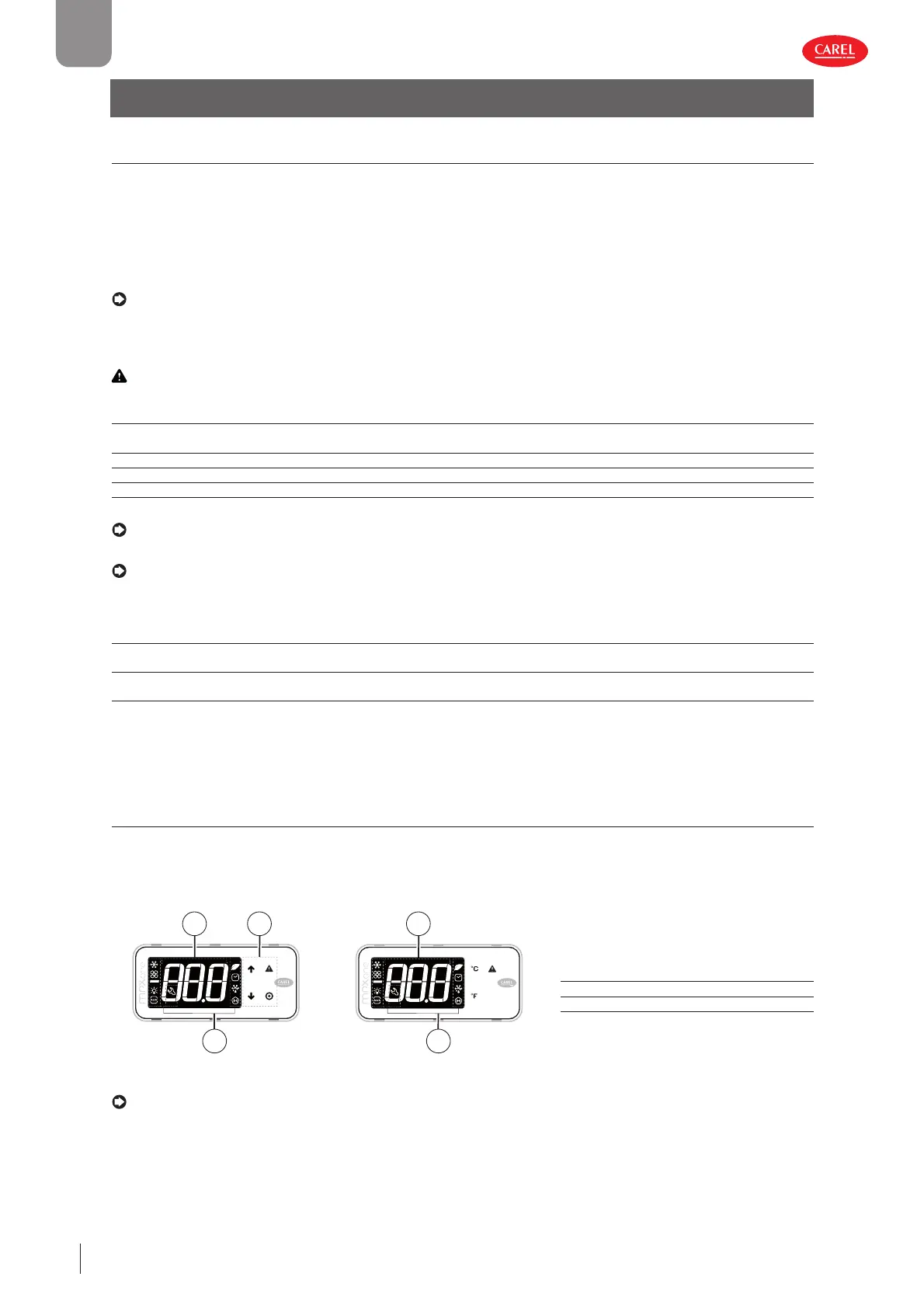
3.2 User terminal and remote display
The display shows measurements in the range –50 and +150°C, according to the type of probe used. For 0 to 5 V ratiometric
and active 0 to 10 V or 4 to 20 mA probes the unit of measure is defi ned by the type of probe used. The decimal point can be
disabled by setting a parameter (/6).
User terminal Remote display
300086_001_R01
3
1 2
300086_002_R01
3
1
Key:
1 Main fi eld
2 Keypad
3 Operating mode
Fig. 3.a Fig. 3.b
Notice:
• the user terminal can only be used to set the frequent parameters and display the value of the probes connected to MPXone.
The Service- and Manufacturer-level parameters are set using the “Applica” app or the confi guration software, depending on
the access profi le. See the parameter table and the paragraph “Parameter categories visible on the user terminal”;
• Parameters /t1 and /t2 are used to choose the variable shown on the display during normal operation, while /t enables display
of the alarms on the remote display.


 To Next Page
 Loading...







