30
ENG
mpxone +0300086EN rel. 2.2 - 13.11.2023
Commissioning
Commissioning parameters
Par. Desc. Public
In Type of unit Basic, Medium, Advanced
Sn Number of secondary devices in the local network Basic, Medium, Advanced
H0 Serial or main/secondary network address Basic, Medium, Advanced
H3 BMS serial port protocol Basic, Medium, Advanced
/P1 Type of probe, group 1 (S1, S2, S3) Basic, Medium, Advanced
P1 Electronic valve Medium, Advanced
PH Refrigerant (**) Medium, Advanced
/P2 Type of probe, group 2 (S4, S5) (**) Medium, Advanced
/P3 Type of probe, group 3 (S6) (**) Medium, Advanced
/P4 Type of probe, group 4 (S7) Advanced
/Fd Assign superheated gas temperature probe (tGS) (**) Medium, Advanced
/FE Assign saturated evaporation pressure/temperature probe (PEu/tEu) (**) Medium, Advanced
/UE Maximum value for saturated evaporation pressure probe (PEu/tEu) (**) Medium, Advanced
/LE Minimum value for saturated evaporation pressure probe (PEu/tEu) (**) Medium, Advanced
End Exit the initial configuration procedure Basic, Medium, Advanced
Tab. 4.a
(*) not displayed if In = 0;
(**) not displayed without electronic expansion valve (P1 = 0).
Caution:
at the end of the configuration wizard, the unit will be ON and the temperature set point = 50°C.
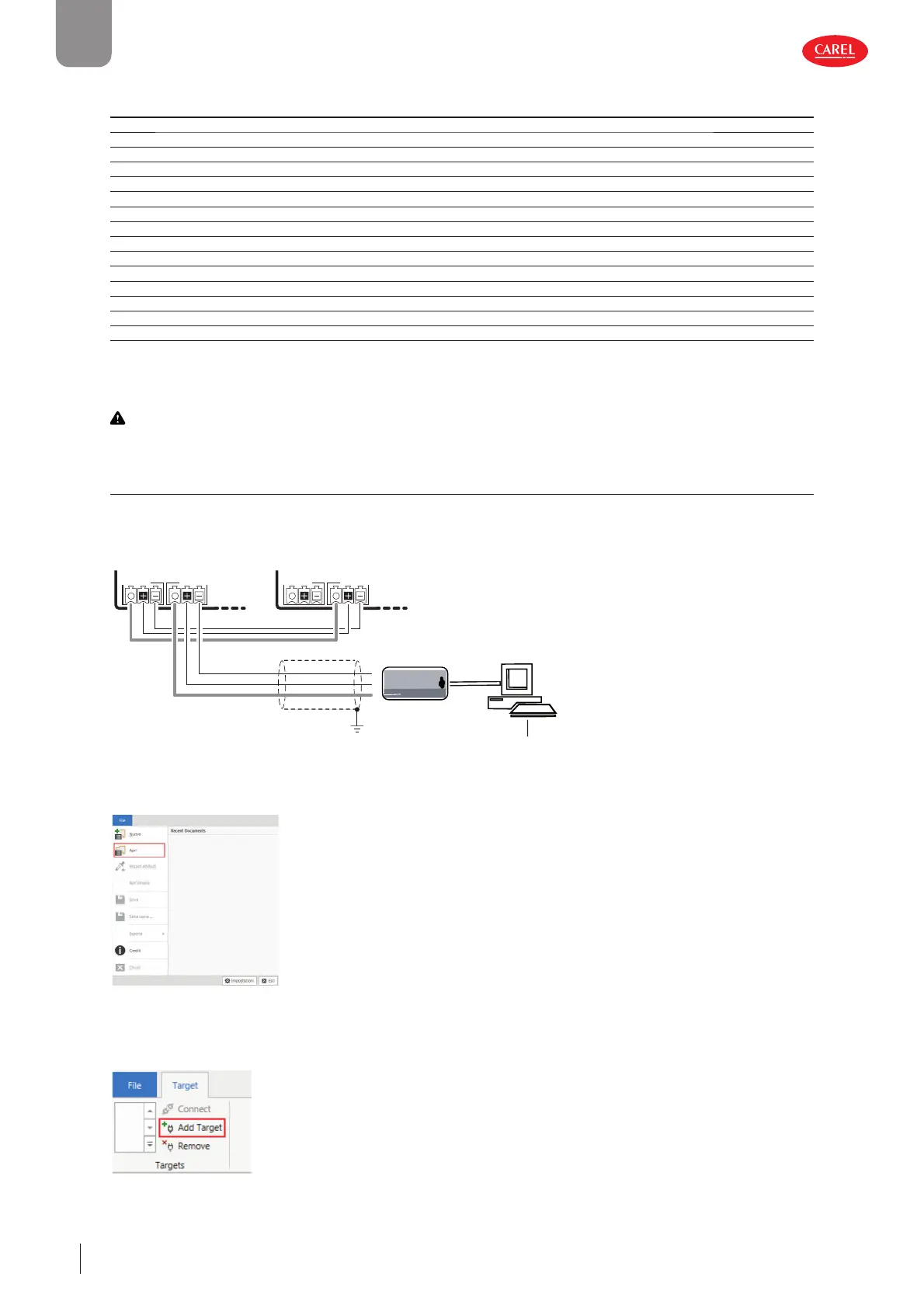
4.2 Computer
The configuration software can be used to configure the commissioning parameters from a PC.
Procedure:
300086_003_R01
CVSTDUMOR0
USB/RS485 converter
J5 FBus
J4 BMS
J5 FBus
J4 BMS
RS485
Main Secondary
Shield
BMS
Commissioning tool
C
A
E
RL
i
s
o
l
a
t
e
d
B
S
U
-
8
4
S
R
5
c
o
v
e
r
t
e
r
R
S
4
8
5
ne
t
w
o
r
k
G
D
N
R
x
+
/
T
x
+
R
x
-
/
T
x
-
Fig. 4.b
1. Connect the PC to connector J4 (BMS) via a USB/RS485 converter (P/N CVSTDUMOR0);
300052_041_R02
Fig. 4.c
2. After starting the software, open the project file provided by Carel;
300052_049_R02
Fig. 4.d











 To Next Page