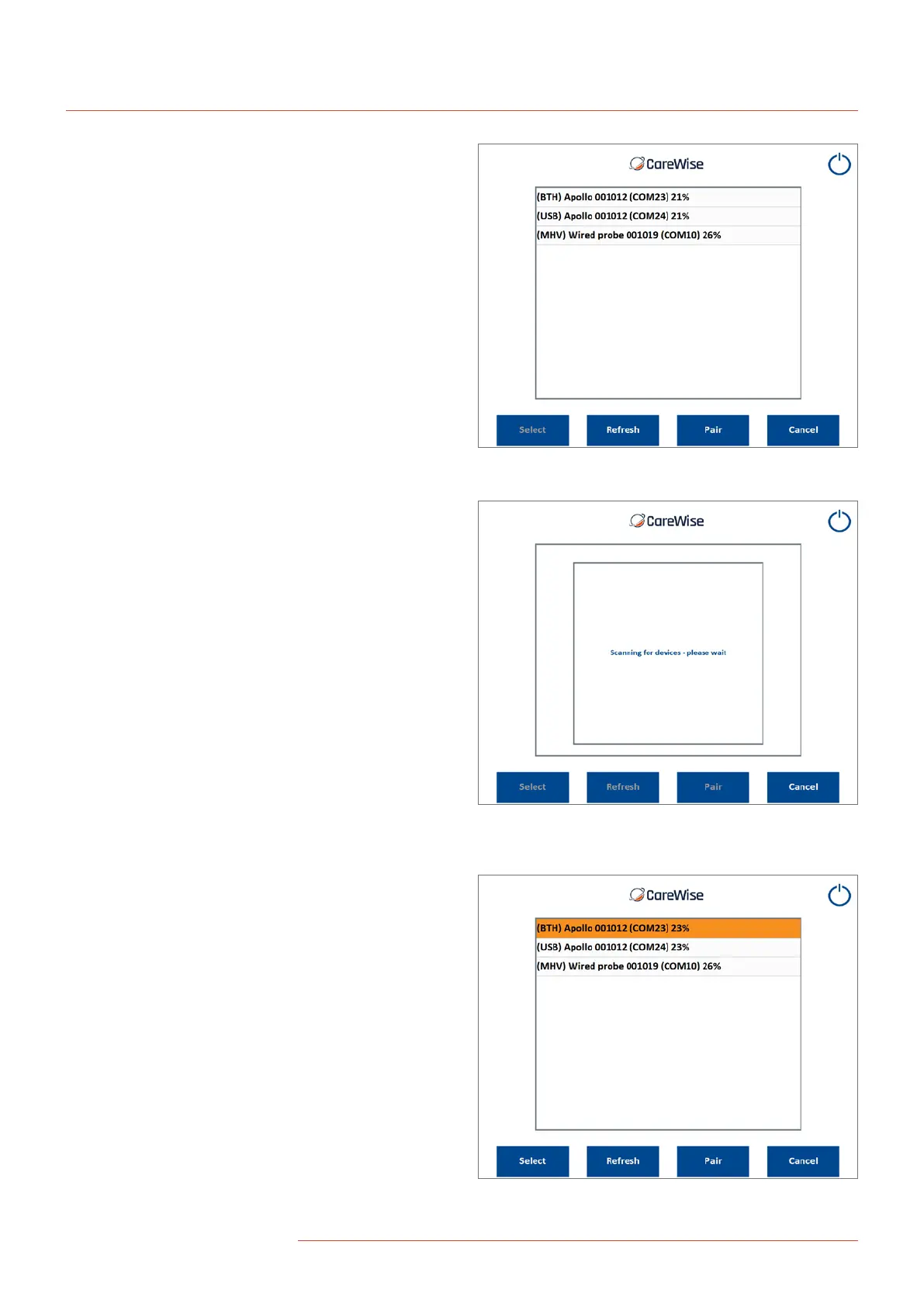
Pressing the Icon will bring up the available connections screen
which will list all of the available Apollo devices that have been
previously linked to the Apollo system.
Each connection type is displayed in terms of six parameters:
Connection Type: Bluetooth (BTH)
Device Name: Apollo
Serial Number: S/N 001012
Connected COM port: COM23
Battery Charge Level: 21%
Figure 23 – Available connections screen
showing the list of available devices
Figure 24 – Information shown on screen when
the list of available devices is being scanned
after pressing the Refresh button
Figure 25 – Highlighted available
device after it has been pressed
Once the desired Apollo device has been listed, press the
corresponding line in the Available Devices table; this will
cause the line to be highlighted in orange:
20
|
www.carewise.com
C-Trak Apollo
If the paired device is not listed, click ‘Refresh’ and the system will
scan for all available paired devices. Note: The OmniProbe must
be connected to the Apollo Handset and the latter be powered on
via the on/o button on the handset keypad before the system
scans for devices; the top blue LED on the handset keypad will
flash blue when looking for a connection.


 To Next Page