LB.05099.02 Pag. 18 18/10/16
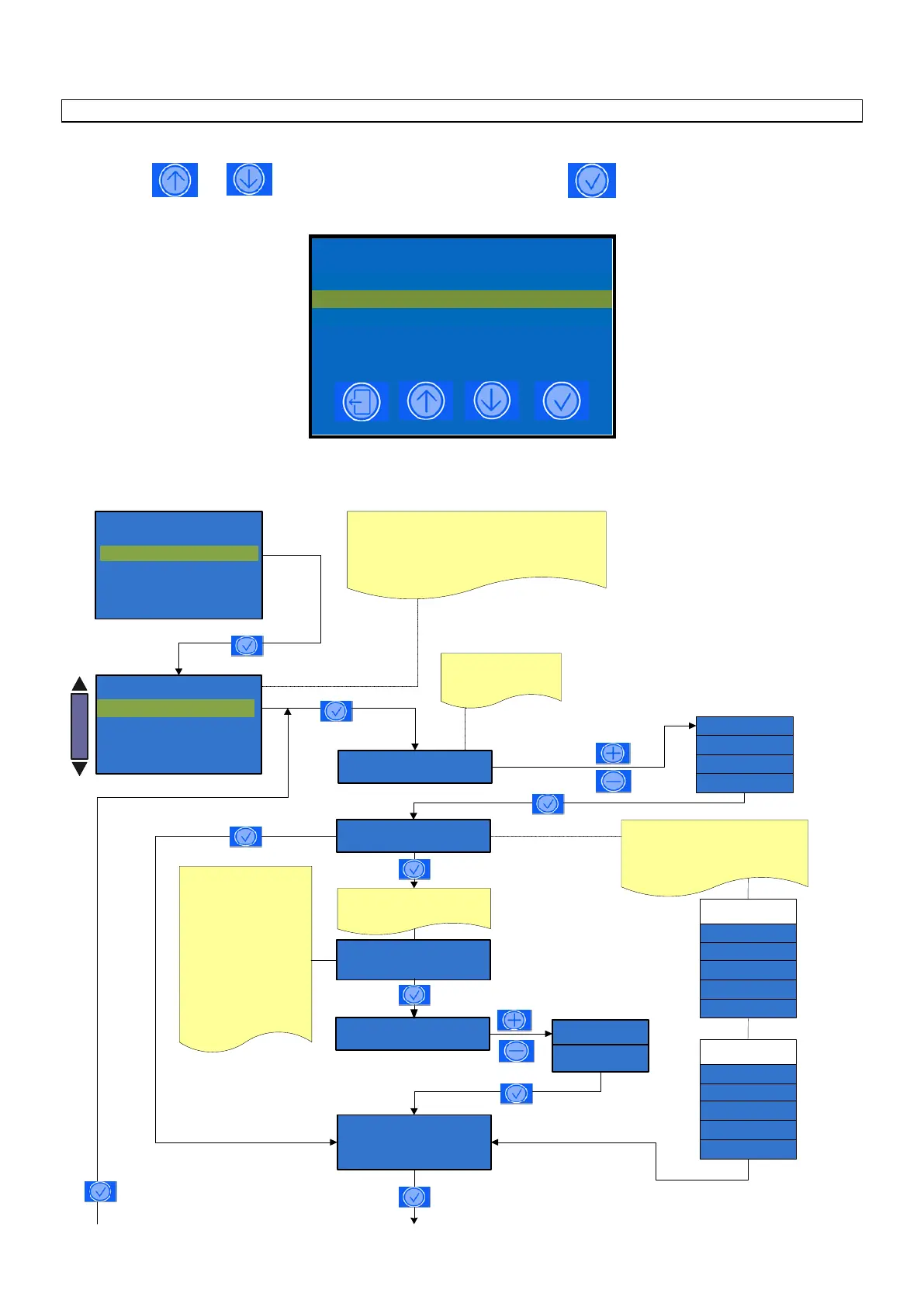
DOSES PROGRAMMING
PLEASE NOTE: TO ACCESS TO THE DOSES PROGRAMMING THE MACHINE MUST BE AT THE SET-UP TEMPERATURE
Press the key and to select the parameter and then press the key to confirm the selection
Coffee
Milk
Disable
GRX BX Drink type
GRX BX Drink name
XXXXX
To modify the drink name
press Edit key,
The display show
XXXXX
> < -B-C-D-F-G-H-I-L-M-
The heart symbol (cursor)
must be located on the
character you want to
select.
To scroll the character use
the keys (+ / - )
Press Enter key to confirm
the selection - Use key
Cut to delete a letter - Use
key Ins to insert a space
After you selected the
required name, press
Enter key, the display
shows:
GRX BX
XXXXX
PRE-INFUSION X ml
PAUSE X s
Coffee + Milk
Black coffee
Kaffee
Americano
Coffee
Espresso
Based on the selected drink type,
the relevant drink name will be
shown.
Press +/- to select the drink name
from the default names list.
COFFEE BASED
DRINK NAME
SELECT
Set doses
DOSE PROGRAMMING
BX˟ XXXXXXXXX
BX˟ XXXXXXXXX
BX˟ XXXXXXXXX
BX˟ XXXXXXXXX
BX˟ XXXXXXXXX
BX: Selected n° key of the dose keys menù
XXXXXX: Drink name.
BX¹: Selected n°key of the first group
BX²: Selected n°key of the second group
GRX: Group number
Latte macchiato
Milchkaffee
Caffè latte
Cappuccino
Espres. macchiato
MILK BASED
DRINK NAME
Extramilk
Disable
Enable












 To Next Page