SECTION 2 - CONTROLS, INSTRUMENTS AND OPERATION
2ï52
Video Camera (Colour Monitor only)
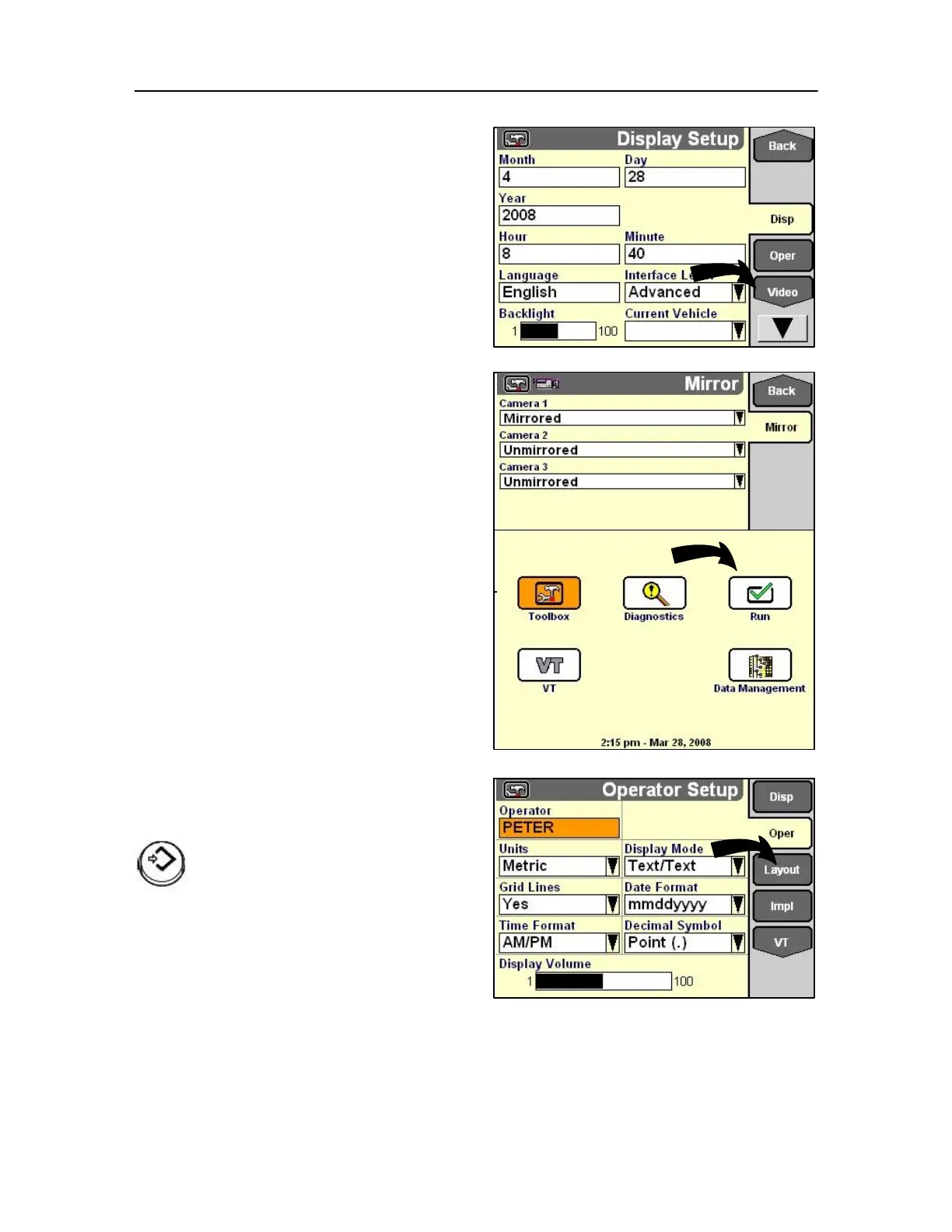
Where the colour touch screen is fitted a video
camera option can be fitted for the operator to view
the rear of the baler.
The screen is accessible with a single touch of the Video
tab.
The viewing options are:
Mirrored view, is the view you get if you were standing
at the same place as the camera and look in the same
direction (backwards). The name “Mirrored” is just
saying that it’s the mirrored view of the normal view.
Unmirrored or normal view: is what you would view in
your rear view mirror.
Layout creation
A Run screen is available to any application on the
monitor for example, the planting or harvesting
software. Each screen is accessible with a single soft
key or use rotary encoder or touch screen through the
RUN application.
Use the Run Layout screen:
• to customize the layout for each Run screen,
• to select locations for the control or reporting
modules from a software application.
NOTE: Application software is required to be loaded for
the run application to be applicable.
On the Home Screen, highlight the Toolbox icon.
Press Select or touch to start the Toolbox application.
The Display Set-up screen displays.
Press the soft key or use rotary encoder or
touch screen for Layout to display the
Layout screen.
MONITOR - ISOBUS TRACTOR
The information shown now through to page 2-63
relates mainly to the ISOBUS tractor and not the
baler.



 To Next Page