SECTION 2 - CONTROLS, INSTRUMENTS AND OPERATION
2ï73
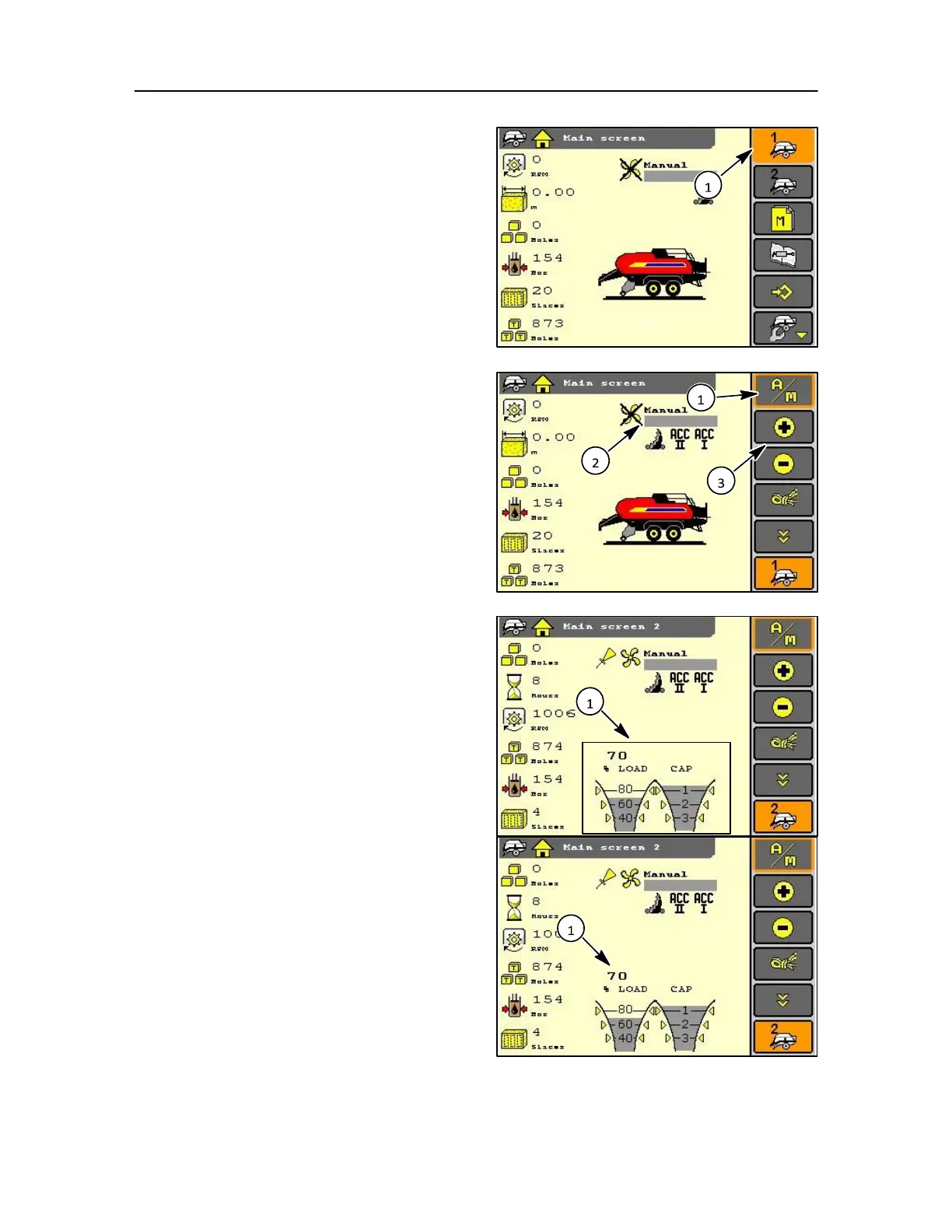
While still in the screen and by selection of the baler
setting icon (1) soft key, encoder, or touch screen, the
menu bar will change to allow inputs as follows:
Automatic or Manual A/M (1) bale density setting can be
set.
A bargraph appears (2) if manual operation is
selected, and the setting can be changed by the
operator using the (+), (-), soft key, or touch screen
(3) opposite. The setting will be reflected in the
density cylinder pressure.
The operator selected setting appears together with
this symbol. In this mode, the setting is the requested
load on the plunger on a scale between 0 and 100.
MAIN SCREEN > 600 RPM
The monitor will enter the operation mode automatically:
• When the monitor has a 12 volt supply
• The tractor PTO runs more than > 600 rpm and
the status area is now showing a load indicator
and a capacity indicator (1).
NOTE: If errors related to the density are active the load
indicator disappears and is discussed in Section 3.
Load indicator
The indicator will light up according to the actual
measured plunger load (1) on a scale between 0 and
100.
Refer to Section 3-29 in this manual.
• With the density system operating in the
automatic mode:
The electronic system will control the density
valve, continuously to maintain the actual
measured load equal to the operator set density



 To Next Page