EasyManua.ls Logo

Case 446 - Air Cleaner Maintenance; Cleaning and Replacing the Element

Case 446
62 pages
Print Icon
To Next Page IconTo Next Page
To Previous Page IconTo Previous Page
Loading...
AIR
CLEANER
Remove and clean element
after
each
25
hours
or
weekly
. I nstall a
new element every
500
hours
or
yearly
or
when loss
of
power
is
noticeable.
Tap
element
lightly
on a
flat
sur-
face
to
cause
the
loose
dirt
to
fall
off
.
Handle
the
element
with
care
to
avoid
damage.
~
__
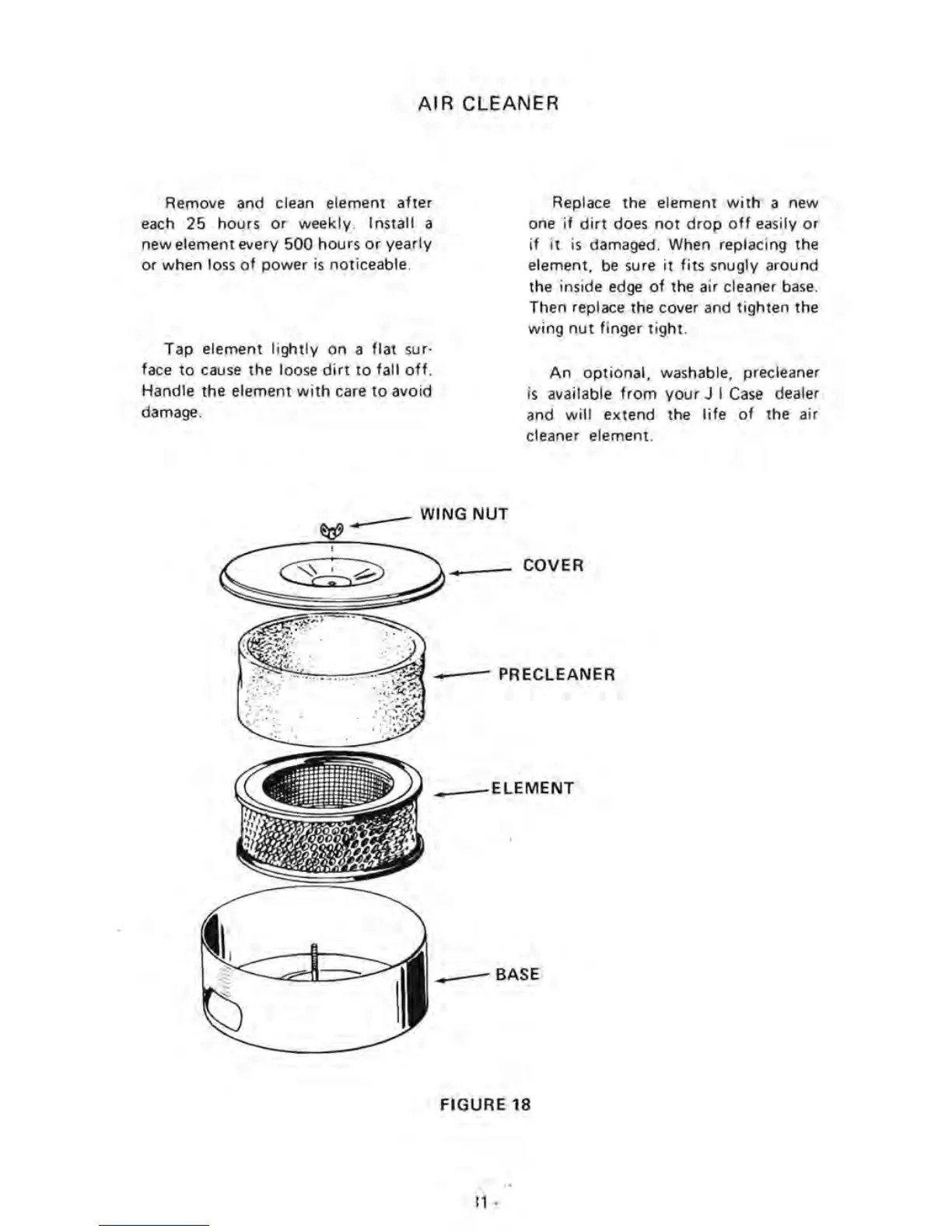
WING
NUT
~~-
Replace the element
with
a new
one
if
dirt
does
not
drop
off
easily
or
if it
is
damaged. When replacing the
element,
be
sure
it
fits
snugly around
the inside edge
of
the air cleaner
base.
Then replace the cover and
tighten
the
wing
nut
finger
tight
.
An
optional,
washable, precleaner
is
available
from
your
J I
Case
dealer
and
will
extend the
life
of
the air
cleaner element.
COVER
.--
PRECLEANER
.--ELEMENT
__
BASE
FIGURE 18
11
-

Related product manuals