Auto Time Calibration Signal
Receive
An automatic time calibration signal receive
operation is performed and the time and day
settings are corrected between midnight and
5:00 a.m. Once a signal receive operation is
successful, no more auto receive operations
are performed that day.
1. Place the watch near a window or some
other location appropriate for signal
reception.
●
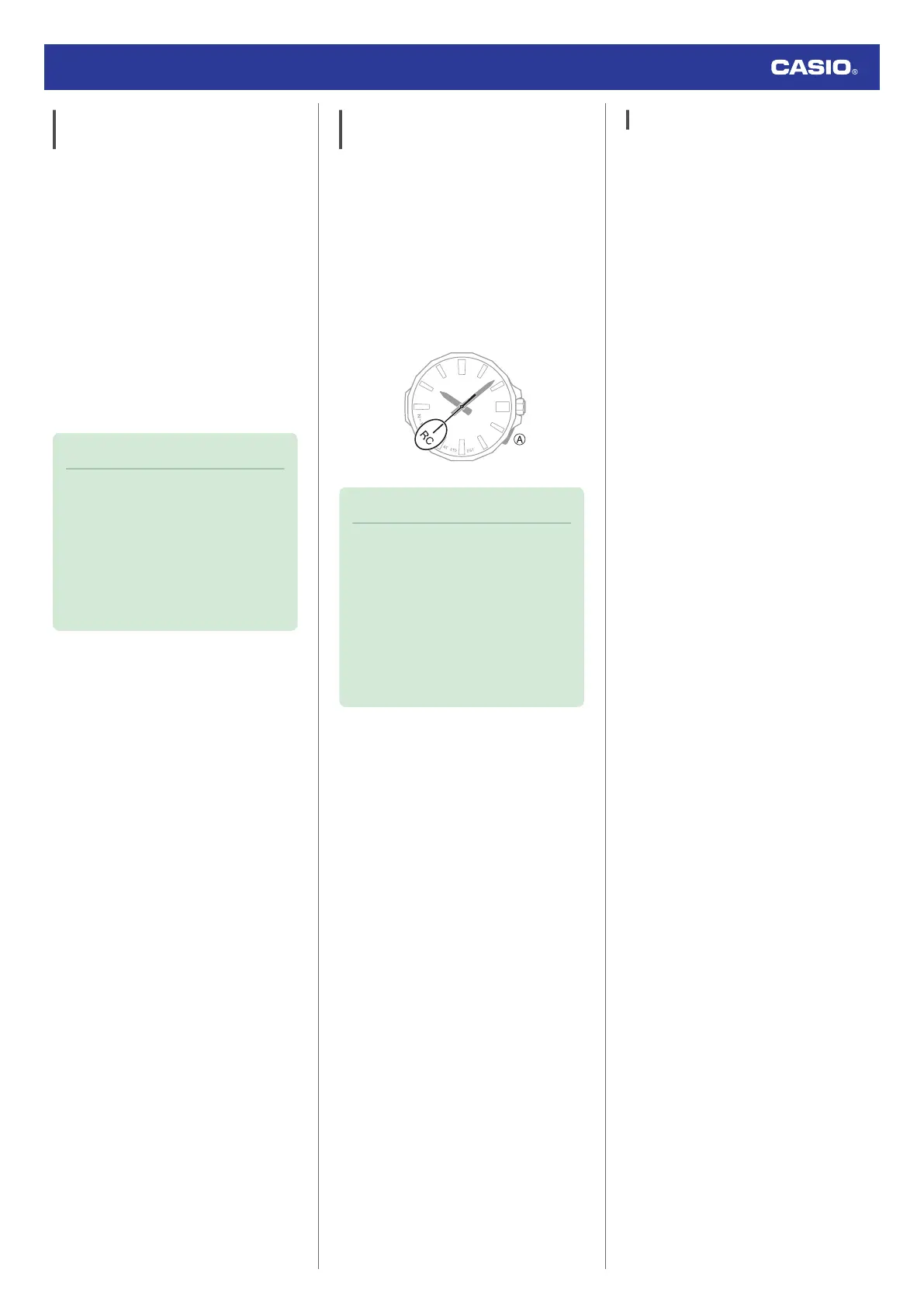
The second hand points to [RC] while
the receive operation in progress.
●
When the receive operation is
successful, the time and day settings
will be adjusted automatically.
Note
●
Reception takes anywhere from about
two minutes to about 10 minutes. It can
take as long as 20 minutes.
●
If the watch connects with a phone and
adjusts its time setting, the watch will
not perform auto receive of a time
calibration signal for the rest of that day
or the next day.
Manual Time Calibration Signal
Receive
1. Place the watch near a window or some
other location appropriate for time signal
reception.
2. Hold down (A) for at least 0.5 seconds until
the second hand points to [RC].
This indicates that the receive operation
has started. After the receive operation is
complete, the watch’s time and day
settings will be corrected accordingly.
Note
●
The receive operation takes anywhere
from about two minutes to about 10
minutes. It can take as long as 20
minutes.
●
Time calibration signal reception is
better at night than during the day.
●
A time calibration signal cannot be
received while the watch is paired with
a phone.
Signal Reception Precautions
●
When the watch is unable to correct its time
in accordance with a calibration signal for
some reason, average timekeeping
accuracy is within ±15 seconds per month.
●
Note that an internal decoding process the
watch performs after it receives a signal
may cause the time setting to be slightly off
(by less than one second).
●
Time calibration signal reception is not
possible under the conditions described
below.
ー
While battery power is low
ー
At Power Saving Level 2
ー
While the crown is pulled out
ー
While the Home City setting is a time zone
where time signal reception is not
possible
ー
While the watch is outside the time signal
reception range
ー
While the watch is paired with a phone
●
To perform a manual time calibration signal
receive operation, make sure the watch is
not paired with a phone. If it is, delete the
watch’s pairing information before
performing the manual receive operation.
l
Unpairing
●
When the receive operation is successful,
the time and/or day settings will be
corrected automatically. Summer time will
not be applied correctly in the case
described below.
ー
When the summer time start date and
time, end date and time, or other rules are
changed by authorities
●
If your watch is connected with a phone,
settings must be configured so CASIO
WATCHES can acquire location
information. Even if you are in an area that
is within the reception range of a time signal,
reception will not be performed if settings
are configured in a way that makes signal
reception impossible.
Watch Operation Guide 5728
14



 To Next Page