Adjusting Hand and
Day Indicator
Alignment
Strong magnetism or impact can cause the
hands and/or the day indicator to go out of
alignment. If this happens, correct hand and
day indicator alignment.
●
The watch performs alignment of the hour
hand, minute hand, and second hand
automatically.
Using CASIO WATCHES to
Adjust Hand and Day
Indicator Alignment
If the watch is paired with a phone, you can
also use the CASIO WATCHES phone app to
correct hand and day indicator positions.
l
Adjusting Hand and Day Indicator
Alignment
Adjusting Hand and Day
Indicator Alignment
1. Pull out the crown to the second click.
2. Hold down (A) for at least five seconds
until the second hand points to 12 o’clock .
Release the button when the second hand
reaches 12 o’clock.
This starts auto alignment of the hour
hand, minute hand, and second hand.
●
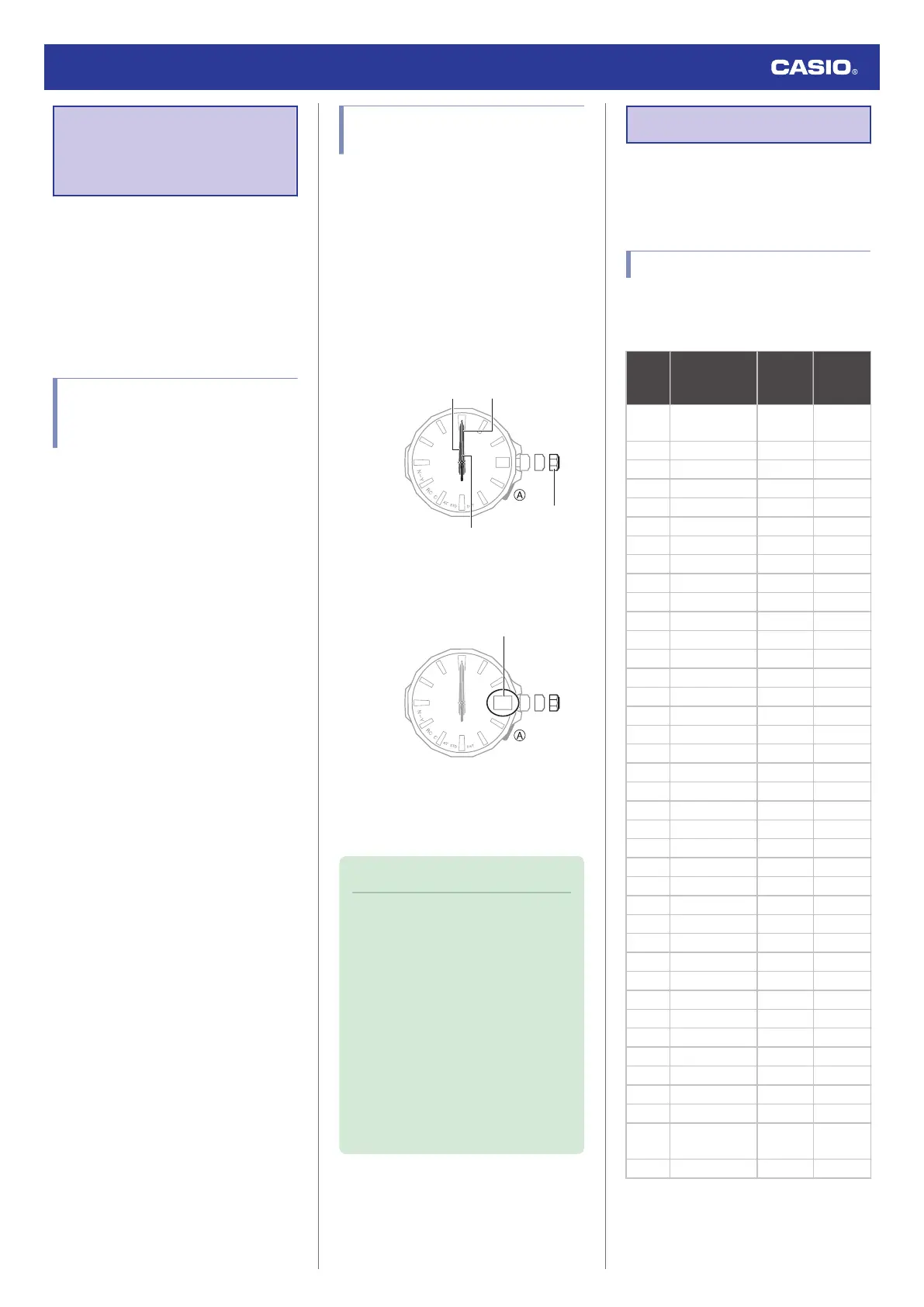
After auto alignment is complete, the
hands should be in the positions shown
below.
30
Hour hand
Minute hand
Second hand
Crown
3. Press (A).
Confirm that the day indicator shows “1”.
4. If “1” is not shown for the day, rotate the
crown until “1” is shown for the day.
5. Push the crown back in.
Note
●
Leaving the crown pulled out for more
than approximately 30 minutes without
performing any operation will
automatically cause the adjustment
operation to become disabled. If this
happens, push the crown back in to its
normal position and then pull it out
again to restart the procedure from the
beginning. Pushing the crown in to its
normal position part way through the
alignment procedure will cause the
hands to return to their normal position.
Any alignment you performed up to
that point will be applied.
Other Information
This section provides non-operational
information you also need to know. Refer to
this information as required.
City Table
You can specify a time zone whose city code
is not shown on the face by aligning the
second hand with the applicable UTC offset.
City
code
City name
Second
Hand
Position
Offset
UTC
Coordinated
Universal Time
0 0
LON* London 2 0
PAR* Paris 4 +1
ATH* Athens 6 +2
JED Jeddah 8 +3
- - 9 +3.5
DXB Dubai 10 +4
- - 11 +4.5
- - 12 +5
DEL Delhi 13 +5.5
- - 14 +5.75
DAC Dhaka 15 +6
- - 16 +6.5
BKK Bangkok 17 +7
HKG* Hong Kong 19 +8
- - 21 +8.75
TYO* Tokyo 22 +9
- - 23 +9.5
SYD Sydney 24 +10
- - 25 +10.5
NOU Noumea 26 +11
WLG Wellington 28 +12
- - 29 +12.75
TBU Nuku’alofa 30 +13
CXI Kiritimati 32 +14
BAR Baker Island 36 -12
PPG Pago Pago 38 -11
HNL Honolulu 40 -10
- - 41 -9.5
ANC Anchorage 42 -9
LAX* Los Angeles 44 -8
DEN* Denver 46 -7
CHI* Chicago 48 -6
NYC* New York 50 -5
YHZ* Halifax 52 -4
- - 53 -3.5
RIO Rio de Janeiro 54 -3
FEN
Fernando de
Noronha
56 -2
RAI Praia 58 -1
* Time zones where time calibration signal
reception is possible.
●
The information in the above table is current
as of July 2023.
Watch Operation Guide 5728
17



 To Next Page