Before Getting
Started...
This section provides an overview of the watch
and introduces convenient ways it can be
used.
Watch Features
●
Timer
Countdown from a start time specified by
you. An alarm sounds when the countdown
reaches zero.
●
World Time
You can display the current time in any one
of 48 cities around the globe, as well as for
UTC (Coordinated Universal Time).
●
Alarm
An alarm sounds whenever a time specified
by you is reached.
●
Stopwatch
Use the Stopwatch Mode to measure
elapsed time. You can use one-press timing
to start a stopwatch elapsed time
measurement operation with a single button
press in the Timekeeping Mode. You can
also specify a target time.
Note
●
The illustrations included in this
operation guide have been created to
facilitate explanation. An illustration
may differ somewhat from the item it
represents.
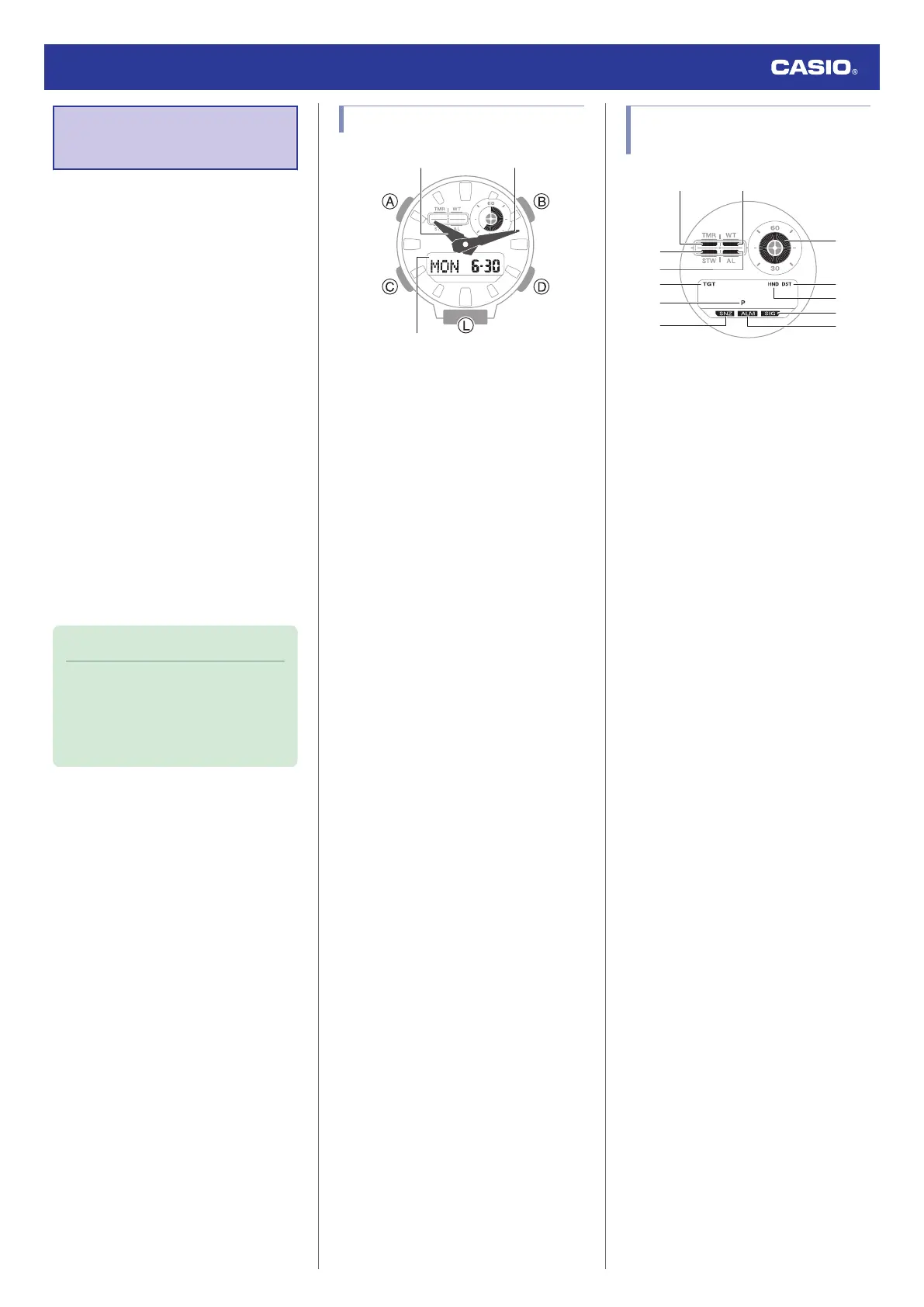
General Guide
A Hour hand
B Minute hand
C LCD
A button
Holding down this button for at least two
seconds in the Timekeeping Mode displays
the setting screen.
Pressing this button while any setting screen
is displayed exits the setting screen.
B button
Pressing this button in the Timekeeping Mode
cycles between displays.
Pressing this button while any setting screen
is displayed will change the setting.
C button
Each press cycles between watch modes.
In any mode, hold down this button for at least
two seconds to return to the Timekeeping
Mode.
D button
Pressing this button while any setting screen
is displayed will change the setting.
In the Timekeeping Mode, press this button to
enter the Stopwatch Mode.
L button
Press to turn on illumination.
Watch Face and Display
Indicators
A Displayed while in the Timer Mode.
B Displayed while in the World Time mode.
C Displayed while in the Stopwatch Mode.
D Displayed while in the Alarm Mode.
E Displayed while in the Stopwatch Mode
when the Target Time function is enabled.
F Displayed during p.m. times while 12-hour
timekeeping is being used.
G Displayed while the snooze alarm is
turned on.
H Graphic display area operation is linked
with operations in each mode.
I Displayed while the watch is indicating
summer time.
J Flashes while the watch’s hands are
shifted for easier reading.
K Displayed while the hourly time signal is
enabled.
L Displayed while an alarm is turned on.
Watch Operation Guide 5735
6



 To Next Page