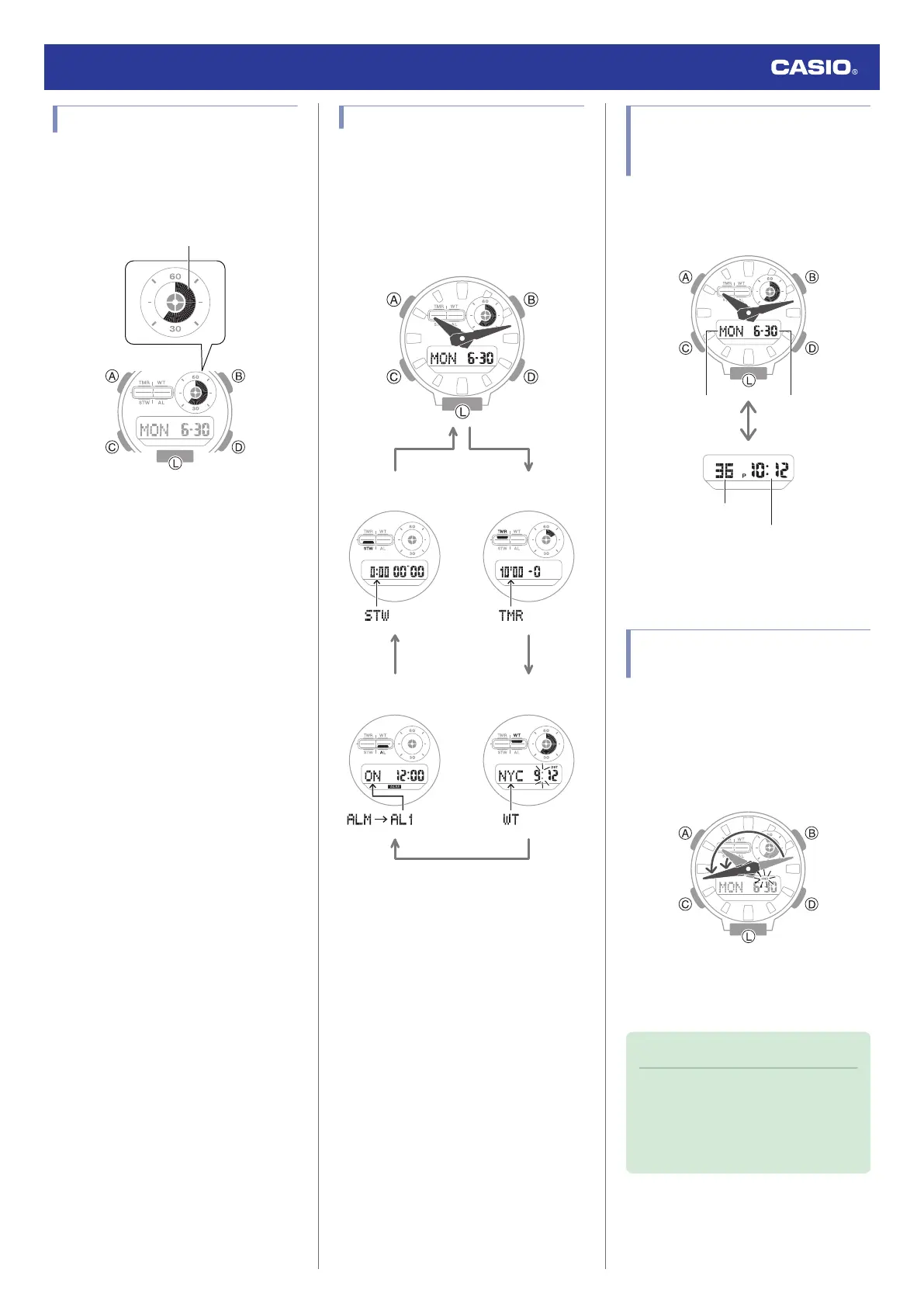
Graphic Display Area
Graphic display area operation is linked with
operations in each watch mode.
●
In the Alarm Mode, the graphic display is
blank.
Timekeeping Mode
Graphic display contents move in
coordination with current time seconds.
Stopwatch Mode
While the Target Time function is enabled, the
graphic display area indicates to what extent
you attained your target time. While the Target
Time function is disabled, graphic display
contents move in coordination with the
stopwatch time minutes.
Timer Mode
Graphic display contents move in
coordination with the remaining timer time.
World Time
Graphic display contents move in
coordination with World Time seconds.
Navigating Between Modes
Each press of (C) cycles between watch
modes.
●
In any mode, hold down (C) for at least two
seconds to return to the Timekeeping
Mode.
CC
C
C
C
Stopwatch Mode
Timekeeping Mode
Timer Mode
World Time Mode
Alarm Mode
Cycling Between
Timekeeping Mode Digital
Display Contents
Each press of (B) in the Timekeeping Mode
cycles the display information as shown
below.
Day of week
Hours, minutes
Month, day
Seconds
●
To display the Home City in the
Timekeeping Mode, press (A).
Shifting Hands to Read the
Digital Display
Hand shift moves the hands out of the way for
easy viewing of display information.
1. While holding down (L), press (C).
●
This will shift the analog hands to allow
easy viewing of display information.
2. To return the hands to their normal
timekeeping positions, hold down (C) as
you press (L) again or press (C).
Note
●
If you leave the watch with its hands
shifted and do not perform any
operation for about one hour, the
hands will resume normal timekeeping
automatically.
Watch Operation Guide 5735
7



 To Next Page