EasyManua.ls Logo

Casio CZ-1 - Dac; Lcd; After

Casio CZ-1
142 pages
Print Icon
To Next Page IconTo Next Page
To Previous Page IconTo Previous Page
Loading...
26.
ADJUSTMENT
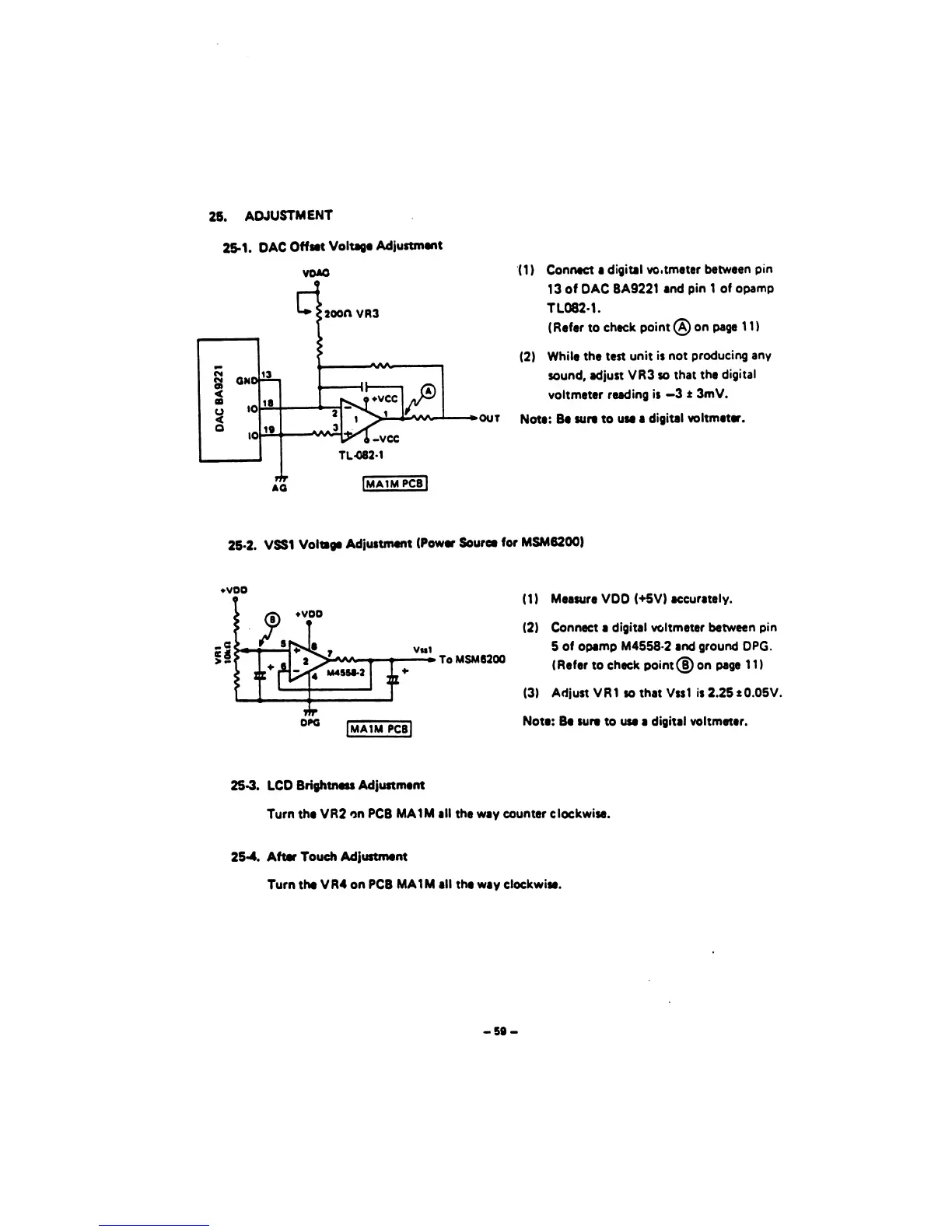
25-1.
DAC
Offset
Voltage
Adjustment
vdao
OUT
(1
)
Connect a
digital
vo.tmeter
between
pin
13
of DAC
BA9221
and
pin
1
of
opamp
TL082-1.
(Refer
to
check
point
(A) on page
1
1
)
(2)
While the test
unit is
not
producing
any
sound, adjust
VR3 so
that
the
digital
voltmeter
reading is
—3
±
3m
V.
Note: Be
sure to
use a
digital
voltmeter.
iMAIMPCBl
26-2. VSS1
Voltage
Adjustment
(Power
Source
for
MSM6200)
voo
To
MSM6200
DPG
[MAIM
PCB|
(1)
Measure
VDD
(+5V)
accurately.
(2)
Connect
a
digital voltmeter
between
pin
5
of opamp
M4558-2
and ground DPG.
(Refer
to
check point® on
page
1
1
)
(3)
Adjust VR1
so
that
Vss1
is 2.25 1
0.05V.
Note:
Be
sure
to
use
a
digital voltmeter.
25-3.
LCD
Brightness
Adjustment
Turn the
VR2
on
PCB
MAIM
all
the way counter clockwise.
25-4.
After
Touch
Adjustment
Turn the
VR4
on
PCB
MAIM all
the way
clockwise.
-50-

Other manuals for Casio CZ-1

Related product manuals