31
Snapshot Tutorial
Snapshot Tutorial
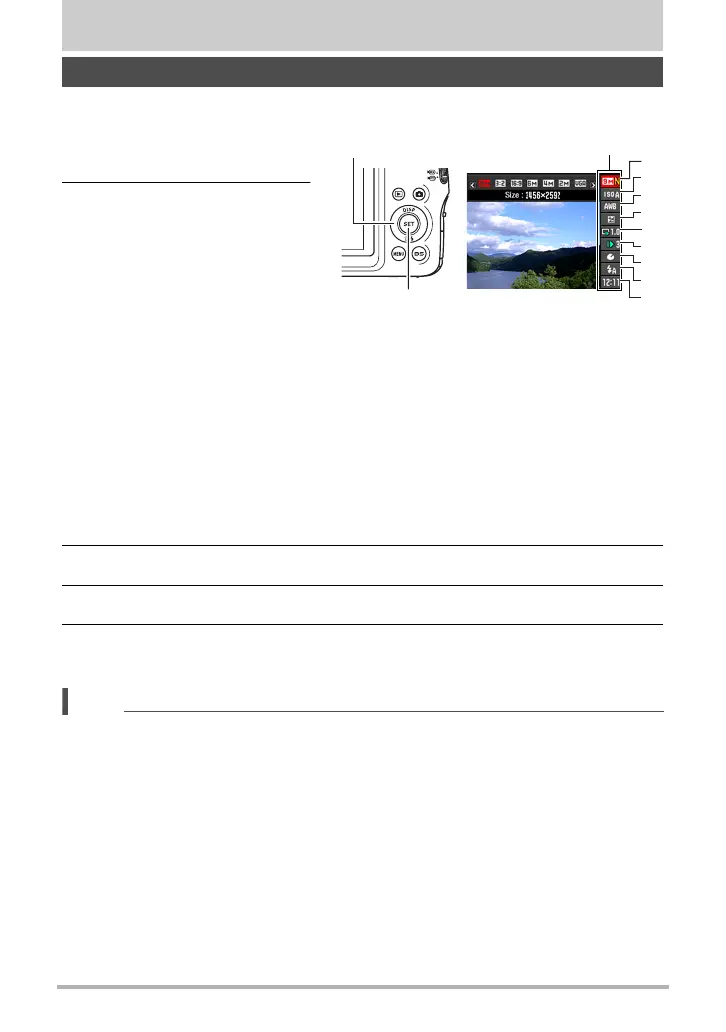
The control panel can be used to configure camera settings.
1. In the REC mode, press
[SET].
2. Use [8] and [2] to select
the setting you want to
change.
This will select one of the
control panel icons and display
its settings.
*1 Image quality cannot be changed using the control panel.
*2 Items displayed in the control panel depend on the recording mode.
3. Use [4] and [6] to change the setting.
4. If you want to configure another setting, repeat steps 2 and 3.
5. After all of the settings are the way you want, press [SET].
This will apply the settings and return to the REC mode.
NOTE
• You also can use on-screen menus to configure settings other than those listed
above (page 77).
Using the Control Panel
[SET]
[8] [2] [4] [6]
1
9
5
3
4
7
8
2
6
Control panel
1
Image size/Quality*
1
(pages 32, 91)
2
ISO sensitivity (page 35)
3
White balance (page 35)
4
EV shift (page 37)
5
Slow Motion View (page 38)*
2
6
Slow Motion View Speed (page 39)*
2
7
Lag Correction (page 40)*
2
8
Flash (page 42)*
2
9
Date/Time (page 44)



 To Next Page
 Loading...