10
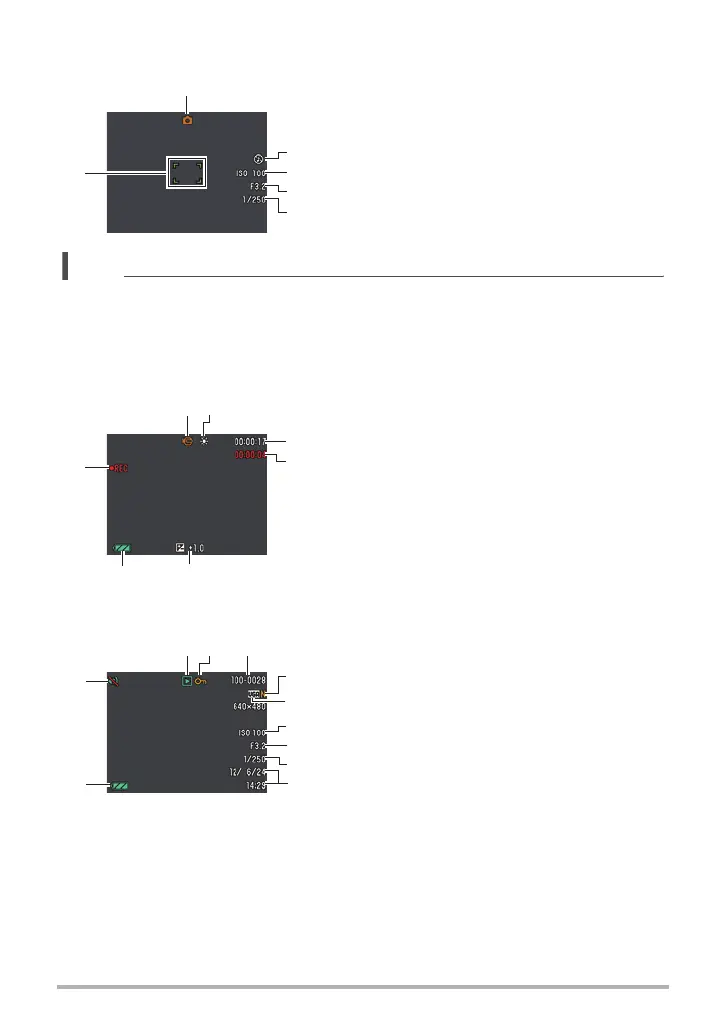
. Shutter Button Half-pressed
. Movie Recording
. Snapshot Viewing
1
Recording mode (page 23)
2
Flash (page 32)
3
ISO sensitivity (page 63)
4
Aperture value
5
Shutter speed
6
Focus frame (pages 25, 52)
NOTE
• Depending on recording settings, the aperture, shutter speed, and ISO sensitivity
values may not appear on the monitor screen. These values will be orange if the
Auto Exposure (AE) is not correct for some reason.
1
Recording mode (page 38)
2
White balance (page 62)
3
Remaining movie memory capacity (page 38)
4
Movie recording time (page 38)
5
Exposure compensation (page 61)
6
Battery level indicator (page 16)
7
Movie recording in progress (page 38)
1
File type
2
Protect indicator (page 72)
3
Folder name/file name (page 88)
4
Snapshot image quality (page 60)
5
Snapshot image size (page 58)
6
ISO sensitivity (page 63)
7
Aperture value
8
Shutter speed
9
Date/time (page 95)
bk
Battery level indicator (page 16)
bl
Silent (page 91)
6
3
4
2
5
1
12
6 5
7
3
4
31
4
7
5
8
9
6
2
bk
bl


 To Next Page
 Loading...