72
Other Playback Functions (PLAY)
Procedure
[p] (PLAY) * Snapshot Screen * [MENU] * “PLAY” Tab *
DPOF Printing
See page 76 for details.
Procedure
[p] (PLAY) * [MENU] * “PLAY” Tab * Protect
IMPORTANT!
• Note that even if a file is protected, it will be deleted if you perform the format
operation (page 98).
Editing Images (Play Menu)
For information about menu operations, see page 47.
Selecting Images for Printing (DPOF Printing)
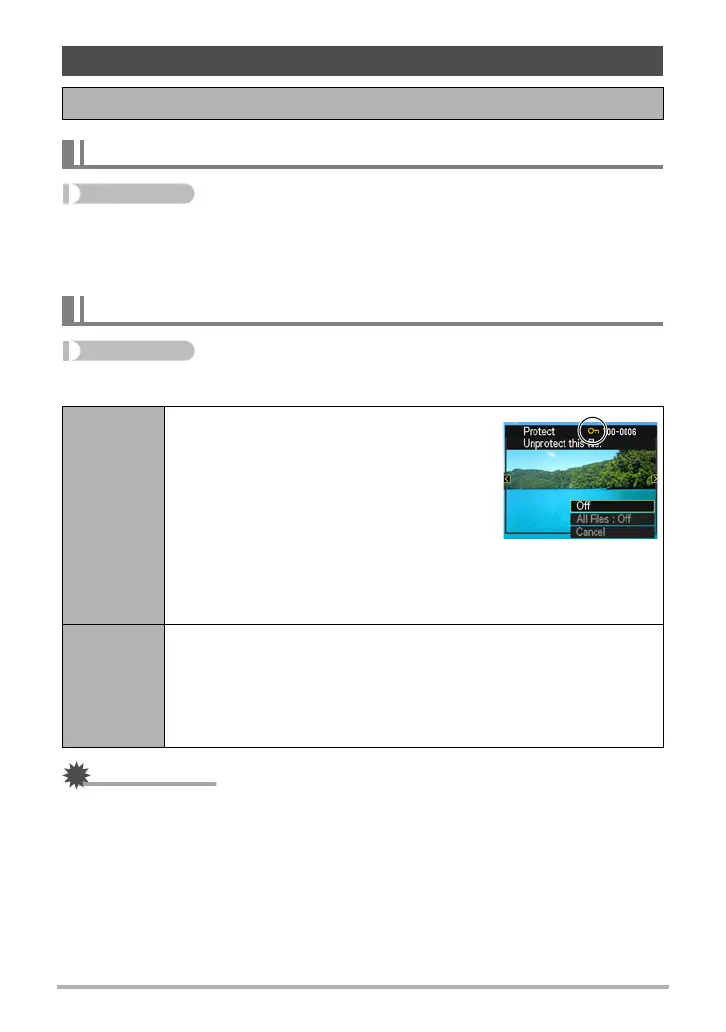
Protecting a File Against Deletion (Protect)
On
Protects specific files.
1
Press [SET] towards [4] or [6] to scroll
through the files until the one you want to
protect is displayed.
2
Press [SET] towards [8] or [2] to select
“On” and then press [SET].
An image that is protected is indicated by
the › icon.
3
To protect other files, repeat steps 1 and 2.
To exit the protect operation, press [MENU]. To unprotect a file,
select “Off” instead of “On” in step 2 above.
All Files:
On
Protects all files.
1
Press [SET] towards [8] or [2] to select “All Files: On” and then
press [SET].
2
Press [MENU].
To unprotect all files, select “All Files: Off” instead of “All Files: On” in
step 1 above.


 To Next Page
 Loading...