EasyManua.ls Logo

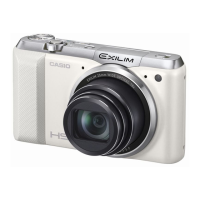
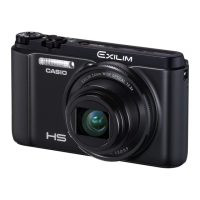
Casio Exilim EX-ZR700 - User Manual

Casio Exilim EX-ZR700
196 pages
Print Icon
To Next Page IconTo Next Page
Loading...
Digital Camera
E
User’s Guide
Thank you for purchasing this CASIO product.
Before using it, be sure to read the precautions contained in this User’s Guide.
Keep the User’s Guide in a safe place for future reference.
For the most up-to-date information about this product, visit the official EXILIM
Website at http://www.exilim.com/

Table of Contents

Questions and Answers

  • B
    Brian TaylorJul 26, 2025
    Why won't my Casio Digital Camera turn on?
    • A
      Alexander CarterJul 26, 2025
      If your Casio Digital Camera does not turn on, it could be due to the following reasons: 1) The battery may not be loaded correctly. 2) The battery may be dead. In both cases, charge the battery. If the battery goes dead soon after being charged, it means the battery has reached the end of its life and needs to be replaced. Purchase a separately available CASIO NP-130 rechargeable lithium ion battery.
  • J
    James ClementsAug 1, 2025
    How to fix auto focus on Casio Exilim EX-ZR700 Digital Camera?
    • C
      Christine McculloughAug 1, 2025
      If the auto focus on your Casio Digital Camera isn't focusing properly, there are several potential reasons. Start by cleaning the lens. If that doesn't work, consider that the subject may not be compatible with Auto Focus, so try using manual focus. Also, avoid moving the camera when shooting, or try using Anti Shake or a tripod.
  • M
    Mr. Philip Wright PhDAug 7, 2025
    What to do if my Casio Digital Camera doesn't record images when pressing the shutter button?
    • J
      Joshua HernandezAug 7, 2025
      If your Casio Digital Camera does not record an image when you press the shutter, it could be due to several reasons. First, ensure the camera is in REC mode by pressing the shutter button. If the flash is charging, wait for it to finish. Finally, if the message “Memory Full” appears, transfer images to your computer, delete unnecessary images, or use a different memory card.
  • D
    Daniel OwenAug 13, 2025
    Why does my Casio Digital Camera suddenly power down?
    • B
      Benjamin ElliottAug 13, 2025
      If your Casio Digital Camera suddenly powers down, it could be due to a few reasons. Auto Power Off may have activated, so turn the power back on. Alternatively, the battery may be dead, so charge it. Finally, the camera’s protection function may have activated because the camera temperature is too high; in this case, turn off the camera and wait until it cools down before trying to use it again.
  • C
    Christopher SpearsAug 19, 2025
    What to do if Casio Digital Camera power will not turn off?
    • D
      David JohnsonAug 19, 2025
      To resolve a situation where your Casio Digital Camera will not turn off or respond to button presses, remove the battery from the camera and then reload it.

Summary

Camera Accessories Guide

Rechargeable Lithium-Ion Battery (NP-130)

Details on the camera's primary power source and its specifications.

USB-AC Power Adapter

Information on charging the camera using the provided AC power adapter.

Important Information Before Use

Manual Notices and Precautions

Key information regarding manual usage, liability, and LCD panel characteristics.

Test Shot Recommendation

Advice to shoot a test image before final shooting for confirmation.

Quick Start Basics

Camera Features Overview

Overview of the camera's main features and capabilities.

Battery Charging Procedure

Step-by-step guide on how to charge the camera's battery.

Memory Card Preparation

Instructions for selecting and preparing a memory card for use.

Camera Power Management

Procedures for powering the camera on, off, and managing sleep modes.

Proper Camera Handling

Guidelines for correctly holding the camera to ensure stable shots.

Snapshot Tutorial

Selecting the Recording Mode

Guide to choosing the appropriate shooting mode for images.

Using the Control Panel for Settings

How to use the control panel for quick camera settings adjustments.

Adjusting White Balance Settings

Instructions for setting white balance to match lighting conditions.

Selecting Focus Modes

Guide to choosing between auto, macro, and manual focus modes.

Managing Flash Settings

How to operate the camera's flash settings for better exposures.

Recording Movies

How to Record a Movie

Step-by-step instructions for recording standard movies.

High Speed Movie Recording

How to capture high-speed video for slow-motion playback.

Using BEST SHOT Scene Modes

Selecting and Using BEST SHOT

Using pre-programmed scene modes for automatic camera settings.

Customizing Shooting Setups (CUSTOM SHOT)

Registering and using custom camera settings for specific scenes.

Wide Angle Shooting (Wide Shot)

Capturing ultra-wide angle images by combining multiple shots.

Advanced Camera Settings (REC MENU)

Configuring Recording Settings

Accessing and modifying various camera recording parameters.

Adjusting ISO Sensitivity Upper Limit

Setting the maximum ISO value for automatic sensitivity adjustment.

Specifying Auto Focus Area

Changing the camera's auto focus metering area for shooting.

Camera and Subject Movement Reduction (Anti Shake)

Minimizing blur caused by camera or subject movement during shooting.

Troubleshooting Common Issues

Power Supply Problems

Solutions for issues related to camera power and battery functionality.

Image Recording Errors

Troubleshooting steps for problems with image capture and focus.

Understanding Display Messages

Explanations and solutions for common on-screen error messages.

Camera Specifications

Supported File Formats

Details on supported image and movie file formats.

Estimated Battery Life

Information on expected battery performance under various conditions.

Casio Exilim EX-ZR700 Specifications

General IconGeneral
Megapixel16.1 MP
Camera typeCompact camera
Sensor typeCMOS
Image stabilizerYes
Total megapixels16.79 MP
Image sensor size1/2.3 \
Image formats supportedEXIF, JPG
Maximum image resolution4608 x 3456 pixels
Still image resolution(s)640 x 480, 2048 x 1536, 2560 x 1920, 3648 x 2736, 4608 x 2592, 4608 x 3072, 4608 x 3456
Digital zoom4 x
Optical zoom18 x
Combined zoom286.9 x
Focal length range4.5 - 81 mm
Maximum aperture number7
Minimum aperture number3.5
Lens structure (elements/groups)11/10
Maximum focal length (35mm film equiv)450 mm
Minimum focal length (35mm film equiv)25 mm
Focus adjustmentAuto
Auto focusing (AF) modesSpot Auto Focus, Tracking Auto Focus
Macro focusing range (wide)0.04 - 0.5 m
Auto Mode focusing range (wide)0.04 - ∞ m
Light meteringCentre-weighted, Spot
ISO sensitivity80, 100, 200, 400, 800, 1600, 3200
Light exposure modesAperture priority AE, Manual, Shutter priority AE
Light exposure controlProgram AE
Light exposure correction± 2EV (1/3EV step)
Camera shutter typeElectronic, Mechanical
Fastest camera shutter speed1/4000 s
Slowest camera shutter speed15 s
Flash modesAuto, Flash off, Flash on, Red-eye reduction
Flash range (tele)1.5 - 2.1 m
Flash range (wide)0.4 - 3.5 m
Flash recharging time5 s
Power source typeBattery
Video resolutions640 x 480, 1280 x 720, 1920 x 1080 pixels
Motion JPEG frame rate30 fps
Video formats supportedH.264, MOV
Maximum video resolution1920 x 1080 pixels
Internal memory52.2 MB
Compatible memory cardsSD, SDHC, SDXC
Display diagonal3 \
Display resolution640 x 1440 pixels
Display resolution (numeric)921600 pixels
USB version2.0
Product colorRed
Scene modes-
White balanceAuto, Daylight, Manual, Shade, Tungsten
Self-timer delay2, 10 s
Battery typeNP-130
Battery life (max)6.25 h
Battery life (CIPA standard)470 shots
Cables includedUSB
Weight and Dimensions IconWeight and Dimensions
Depth30.7 mm
Width107.4 mm
Height60 mm
Weight182 g
Weight (including battery)222 g

Related product manuals