fx-991EX Quick Start Guide36
The function that represents the volume of the box is
f(x)= x(20-x)(15-x).
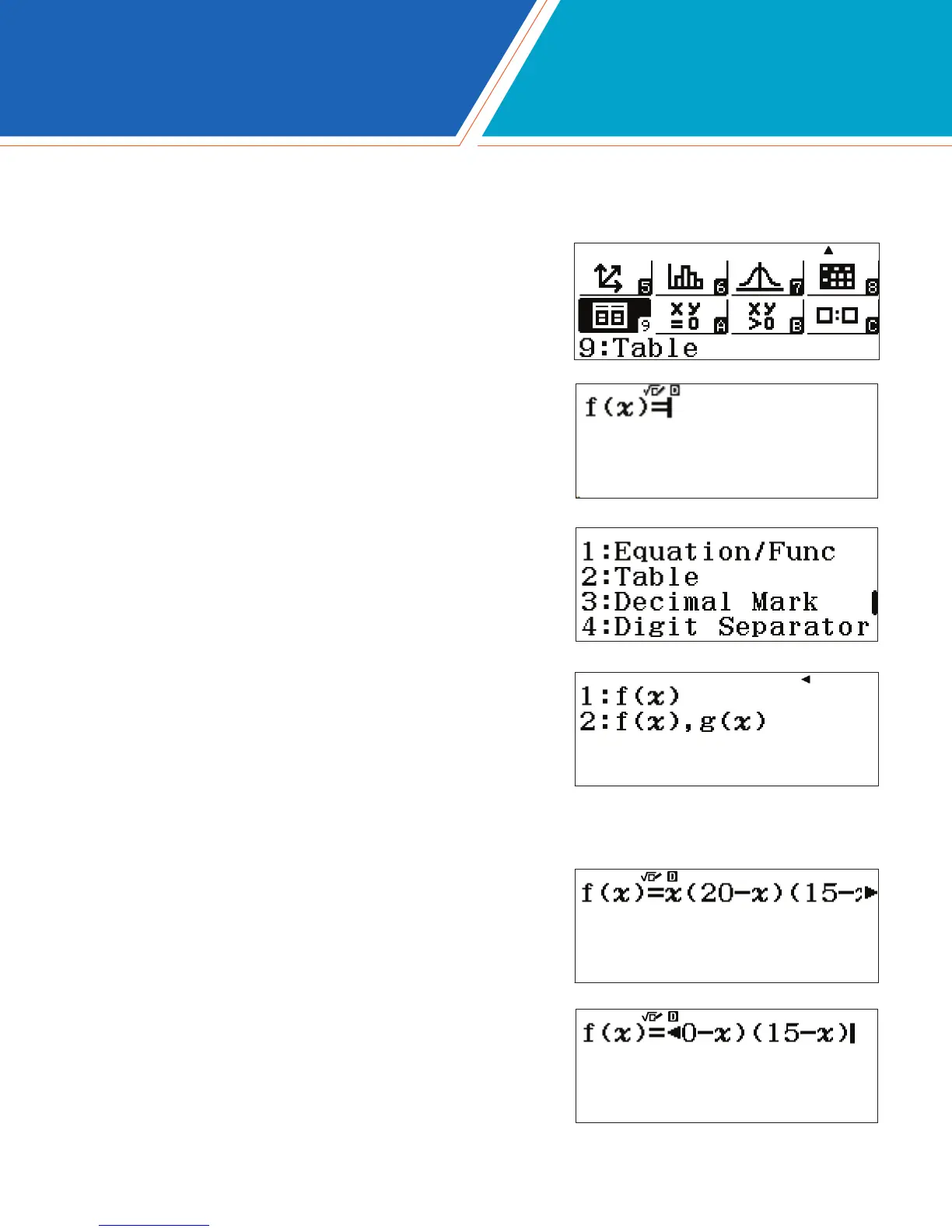
To enter this function, press x(20-x)
(15-x)p.
From the Main Menu, use the arrow keys to highlight the Table
icon and press p or press 9.
To change the setup of the table to generate a table with only one
function, press qp(SET UP).
Use the down arrow key to view the menu option for Table; it
will be the 3rd screen.
Press 2(Table) to choose the number of functions used in
the table.
Press 1(f(x)) to generate a table with only one function as
an input.
The Table feature on the fx-991EX is a powerful way to solve a single function or two functions simultaneously.
The table range and step is easily customizable.
Consider the classic volume of a box problem. What is the maximum volume of a box made from a 20x15 sheet of
cardboard by removing squares from each corner?
TABLE







 To Next Page