fx-991EX Quick Start Guide40
The fx-991EX numerically solves equations elegantly. It is accomplished with the help of the Natural Textbook
Display™ in the Equation/Func mode. The Equation/Func mode uses Newton’s method to nd solutions to equations.
The fx-991EX has the power to handle Simultaneous Equations with up to 4 unknowns and Polynomial Equations up
to the 4th degree.
SIMULTANEOUS EQUATIONS
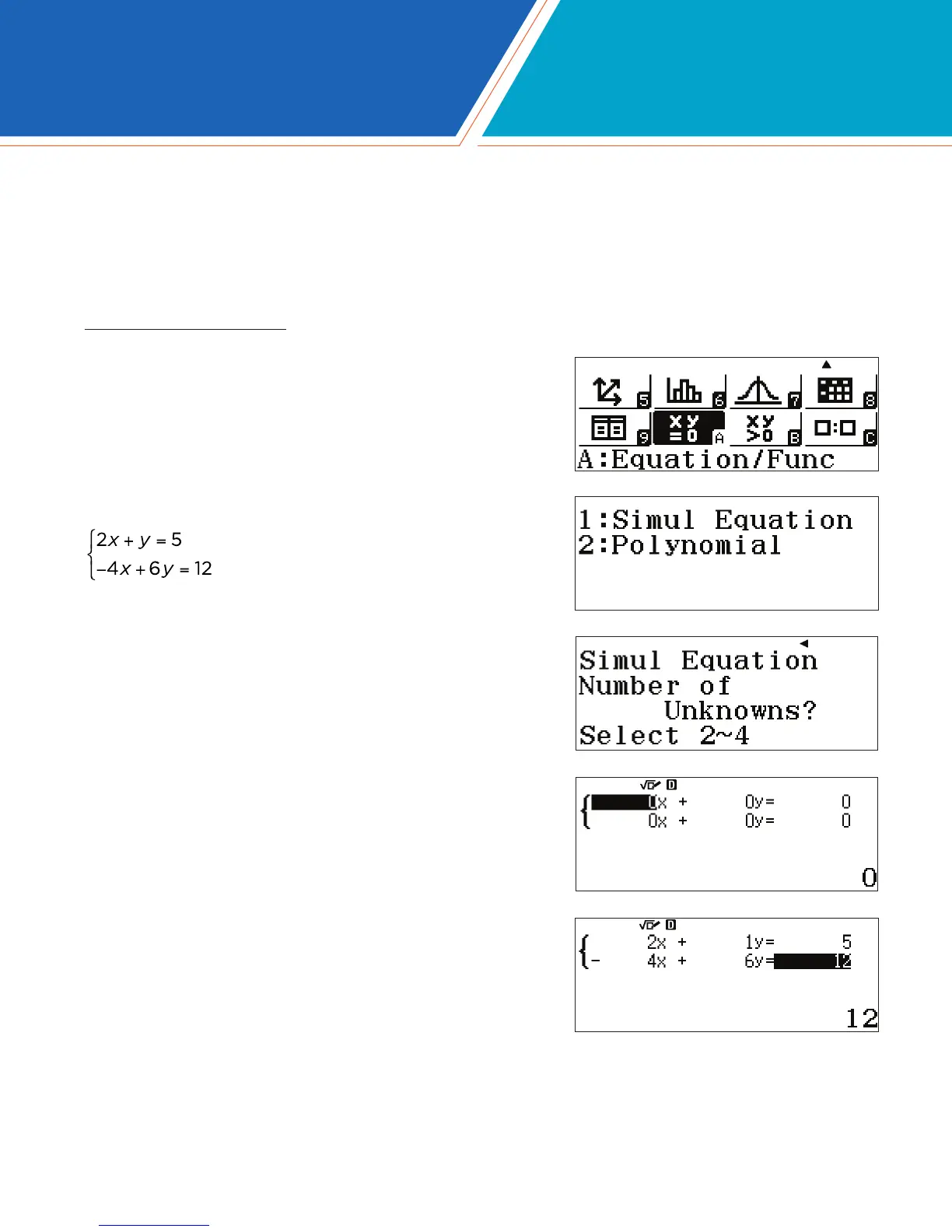
From the Main Menu, use the arrow keys to highlight the
Equation/Func icon and press p or press z(A).
To solve the following system of simultaneous equations
,
select 1(Simul Equation).
Choose the number of Unknowns. For this example,
press 2(Unknowns).
A 2x2 system of equations template is displayed. The template is
in Ax + BY = C form in which A, B and C can be any value. For
fractional values, use the a key.
Type in each value followed by the p key.
Press 2p1p, etc.
EQUATION/FUNC







 To Next Page