EasyManua.ls Logo

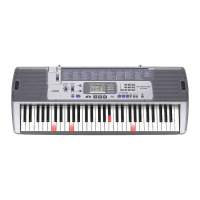
Casio LK-200S - User Manual

Casio LK-200S
58 pages
Print Icon
To Next Page IconTo Next Page
Loading...
LK200ES1A
ES
USER’S GUIDE
GUÍA DEL USUARIO

Table of Contents

Questions and Answers

  • M
    Mark RodriguezAug 15, 2025
    Why is there no sound from my Casio LK-200S?
    • J
      Jeffrey FlynnAug 16, 2025
      There are several potential reasons for the lack of sound from your Casio Electronic Keyboard: * There may be a power supply issue. Ensure the AC adapter is correctly attached, the batteries are properly installed with the correct polarity (+/–), and that the batteries are not depleted. * The power might not be turned on. Check the POWER/MODE switch to ensure it is in the ON position. * The volume could be set too low. Adjust the MAIN VOLUME slider to increase the volume. * The POWER/MODE switch might be set to CASIO CHORD or FINGERED. Normal play is not possible in these modes; switch it to NORMAL. * LOCAL CONTROL may be turned off. Turn LOCAL CONTROL on.
  • I
    Ian ParsonsAug 19, 2025
    What to do if there is no microphone sound on my Casio LK-200S Electronic Keyboard?
    • A
      andrew10Aug 19, 2025
      If you're not getting any sound from your microphone on your Casio Electronic Keyboard, here's what to check: * The microphone volume might be set too low. Try increasing the microphone volume setting. * The microphone on/off switch may be set to off. Make sure to switch it to the 'on' position.
  • J
    Jennifer CamachoAug 21, 2025
    What to do if Auto Accompaniment does not sound on Casio Electronic Keyboard?
    • D
      Daniel RobinsonAug 21, 2025
      If the auto accompaniment isn't working on your Casio Electronic Keyboard, it might be because the accompaniment volume is set to 000. To fix this, use the FUNCTION button to increase the volume.
  • W
    William ArnoldAug 25, 2025
    Why do keys light up but there is no sound on my Casio Electronic Keyboard?
    • R
      Robert BurtonAug 25, 2025
      If the keys on your Casio Electronic Keyboard are lit but no sound is produced, it's likely a power-saving feature. The keyboard is reminding you that it was left on without any use. Press any button or keyboard key to restore power and sound to normal.
  • J
    Jennifer BruceAug 27, 2025
    What to do if song play momentarily cuts out at some points during SMF play on Casio LK-200S Electronic Keyboard?
    • U
      ucooperAug 27, 2025
      If your Casio Electronic Keyboard song playback cuts out during SMF play, the data may be fragmented. You can try the following: * Save the data under a different name using the “save as” function without deleting the original data. Then, try using the newly saved data. * If the data was saved from another location, format the card (this will erase its contents) and save the data to the card again. Then, try using the newly saved data.
  • M
    Mark LambertAug 30, 2025
    How to fix static noise when using microphone with Casio LK-200S?
    • K
      ksanchezAug 30, 2025
      If you're experiencing static noise when using a microphone with your Casio Electronic Keyboard, it could be due to the microphone's proximity to fluorescent lighting. Try moving the microphone away from the source of the static.
  • K
    Kimberly BrightSep 2, 2025
    What to do if I cannot recall data from a memory card on Casio LK-200S?
    • L
      Laura PierceSep 2, 2025
      If you're having trouble recalling data from a memory card on your Casio Electronic Keyboard, consider these possibilities: * The memory card might not be correctly inserted into the card slot. Ensure it is properly inserted. * The memory card could be damaged. Try using a different memory card. * The data may not have been copied to the correct folder. Insert a formatted memory card into your computer and copy the data into the “MUSICDAT” directory.
  • T
    tammykimSep 5, 2025
    Why do auto accompaniment chords not sound on my Casio LK-200S Electronic Keyboard?
    • P
      paigeharrisSep 5, 2025
      If the auto accompaniment chords aren't sounding on your Casio Electronic Keyboard, the keyboard may be in Song Bank mode. Press the RHYTHM button to enter the rhythm mode, indicated by the rhythm indicator on the display.
  • R
    Robert FreemanSep 9, 2025
    Why key light stays on my Casio LK-200S?
    • M
      Mrs. Theresa AtkinsonSep 9, 2025
      If a key light stays on, on your Casio Electronic Keyboard, it means that the keyboard is waiting for you to play the correct note during Step 1 or Step 2 play. Press the lit key to continue, or press the PLAY/STOP button to quit Step 1 or Step 2 play.
  • J
    Jeff ParsonsSep 12, 2025
    What to do after transferring song data, playback stops part way through on Casio LK-200S Electronic Keyboard?
    • M
      Mr. Thomas Weber DDSSep 12, 2025
      If playback stops part way through after transferring song data to your Casio Electronic Keyboard, digital noise from the USB cable or power cord likely interrupted data communication. Try these steps: * Stop playback, disconnect, and then reconnect the USB cable to the keyboard’s USB port, and try playing back the tune again. * If the problem persists, exit the MIDI software, disconnect and reconnect the USB cable, restart the MIDI software, and try playback again.

Summary

Safety Precautions

Power and Component Safety

Covers AC adaptor, batteries, water, foreign matter, and disassembly hazards.

Physical Hazards and Location

Covers dropping, impact, plastic bags, stand stability, and location risks.

Product Usage Precautions

Covers display screen, sound volume, health, heavy objects, and stand assembly safety.

General Safety Advice

Covers DANGER, WARNING, CAUTION levels and initial safety advice.

General Guide

Control Panel Overview

Identification and description of all buttons and controls on the keyboard.

Controller Functions

Detailed descriptions of numbered controls like MIC VOLUME, POWER/MODE, PLAY/STOP.

Rear Panel Connections

Detailed view and explanation of rear panel ports (USB, SD CARD SLOT, etc.).

Quick Reference

How to Play the Keyboard

Step-by-step guide to turn on and start playing the keyboard.

Power Supply

Using Batteries

Instructions on how to load and replace AA batteries for power.

Using the AC Adaptor

Instructions on using the specified AD-5 AC adaptor and important precautions.

Connections

Phones;Output Jack Connection

How to connect headphones or external audio equipment.

USB Port Connection

Information on connecting the keyboard to a computer via USB.

Sustain;Assignable Jack Usage

Connecting sustain pedals and their functions.

Microphone Jack Connection

Connecting a microphone for singing along with tunes.

Basic Operations

Playing the Keyboard

Steps to set up and play the keyboard.

Selecting a Tone

Procedure to select one of the 264 built-in tones.

Using the Microphone Jack

Detailed steps for connecting and using a microphone.

Playing a Built-in Tune

Playing Song Bank Tunes

Steps to select and play tunes from the Song Bank.

Playing Piano Bank Tunes

Steps to select and play tunes from the Piano Bank.

Playback Control Features

How to pause, fast reverse, fast forward, and loop playback of tunes.

Adjusting the Tempo

How to set the tempo for playback and lessons.

3-Step Lesson

Lesson Steps Overview

Explanation of the three steps (timing, notes, normal speed) for learning tunes.

Evaluation Mode Details

Explanation of Evaluation Mode display, timing, and results.

Auto Accompaniment

Connection to a Computer

Installing the USB MIDI Driver

Steps to install the USB MIDI driver for computer connection.

Using a Memory Card

Troubleshooting

Sound & Power Issues

Troubleshooting steps for no keyboard sound and battery power problems.

Specifications

Casio LK-200S Specifications

General IconGeneral
Number of Keys61
Lighted KeysYes
Touch ResponseNo
Sampling FunctionNo
DisplayLCD
SpeakersYes
Lesson FunctionYes (EZ Learning System)
Speaker Power2.5W x 2
Power SourceAC Adaptor or Batteries (AA x 6)
TerminalsMIDI

Related product manuals