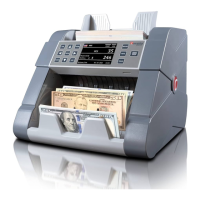
Cassida 9900R 2-Pocket Mixed Currency Counter & Sorter
This function allows batching bills while also incrementing the running totals as more bills are
added to the hopper, instead of resetting them after each batch. It occurs when both the ADD and
the BATCH functions are active at the same time.
To exit the ADD+BATCH state, disable either the ADD or the BATCH function as described in their
dedicated sections above.
This function allows counting a stack of mixed currencies. It is available by repeatedly pressing the
Currency indicator on the touch screen until it shows the Infinity symbol (∞).
The machine can automatically detect and handle up to 7 mixed currencies at a time. The total
number of bills and total value for each currency will be displayed on the screen.
To exit the MULTI-CURRENCY function, press the Currency indicator / Infinity symbol (∞) on the
touch screen as to activate another desired currency choice.
3.11 Add + Batch Function
3.12 Multi-Currency Function
17


 To Next Page