CassidaPRO Zeus: Service Manual
2018 Cassida Corporation. All rights reserved.
Rev: 09/05/2018
cassidapro.com/partner/
CONNECTIVITY / PORTS
RS-232 - SERIAL CONNECTION
1) CONNECTION WITH A PC
• Connection to a PC for remote printing is possible by using the serial port on the back
of the discriminator. An RS232 male – RS232 female cable may be used to directly
connect to a serial port on a PC. An RS232 male – USB-A converter cable may also
be used to connect the discriminator serial port to a PC USB port. Both cables are
available at most electronic retailers
Example of RS232 male - USB-A converter cable:
Communication data format:
This is available in the ZEUS Protocol
Manual. If you need this information,
please contact Support@CassidaPro.
com.
1.4.
1.4.1.
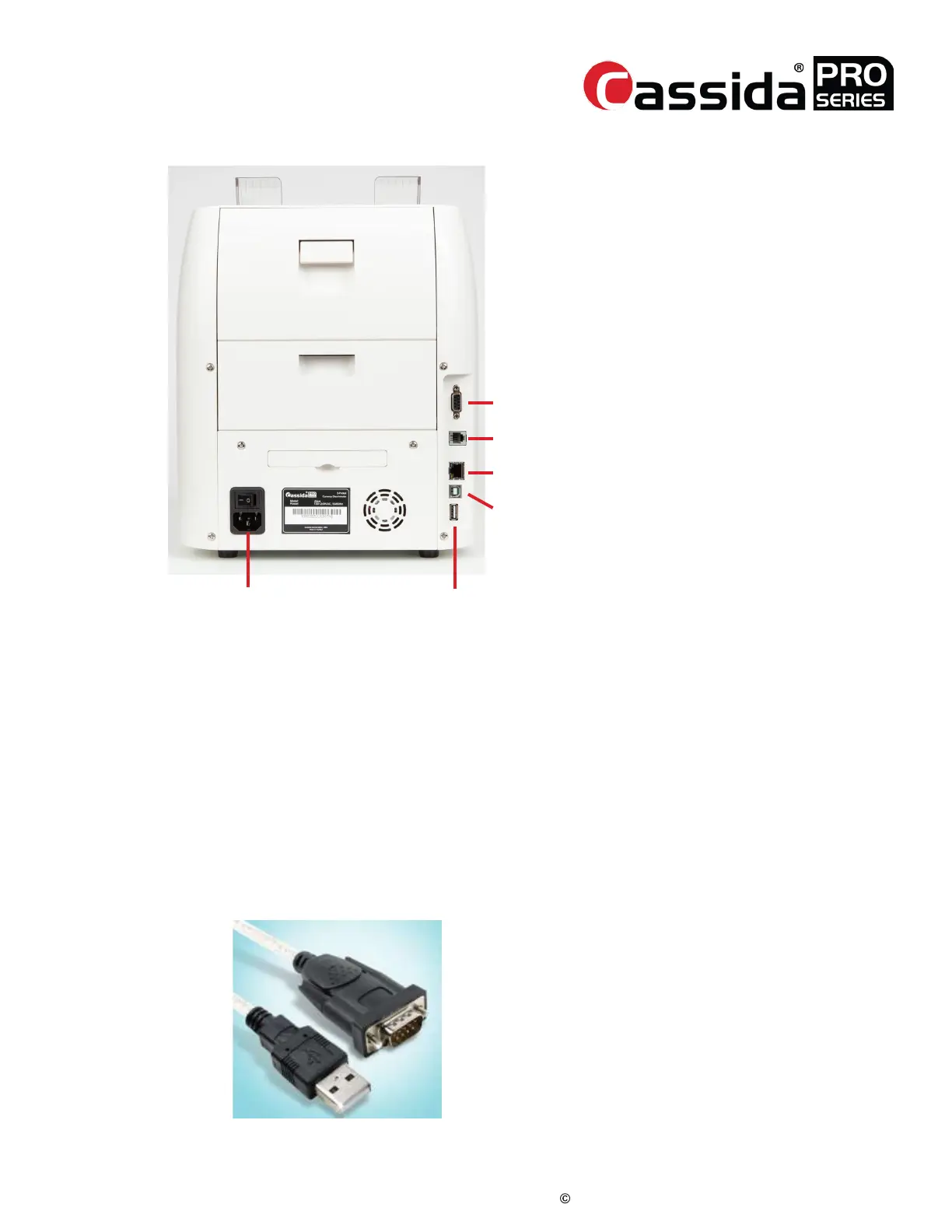
1. AC
2. Serial Port (Printing)
NULL MODEM
3. RJ12 (Remote Display)
4. RJ45 (Network PortGND)
5. USB-B (PC Connection Port)
6. USB-A (Programming Update and
Export Port)
AC
Serial Port
RJ 12
RJ45
USB-B
USB-A



 To Next Page