CassidaPRO Zeus: Service Manual
2018 Cassida Corporation. All rights reserved.
Rev: 09/05/2018
cassidapro.com/partner/
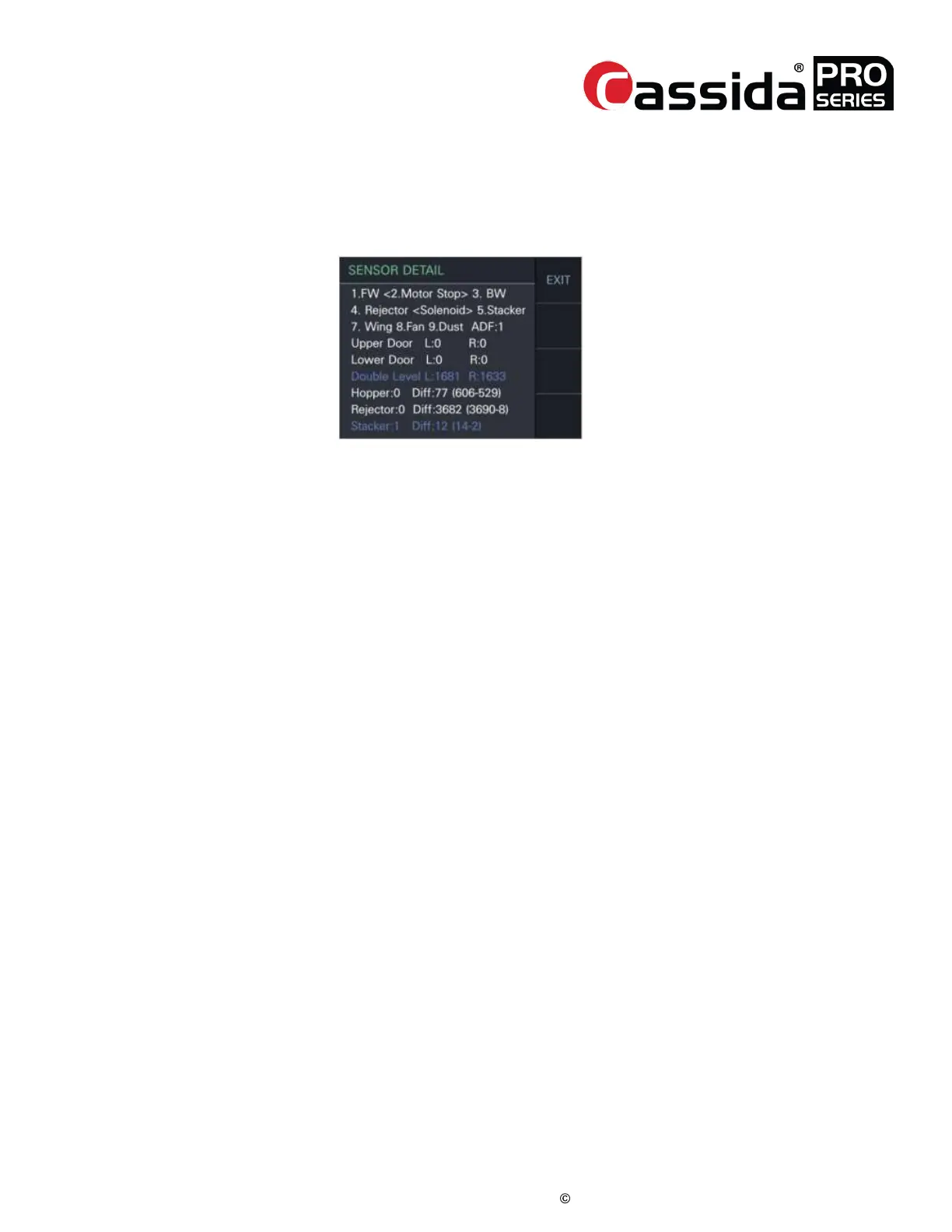
1-7 Sensor Detail
• This menu allows you can check motor, separator, wing motor and sensors all on a
single screen. When a test completes successfully, the color turns blue. If the color of the
DOUBLE LEVEL turns red, check the sensor.
Press the numeric keys to test mechanisms:
[1] Main Motor forward rotation
[2] Main Motor STOP
[3] Main Motor backward rotation
[4] Separator to the reject
[5] Separator to the stacker
[7] Wing on/off (toggle)
[8] Fan on/off (toggle)
[9] Dust Cover on
The definition of the sensors’ status is:
ADF: 1 (Pickup Roller Position Normal) Upper/Lower Door L, R: 0 (closed), 1(opened)
For other sensors’ output, please refer to “3. ADJUSTMENT”.
1-8 Keypad Test
• Press every key until the screen displays “Keypad Press Test: OK.”
SOFTWARE VERSION 6.10.



 To Next Page