8
WORK RATE
TIME
CADENCE
PULSE
EC-3200
8
7
6
5
4
3
2
1
LOADING LEVEL MODE
INSTRUCTIONS
5. Repeat 3 & 4 to set other exercise conditions.
6. Press button and start pedaling.
7. Adjust pedal resistance by moving shift lever.
CALORIE
DISTANCE
SPEED
PULSE
1. Attach pulse sensor to earlobe.
2. Press button to turn screen on.
3. Press button to enter "AGE".
4. Press buttons to adjust to your age.
TARGET PULSE
ON/OFF
VALUE
ADJUST
MODE ADVANCE
TPL
PLL
min
sec
AGE
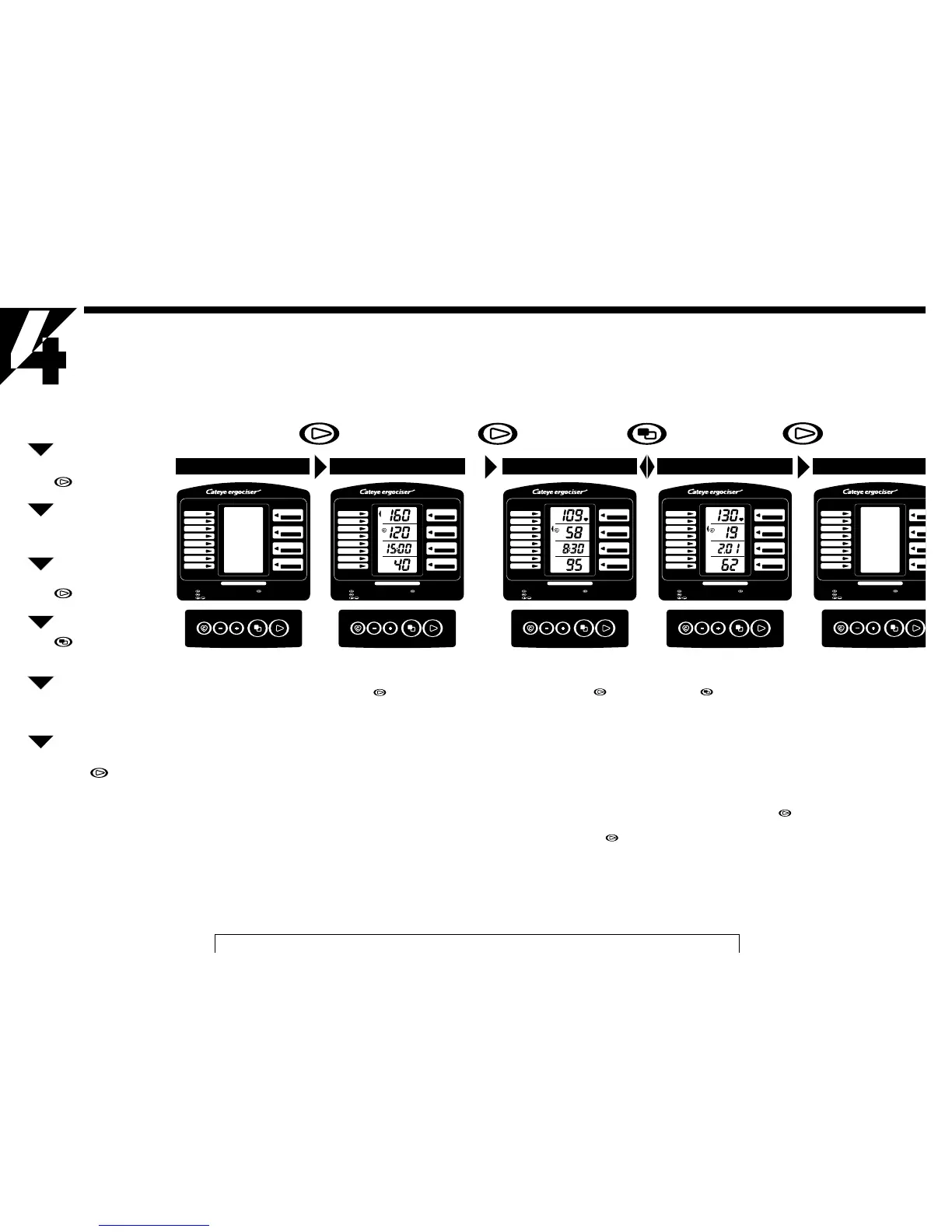
YOU R FIRST RIDE
Try a ride so that you can familiarize yourself with the unit.
Attach Pulse Sensor
Press Button
Confirm Initial Display
Press Button
Begin Exercise
Press Button
Confirm In-Exercise
Display(A) and (B)
Operate Workload Shift
Lever. Confirm Pedal
Resistance changes
Finish Exercise when Buzzer
beeps. Press Button
Initial Display Screen
In the "No-Display" state, this "Initial
Display" appears with a press of the Ad-
vance button .
Preset Initial Display (from top)
• Upper-Limit Pulse Rate
160 bpm (beats per minute)
• Target Pulse Rate
120 bpm (beats per minute)
• Target Exercise Time
15 minutes
• Age
40 years old
The above display can be modified to
your personal data, but at this stage leave
them as they are.
WORK RATE
TIME
CADENCE
PULSE
EC-3200
8
7
6
5
4
3
2
1
LOADING LEVEL MODE
INSTRUCTIONS
5. Repeat 3 & 4 to set other exercise conditions.
6. Press button and start pedaling.
7. Adjust pedal resistance by moving shift lever.
CALORIE
DISTANCE
SPEED
PULSE
1. Attach pulse sensor to earlobe.
2. Press button to turn screen on.
3. Press button to enter "AGE".
4. Press buttons to adjust to your age.
TARGET PULSE
ON/OFF
VALUE
ADJUST
MODE ADVANCE
No-Display Screen
When power is off, no display appears on
the screen. In this state, the battery con-
sumes minimal power. When the unit is
not in use, turn off to "No-Display" state.
• If input signal is not entered into the
control unit in 10 minutes, the unit is
automatically turned off to "No-Dis-
play" state.
9
WOR
T
CA
1. Attach pulse sensor to earlobe.
2. Press button to turn screen on.
3. Press button to enter "AGE".
4. Press buttons to adjust to your age.
TARGET PULSE
ON/OFF
VALUE
ADJUST
MODE ADVANCE
WORK RATE
TIME
CADENCE
PULSE
EC-3200
8
7
6
5
4
3
2
1
LOADING LEVEL MODE
INSTRUCTIONS
5. Repeat 3 & 4 to set other exercise conditions.
6. Press button and start pedaling.
7. Adjust pedal resistance by moving shift lever.
CALORIE
DISTANCE
SPEED
PULSE
1. Attach pulse sensor to earlobe.
2. Press button to turn screen on.
3. Press button to enter "AGE".
4. Press buttons to adjust to your age.
TARGET PULSE
ON/OFF
VALUE
ADJUST
MODE ADVANCE
mile/h
mile
kcal
WORK RATE
TIME
CADENCE
PULSE
EC-3200
8
7
6
5
4
3
2
1
LOADING LEVEL MODE
INSTRUCTIONS
5. Repeat 3 & 4 to set other exercise conditions.
6. Press button and start pedaling.
7. Adjust pedal resistance by moving shift lever.
CALORIE
DISTANCE
SPEED
PULSE
1. Attach pulse sensor to earlobe.
2. Press button to turn screen on.
3. Press button to enter "AGE".
4. Press buttons to adjust to your age.
TARGET PULSE
ON/OFF
VALUE
ADJUST
MODE ADVANCE
rpm
min
sec
watt
In-Exercise Display (A) Screen
After the "Initial Display" state, this "In-
Exercise Display (A)" appears with a
press of the advance button .
Exercise Display (A) Screen (from top)
• Current Pulse Rate
(bpm)
• Pedal Cadence
(rpm-revolutions per minute)
• Countdown Timer
(minute:second)
• Work Rate
(watt)
Move the workload shift lever, and con-
firm the changes of pedal resistance.
If you press the advance button when
the screen is in this state, it turns to the
"No-Display" state.
In-Exercise Display (B) Screen
The In-Exercise Display (A) and (B) al-
ternately appear with each press of the
mode button .
In-Exercise Display (B) Screen (from top)
• Current pulse Rate
(bpm)
• Simulated Current Speed
(mile/h or km/h)
• Simulated Trip Distance
(mile or km)
• Calorie Consumption
(kcal)
If you press the Advance button
when the screen is in this state, it turns to
the "No-Display" state.
No-Display Screen


 To Next Page
 Loading...