10
OPERATION OF BUTTONS & WORKLOAD SHIFT LEVER
To make the most of the functions of the unit.
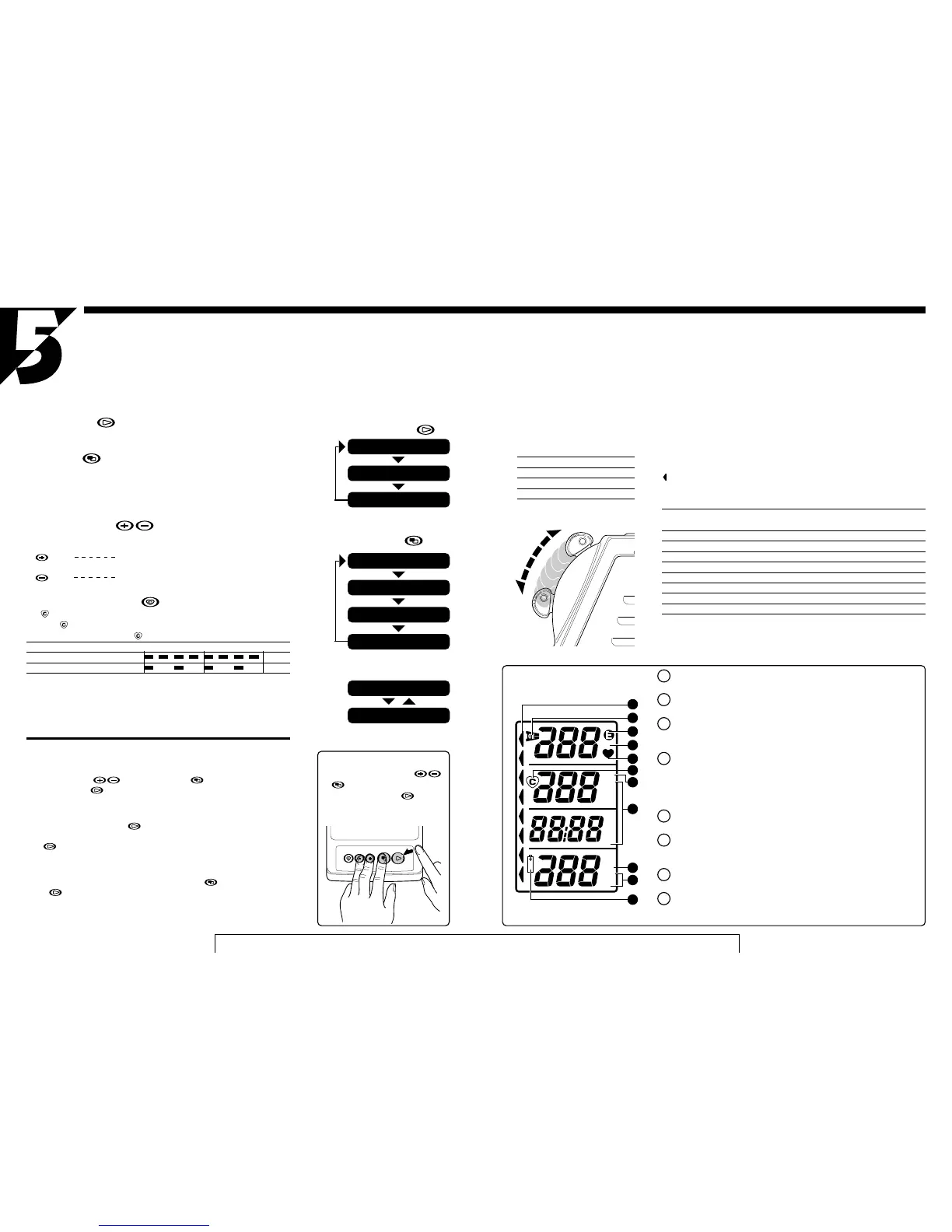
1. Functions of the buttons
Advance Button
It makes the program proceed. Each time you press this button, the display ad-
vances in the order as Fig. 1.
Mode Button
It is used in two ways.
a) In the "Initial Display", each press of this button switches the item to be modified
in the order as Fig. 2.
b)In the "In-Exercise Display", each press of this button converts the screen alter-
nately as Fig. 3.
Value Adjust Buttons
In the "Initial Display", each button serves to change the blinking numerical value
in each selected mode.
Button Each press increases the numerical value by 1, and
when held down, it increases rapidly.
Button Each press decreases the numerical value by 1, and
when held down it decreases rapidly.
Target Pulse On/Off Button
The mark turns on and off each time you press this button.
When the mark is shown, the buzzer beeps if your pulse rate deviates from the
target pulse rate zone. When the mark is off, such a function is not activated.
[Beeping Sound Pattern] 0 1 2 (sec.)
Beyond the target pulse rate zone 2kHz
Below the target pulse rate zone 1kHz
• The buzzer function is not activated until your pulse rate once reaches the target
pulse rate.
• The target pulse rate zone may slightly differ depending on the target pulse rate
that you input, but approximately within +/- 5 bpm from the target pulse rate.
Special functions of buttons
"All Clear" Function
When new batteries are loaded, or when abnormal signal is received due to electro-
static trouble, etc., the screen may show abnormal displays. In such a case, first hold
down the set buttons and the mode button simultaneously, then press
the advance button . The screen first turns to "No-Display" state, then it dis-
plays all the readings for 2 seconds. Finally it returns to the "No-Display" state.
Recovery Function
If you press the advance button by mistake during exercise, making the screen
turn to "No-Display" state, press any of the other buttons, except the advance but-
ton , within 10 seconds. The screen recalls the previous "In-Exercise Display"
state.
Memory Function
In the "No-Display", if you hold down the mode button and press the advance
button , the data that was set for your last exercise can be recalled. This func-
tion is useful when you can use the unit exclusively and want to repeat the same
exercise program.
*This function becomes effective 10 seconds after the unit is turned off.
Advance Button
NO-DISPLAY
INITIAL DISPLAY
IN-EXERCISE DISPLAY A/B
Mode Button
AGE
TARGET EXERCISE TIME
TARGET PULSE RATE
UPPER-LIMIT PULSE RATE
IN-EXERCISE DISPLAY (A)
IN-EXERCISE DISPLAY (B)
All-clear Process
• Press the three buttons
simultaneously, and holding
them down press the button.
• Be sure to perform this procedure
after replacing the batteries.
Fig.1
Fig.2
Fig.3
TARGET PULSE
ON/OFF
VALUE
ADJUST
MODE ADVANCE
11
Before starting exercise, set the
workload shift lever to the following
standard level in accordance with
your age and sex.
Age Male Female
20~30's 3 2
40~50's 2 1
Over 60 1 1
1
2
3
4
5
6
7
8
2. Workload Shift Lever and Work Rate
Work rate (watt) is determined by the position of the workload shift lever, and
your pedal cadence. To get the desired work rate during exercise, first adjust it
roughly by the workload shift lever, then precisely by changing your pedal ca-
dence. The workload can be shifted to 8 positions, 1 is the easiest and 8 is the
heaviest.(Fig. 4) Each position of the workload shift lever is identified by the
mark displayed on the screen. The following table shows work rate (watt) corre-
sponding to each workload shift lever position, and the pedal cadence.
Work Rate (watt)
Pedal Cadence 50 60 70 80 100 120
Shifting Position
1 253341506585
2 50 65 85 105 140 195
3 75 100 130 155 215 265
4 100 135 170 210 285 355
5 125 165 215 260 350 440
6 150 200 255 310 420 520
7 175 235 295 355 480 595
8 200 265 335 405 545 680
1 Workload Shift Position Mark
Indicates the position of the workload shift lever
2 Pulse Sensor "OK" Mark
Indicates that the pulse sensor functions properly.
3 "Error" Mark
Appears when the pulse rate jumps up or down abnormally, or when the
pulse sensor is not attached to your earlobe properly.
4 Data Mark
Indicates the mode in display.
PLL --------- Upper-Limit Pulse Rate
TPL --------- Target Pulse Rate
AGE -------- Age of the user
5 Pulse Mark
Flickers synchronized with the pulse
6 Target Pulse Rate On/Off Mark
When this mark is on, the buzzer functions to signal when your pulse rate is
out of the target pulse rate zone.
7 Unit Mark
Indicates the unit of the display figure.
8 Battery Alarm Mark
Indicates that the battery power has exhausted.
Screen Display
Fig.4
Harder
Easier


 To Next Page
 Loading...