Check Method of Causes Repair Method
Explanation Figures
Cateye Ergociser EC-5000 Service Manual
12
No Display of Cadence when the Pedal is Rotated. (3)
T-2
No Display of Cadence when the Pedal is Rotated. (3)
T-2
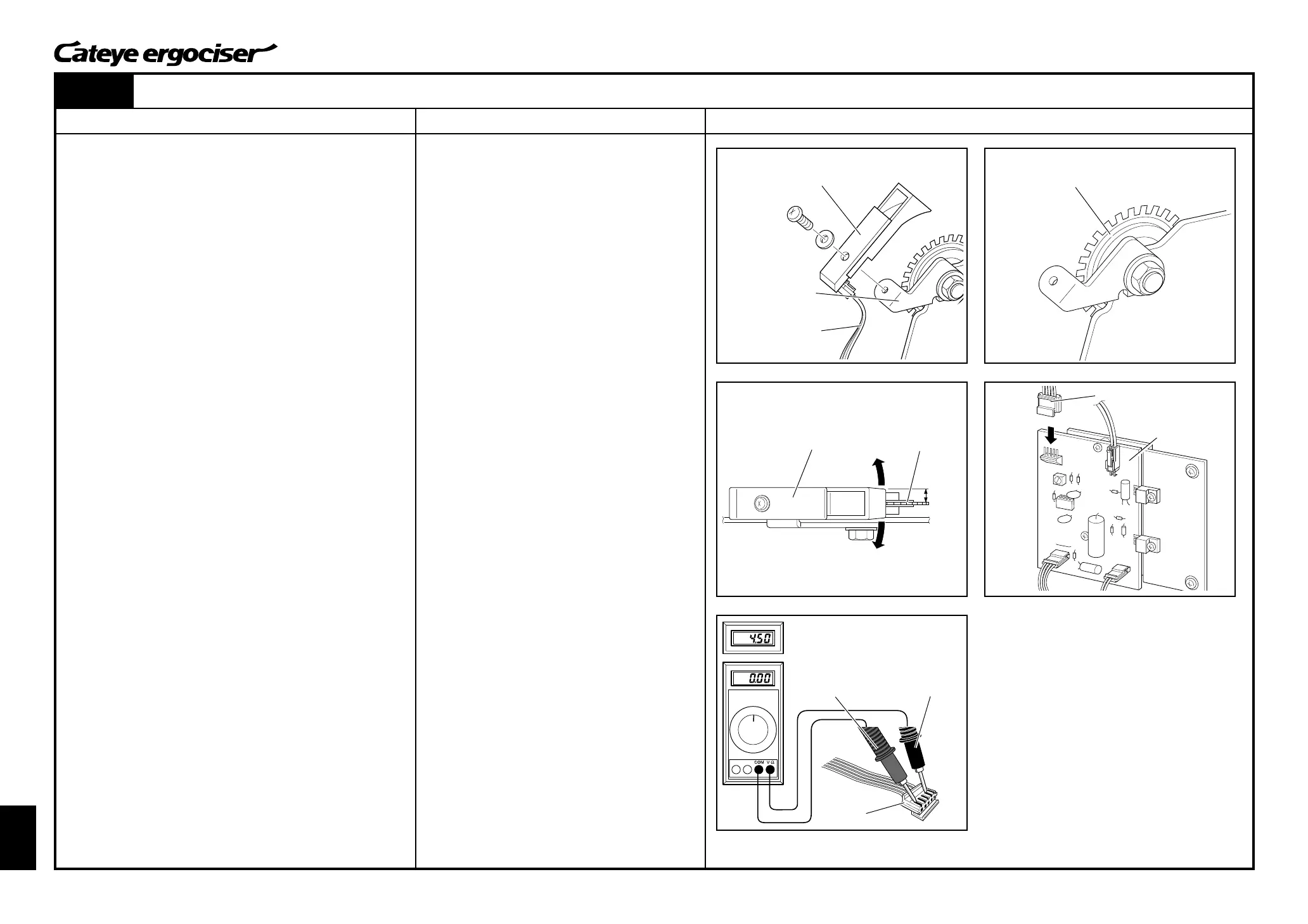
CDC Sensor Set
CDC Sensor Cable
Turn Board
CDC Sensor Set Turn Board
Cable Connector
Red Cable
(Terminal 1)
Black Cable
(Terminal 4)
Fig.9
Nomal condition: Frequently shifting
between 0V & 5V
5P Cable
Power Supply Board
[3] Checking the CDC Sensor (Continued)
3. Remove the CDC sensor set.
A.Remove the CDC sensor set by loosening screws. (Fig. 9)
B.Disconnect the CDC sensor cable from the CDC sensor set.
4. Rotate the CDC magnet to check if it is damaged or clogged.
(Fig. 10)
[Judgment]
ⓦ Damaged CDC magnet will be the cause of the problem. In
this case, you need to take actions as specified in the re-
pair method (e) as described at the right.
5. When the CDC magnet is clogged, remove dust from the mag-
net.
6. Install the CDC sensor set.
A.First, connect the CDC sensor set and the CDC sensor
cable, and then mount it to the CDC sensor metal base.
(Fig. 9)
B.Rotate the CDC sensor around the screw, and adjust the
sensor so that it can be positioned to parallel with the CDC
magnet with the condition that the sensor does not touch the
magnet. (Fig. 11)
7. Connect the 5P cable to the power supply board, and check
the voltage. (Fig. 12)
A.Turn on the power of the main unit.
B.Slowly move the pedal while measuring the voltage across
the terminals 1 and 4 at the cable connector of the 5P cable
(5P connector at the side of the control unit connection).
(Fig. 13) Terminal 1 is for plus (+) and Terminal 4 is for
minus (-).
C.The CDC sensor is working fine when the voltage frequently
changes between approx. 5V and 0V.
[Judgment]
ⓦ When the voltage check is found to be all right, the possible
cause is the clogging of the CDC magnet or incorrect posi-
tioning of the CDC sensor. In this case, you need to take
actions as specified in the repair method (f) as described at
the right.
When the voltage is not correct, proceed to the checking procedures
described on the next page.
Parallel
CDC Sensor Metal
Base
Fig.10
Fig.11
Fig.12
Fig.13
(e) Replace the workload unit. (See [MS-1: Re-
placing the Workload Unit].)
(f) Present status is correct. Go ahead to as-
semble Ergociser.


 To Next Page