Cateye Ergociser EC-5000 Service Manual
58
MS-18
Replacing the Tray
Replacing the Tray
MS-18
REMOVAL
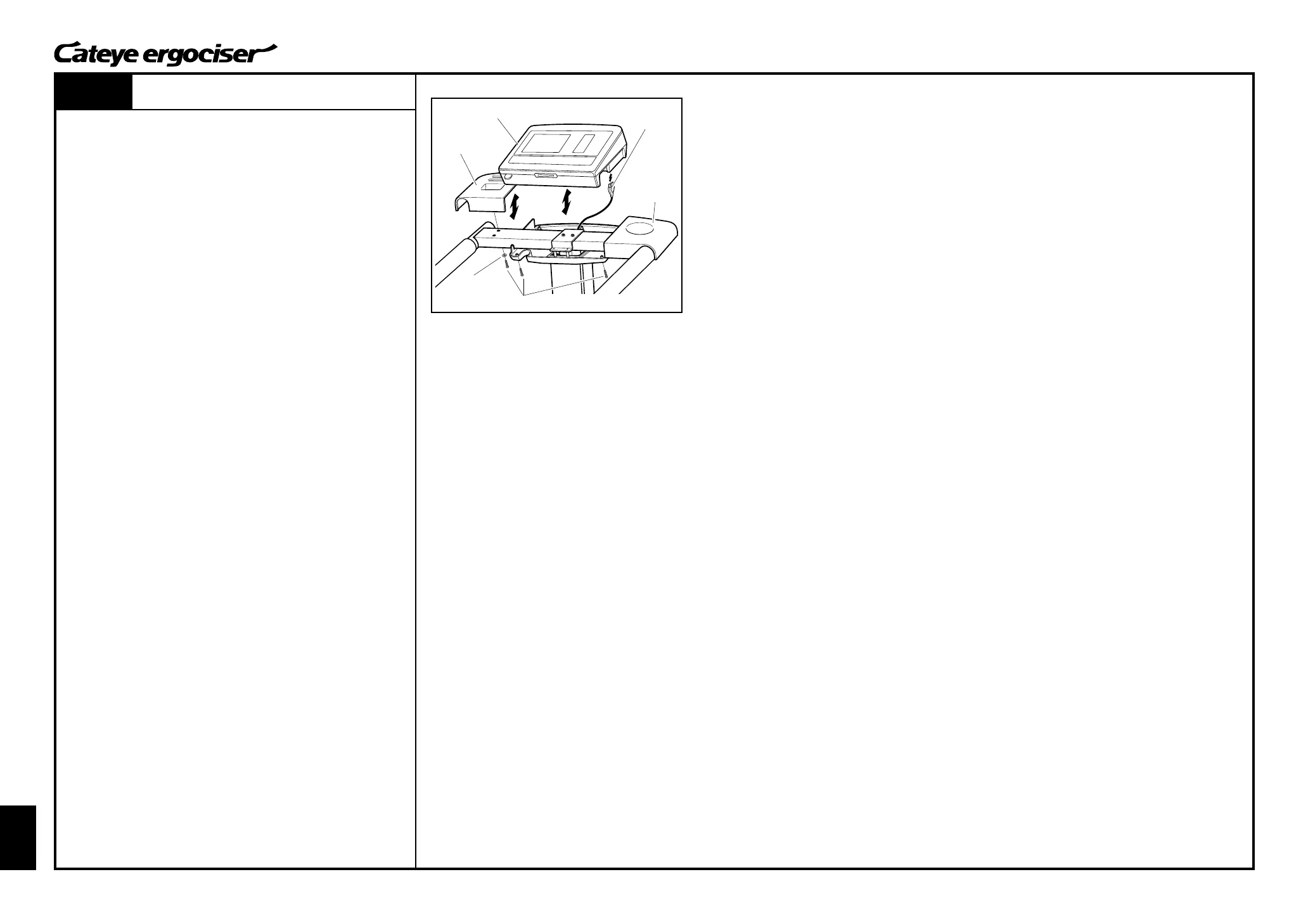
1. Remove the seven tapping screws at the control unit cover,
and then detach the control unit.
2. Disconnect the 5P cable which is connected to the cable inlet
at the back of the control unit. Do this by holding the cable
connector.
3. Remove the tapping screws (one for each joint pipe) at the
joint pipe, and detach the tray.
ASSEMBLE
1. Set the tray to each joint pipe, and fix it by using washers and
tapping screws from the back side.
2. Firmly insert the cable connector, which is at the leading edge
of the 5P cable, to the cable inlet at the back of the control unit
cover.
3. Put the control unit on the control unit cover, and fix it by using
seven tapping screws from underneath.
Fig.1
Tray(L)
Control Unit
Tapping Screw
Washer
Cable
Connector
Tray(R)


 To Next Page