
 Need help?
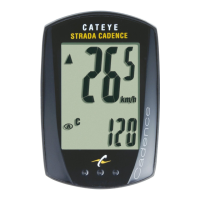
Do you have a question about the Cateye STRADA CADENCE CC-RD200 and is the answer not in the manual?
Explains MENU and MODE button functions for computer setup.
Guides on resetting the device to factory settings before initial setup.
Selects the preferred unit for speed display.
Inputting tire size for accurate distance and speed measurements.
Configures the clock display between 12-hour and 24-hour formats.
Adjusts the current hour value for the digital clock.
Adjusts the current minute value for the digital clock.
Finalizes setup and displays the active measurement screen.
Lists all necessary components and accessories for mounting the computer bracket.
Securing the speed sensor to the bicycle's left chain stay.
Attaching the speed magnet to a rear wheel spoke.
Attaching the cadence sensor to the bicycle's left chain stay.
Mounting the cadence magnet onto the bicycle's left crank.
Positioning sensors and magnets to align with their respective SENSOR LINE indicators.
Ensuring proper distance (within 3mm) between sensors and magnets.
Securing the sensor wire along the bicycle frame to the handlebars.
Firmly tightening all sensors and magnets and tidying excess ties.
 General
| Display Type | LCD |
|---|---|
| Cadence Sensor | Yes |
| Water Resistance | Yes |
| Cadence Range | 0 - 199 rpm |
| Pace Arrow | Yes |
| Wireless Transmission | Yes |
| Battery | CR2032 |
| Mounting | Handlebar or stem |
| Wireless | Yes |
| Model | CC-RD200 |
| Functions | Current speed, average speed, maximum speed, trip distance, total distance, elapsed time, cadence, clock |
| Battery Life | Approx. 1 year |
| Current Speed Range | 0.0 - 99.9 km/h |
| Total Distance Range | 0 - 99999 km or miles |
| Trip Distance Range | 0 - 999.99 km or miles |
| Elapsed Time Range | 0:00 - 9:59:59 |
| Average Speed Range | 0.0 - 99.9 km/h |
| Maximum Speed Range | 0.0 - 99.9 km/h |
| Type | Bike Computer |






 To Next Page
