
 Need help?
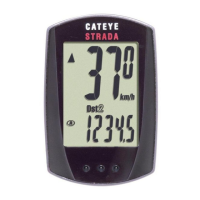
Do you have a question about the Cateye STRADA CC-RD100 and is the answer not in the manual?
Resets all data and settings to default values, preparing the device for initial setup.
Allows selection between kilometers per hour (km/h) and miles per hour (mph) for speed display.
Inputting tire circumference for accurate distance and speed calculations based on wheel size.
Setting the current time, with options for 12-hour or 24-hour format.
Lists essential components included in the standard package for installation.
Details optional accessories available for purchase to enhance functionality.
Instructions for correctly mounting the sensor and magnet, ensuring proper clearance.
Explanation of how the computer automatically starts and stops measurement based on movement.
Guidance on navigating between different functions and modes using the MODE button.
Recommendations for cleaning the computer and accessories using mild detergents.
Solutions for problems like unresponsive buttons, no display, or incorrect data readings.
Steps for replacing the battery, including initial setup after replacement.
 General
| Brand | Cateye |
|---|---|
| Model | STRADA CC-RD100 |
| Category | Bicycle Accessories |
| Language | English |





 To Next Page
