【Replace All Cat Litter】
1
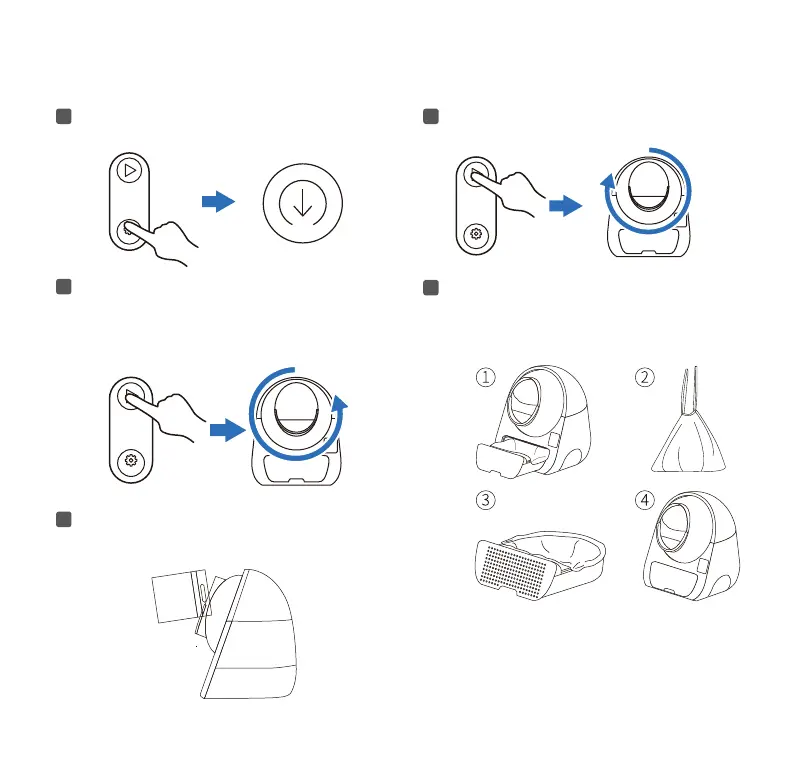
Click the Mode button to switch to Empty mode.
3
After all the cat litter has fallen into the
Waste Drawer, click the Clean/Pause
button again, and the Globe will
return to its original position.
5
Add new cat litter, below the MAX mark, then click the
Clean / Pause button to clean once to smooth the cat litter.
2
Click the Clean/Pause button and the Globe will
rotate clockwise.
4
Take out the Waste Drawer, seal and discard the
waste cat litter; put on a new Trash Liner, and push
the Waste Drawer back to its original position.
Toll free: +1 833 440 2772 Email: suppo@catlink.cn
13



 To Next Page