【Troubleshooting】
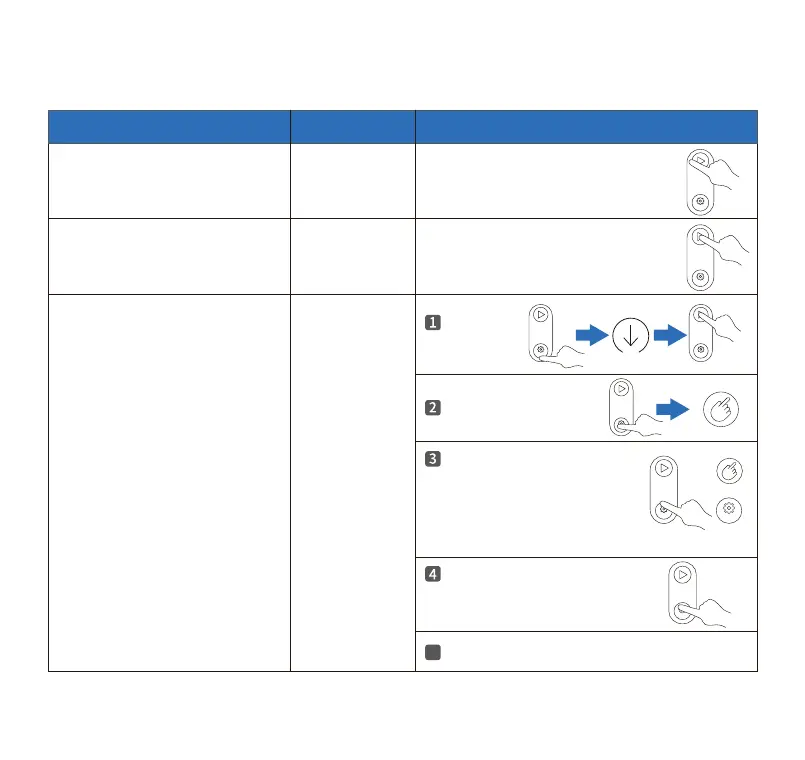
Stop operation caused by Radar
protection, weighing protection,
full Waste Drawer.
Cancel manually Click the Clean/ Pause button once.
Click the Clean/ Pause button once.
Cancel manually
Reset cat litter
to ZERO
Stop operation caused by
Anti-pinch was triggered.
The amount of cat litter is
not accurate.
Empty all
cat litter.
Empty all cat litter.
Long press the Mode Switch
button, release it after hearing
2 beeps, the Manual Mode
indicator and the Mode Switch
button indicator ash.
Immediately press and hold the
Mode Switch button again,
release it after hearing 2 beeps.
5
Operation complete.
Trouble
Solution
Steps
Toll free: +1 833 440 2772 Email: suppo@catlink.cn
16



 To Next Page