OPERATING INSTRUCTIONS
tild VP v2.0EN
5. Choice of the Vigipool "central unit" appliance
Please refer to the attached "Vigipool World" page for more information
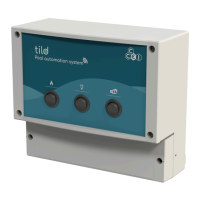
On delivery or after a reset (see "Reset” section),the multi-colour LED (A) flashes slowly white after the initialisation phase.
This corresponds to the choice of the appliance that will perform the Vigipool "central unit" function (see attached specific
"Vigipool World" page):
• If the installation only has this appliance, press the selection button (A). The appliance is then configured as a Vigipool
"central unit" and other appliances can be added to the installation later.
• If the installation has several Vigipool World compatible appliances
– If an appliance is already configured as a Vigipool "central unit", press the button on the Vigipool "central unit" if it has
been powered on for more than one minute. (If it has been powered on for less than a minute, there is no need to press its
button). Your tild VP then connects to the Vigipool "central unit": It stops flashing white and switches to normal operation.
– If no other appliance is already configured as a Vigipool "central unit", turn on all the appliances and press the button on
the appliance you want to use as a Vigipool "central unit". The other products will then connect to the appliance you have
validated as the Vigipool "central unit", they stop flashing white and switch to normal operation mode.
When the tild VP is configured as a Vigipool "central unit", LED (A) lights in green and flashes green when it accepts the
connection of new Vigipool compatible appliances. tild VP accepts new appliances for 5 minutes after it is powered on, or
after its (B) button is pressed.
If you want to change the Vigipool "central unit” appliance, the system must be reset (see "Re-
setting to zero")
6



 To Next Page