EasyManua.ls Logo

ccei Tild - User Manual

ccei Tild
10 pages
Print Icon
To Next Page IconTo Next Page
Loading...
Technical manual
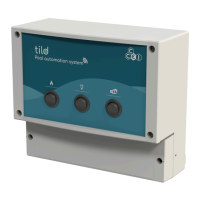
Tild
Control & monitoring sys-
tem for pool and spa
Réf : PF10T000
Table of Contents
1. Important warnings and safety instructions .................................................................................. 1
2. Packing contents .......................................................................................................................... 2
3. Technical features ........................................................................................................................ 2
4. Wall mounting ............................................................................................................................. 3
5. Electrical wiring .......................................................................................................................... 3
5.1. Temperature probe mounting ............................................................................................ 5
5.2. Heater wiring .................................................................................................................... 5
6. Front panel description ................................................................................................................ 6
7. Connection indicator .................................................................................................................... 6
8. App connection ........................................................................................................................... 7
8.1. Bluetooth® and Wi-Fi control .......................................................................................... 7
8.2. App download .................................................................................................................. 7
8.3. First connection ................................................................................................................ 7
8.4. Vigipool app description ................................................................................................... 7
8.5. Vigipool general settings .................................................................................................. 8
8.6. Wi-Fi connection / Vigipool account creation ................................................................... 9
A. Technical support / Declaration of conformity ...................................................................... 10
1. Important warnings and safety instructions
When installing and using this electrical equipment, basic safety precautions
should always be followed, including the following:
READ AND FOLLOW ALL INSTRUCTIONS.
WARNING - To reduce the risk of injury, do not permit children to use this
product unless they are closely supervised at all times
SAVE THESE INSTRUCTIONS
SERIOUS BODILY INJURY OR DEATH CAN RESULT IF THIS PRODUCT
(UNIT) IS NOT INSTALLED AND USED CORRECTLY.
INSTALLERS, POOL OPERATORS AND POOL OWNERS MUST READ
THESE WARNINGS AND ALL INSTRUCTIONS BEFORE USING THIS
PRODUCT.
This guide provides installation and operation instructions for the Tild . Consult
CCEI with any questions regarding this equipment.
CONT0044 v1.0QC (29/12/2020)

Question and Answer IconNeed help?

Do you have a question about the ccei Tild and is the answer not in the manual?

Overview

The Tild is a control and monitoring system designed for pools and spas, manufactured by CCEI Inc. It allows users to manage various pool and spa functions via a smartphone or tablet application, offering both Bluetooth® and Wi-Fi connectivity.

Function Description

The Tild system provides comprehensive automation and control over key pool and spa equipment. It enables users to:

  • Control Filtration: Turn the filtration system ON or OFF and set up schedules. Forcing filtration OFF will automatically shut down the heater for safety.
  • Manage Heating: Control the pool/spa heater by turning it ON or OFF and setting up schedules. The heater cannot be turned ON if the filtration system is not running. The system connects to heaters equipped with a POOL or SPA selection mode via dry contact.
  • Operate Lighting: Turn pool lights ON or OFF, choose desired colors, adjust color intensity, and set up lighting schedules. The Tild is compatible with 12 VAC or 24 VDC CCEI LED lights.
  • Monitor Temperature: Connects to an NTC temperature probe to monitor water temperature.
  • Remote Control: Offers remote control capabilities via the Vigipool app, allowing users to manage their pool/spa from anywhere once connected via Wi-Fi.
  • Local Control: Features front panel rocker switches for direct ON/OFF/Automatic control of the heater, lights, and pump, providing an alternative to app control.

Important Technical Specifications

Physical Characteristics:

  • Dimensions (L x H x D): 8.5" x 8.25" x 4"
  • Weight: 2.6 lbs (1.2 kg)
  • Installation: Designed for vertical mounting on a wall, both inside and outside.
  • Protection Index: IP 55

Electrical Specifications:

  • Power Supply: 12 VAC or 24 VDC (depending on model) 50/60 Hz.
  • Power Consumed: 2.4W @ 12VAC
  • Filtration Pump Compatibility: All 110V - 240V single-speed pumps. While a variable-speed pump can be connected, Tild will only manage its power supply.
    • Max Load: 277 V AC / 30 VDC max - 20A max
  • Light Compatibility: All 12 VAC CCEI lights (or 24 VDC depending on the Tild version). The number of maximum lights depends on the power supply.
    • Max Load: 12 VAC or 24 VDC (depending on version) / 16A max (divided between the 2 connectors).
  • Heater Compatibility: All heaters equipped with a POOL or SPA selection mode via dry contact.
    • Max Load: 277 VAC / 30 VDC max - 10 A max
  • Temperature Probe: NTC probes.
    • Max Load: 270 VAC / 30 VDC max - 10 A

Connectivity:

  • Bluetooth®: Low energy (V4.x), conform R&TTE Directive 1999/5/EC.
    • Range: 60m
  • Wi-Fi: 802.11 b/g/n and "dual band" (2.4 GHz only). Vigipool is compatible with 2.4 GHz networks only.

Certifications:

  • UL listed under the number E517110.
  • Compliant with European directives 2006/95/CE and 2004/108/CE.

Usage Features

Installation and Setup:

  • Wall Mounting: The unit must be installed either more than 3.5 meters (11.5 ft) away from the pool edge (or further if local legislation requires) or in an underground room close to the pool, accessible by a tool-opened trap door.
  • Electrical Wiring: Requires professional installation due to electric shock hazards. The bottom cover is removed to access terminal blocks for connecting the temperature probe, heater, power supply (12VAC or 24VDC, polarity-sensitive for DC), CCEI LED lights (12VAC or 24VDC, polarity-sensitive for DC), filtration pump power supply, and the filtration pump itself.
  • Temperature Probe Mounting: Involves drilling a 0.7" (18 mm) hole on the high point of the pipe, fitting a collar, applying Teflon to the probe thread, and screwing the probe into the collar.
  • Heater Wiring: Connects to the heater's "POOL" and "SPA" contacts using a 2-wire 22 AWG cable. Heater parameters should be set to 0°C for "POOL" and 40°C for "SPA".

App Connection (Vigipool App):

  • Download: Search "Vigipool" in the App Store or Play Store.
  • Device Compatibility: Requires an iOS (Apple®) or Android device with Bluetooth® Low Energy (v4.x) connectivity or Wi-Fi 502.11 B:N:G. Older Bluetooth® versions (lower than 4.0) and other operating systems (e.g., Windows Phone®) are not supported.
  • Single Device Connection: Only one phone/tablet can be connected to the Tild panel at a time.
  • Bluetooth® Connection: Activate Bluetooth® and geolocation on the phone. For the first connection, place the phone on the top right corner of the enclosure for 5-10 seconds for pairing.
  • Wi-Fi Connection: Requires the phone's Wi-Fi to be connected to an access point. After Bluetooth® pairing, access general settings in the app, select "My devices," then "Configure Wifi connection." Enter the SSID and password of the network.
  • Vigipool Account: Once Wi-Fi is set up, users can create a Vigipool account to manage their pool remotely. This allows adding the Tild to "My devices" for remote control.

Connection Indicator (LED on Tild unit):

  • Flashes blue every 2 seconds: Device configured for Bluetooth®, waiting for smartphone connection.
  • Blue (not flashing): Smartphone connected via Bluetooth®.
  • Flashes green every two seconds: Device configured for Wi-Fi, connected to router, waiting for smartphone connection.
  • Green (not flashing): Smartphone connected via Wi-Fi.
  • 2 green flashes per second: SSID configuration in progress (password to connect to router).
  • Flashes green quickly: Connection fault (SSID entry error or router not accessible).
  • Visibility Note: In high brightness, the blue LED may be less visible.

Front Panel Control:

  • Rocker Switches: Three switches control Heater, Light, and Pump.
    • Top Position (=): Automatic mode (app defines operation).
    • Middle Position (O): Device OFF (can be used for servicing).
    • Bottom Position (-): Device ON (Heater cannot run if pump is OFF).

Maintenance Features

  • Watertightness: When reattaching the lower cover, a torque of 1.2 Nm must be applied to the screws to ensure watertightness.
  • Cable Gland Tightening: After connecting all devices, the cable gland must be tightened.
  • Sensor Calibration: The Vigipool app includes a "Sensor & calibration" option for maintaining accuracy.
  • Measurement Units: Users can choose their preferred measurement units (°C/°F) in the app.
  • Technical Support: CCEI provides technical support via phone and website for both USA and Canada.
  • Documentation: The manual emphasizes the importance of reading and following all instructions, and retaining the manual for future reference.

ccei Tild Specifications

General IconGeneral
Brandccei
ModelTild
CategoryControl Systems
LanguageEnglish

Related product manuals