Technical manual Tild v1.0QC
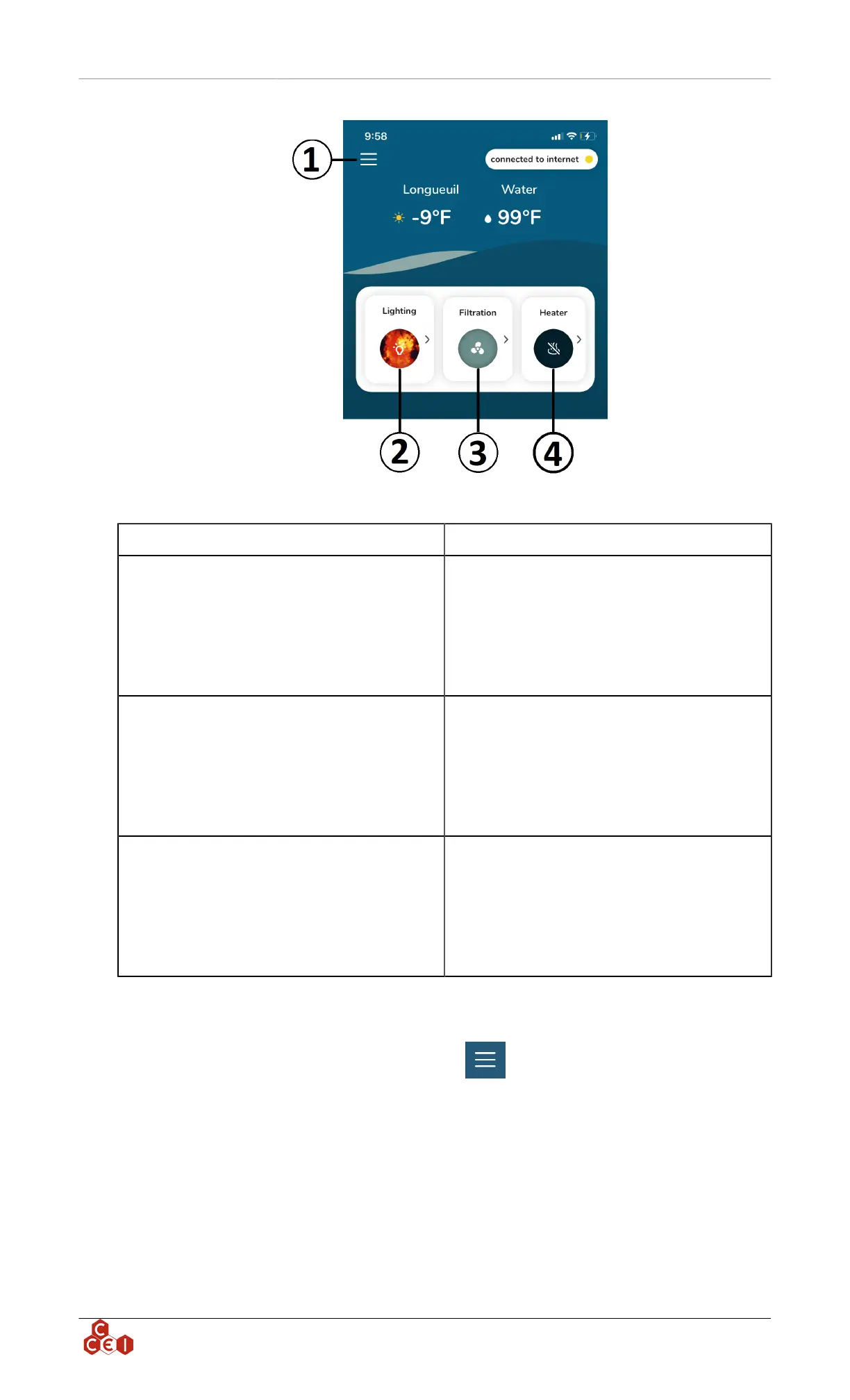
1- Vigipool General settings Access to Vigipool settings
2- Lighting
Lighting menu, clicking on this button allow you
to put ON or OFF your lights, choose the desired
color/show to display and setup a timer.
The arrow on the right gives you access to a sec-
ond menu to manage the color intensity and to
setup a schedule.
3- Filtration
Filtration menu, clicking on this button allow you
to put ON or OFF your filtration system. (Note:
by forcing OFF the filtration, the heater will be
automatically shut down)
The arrow on the right gives you access to a sec-
ond menu to setup a schedule.
4- Heater
Heater menu, clicking on this button allow you
to put ON or OFF your filtration system. (Note:
The heater canno't be put ON if the filtration is
not running)
The arrow on the right gives you access to a sec-
ond menu to setup a schedule.
8.5. Vigipool general settings
To access the general setting menu, click on the icon " ".
ccei.ca
8


 To Next Page