Page.43.
Select relative function on the right side Toolbar to operate , functions including “Photos”, “Snapshot” ,
“Record” , “Playback” , “PTZ” , “Set” ,
Click , or press to quit.
Click the screen twice quickly, can be full zoom in on the touch screen.
(1) PTZ controller parameter setting
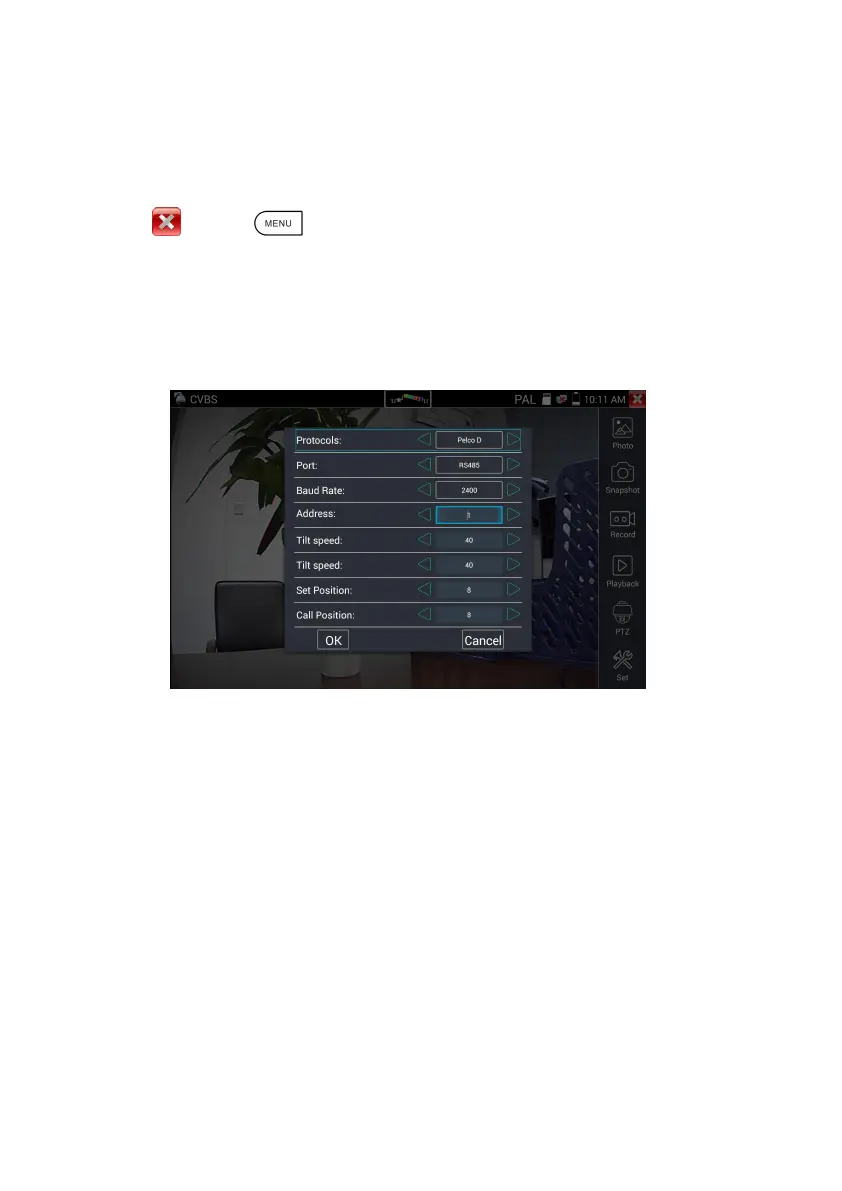
Select and click icon “PTZ”, to enter PTZ setting:
A. Protocol
Use the up and down arrow keys to move the yellow cursor to the “protocol ”, set corresponding
Protocol and support more than thirty PTZ protocols. Such as
Pelco-D,Samsung,Yaan,LiLin,CSR600,Panasonic,Sony-EVI etc.
B. Port
Click and move, to “port” Select the communication port for the PTZ camera controlling (RS485)
C. Baud
Move the yellow cursor to “Baud”, Select the baud rate according to baud rate of the PTZ
camera.(150/300/600/1200/2400/4800/9600/19200/57600/115200)
D. Address
Set the ID according the ID of PTZ camera (0~254), the setting address data must be consistent the


 To Next Page