7
A920 of TeleCash From Fiserv
Start
Upon booting up the terminal, the TeleCash app launches automatically.
If there are additional apps to be installed on the terminal, close the TeleCash app and open the CCVStore.
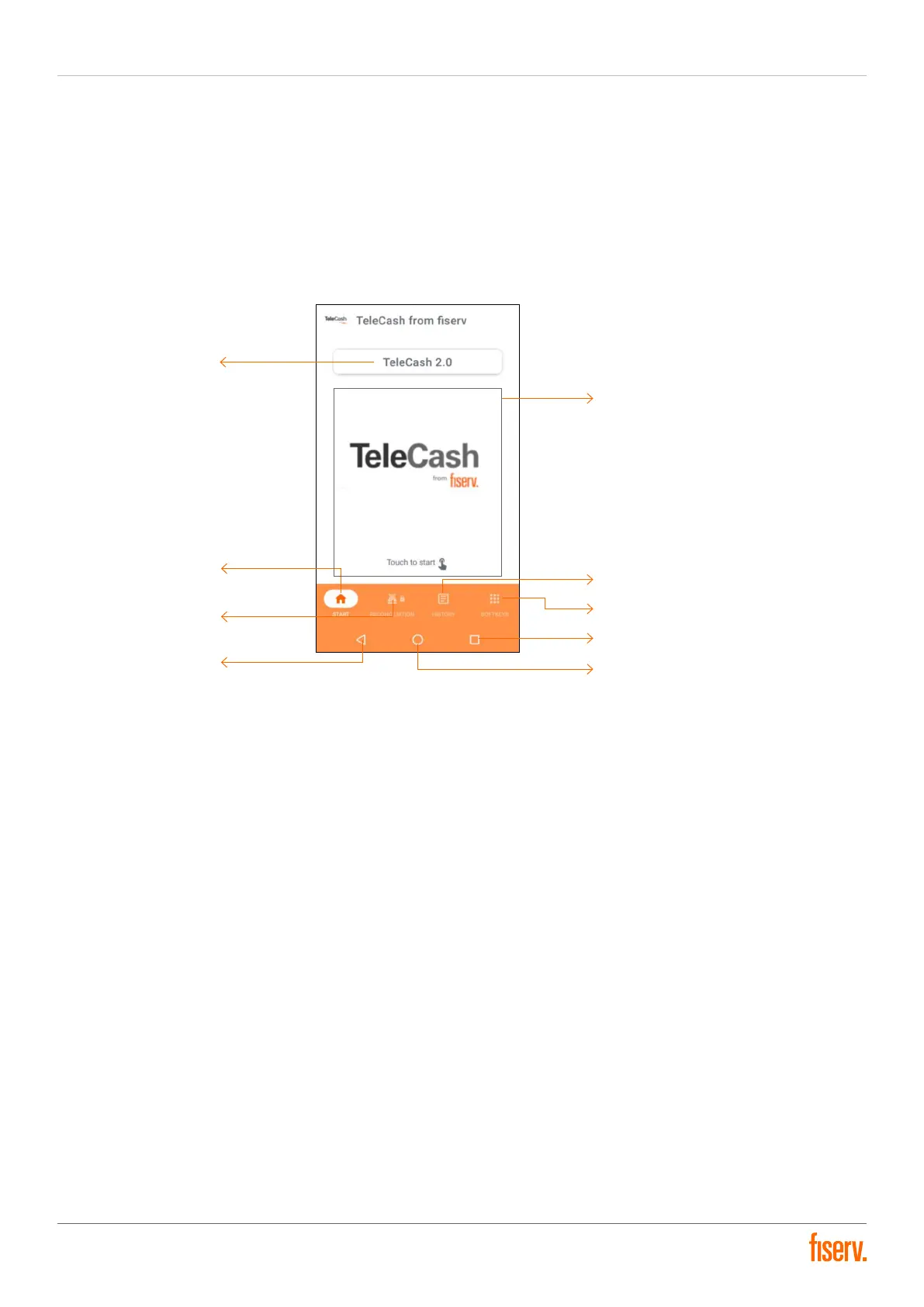
Start screen
App version: Displaying the current version of the TeleCash app
Starting area: Jump to the interface for entering the amount
Start button: Jump to the home screen/Starting Area of the TeleCash app
Reconciliation button: Jump to the Reconciliation screen
History button: Jump to the Transaction history screen
Softkey button: Jump to more features and services
Back button: Jump back to the previous screen
Home button: Jump to Terminal home menu
Recently used button: Shows the currently launched applications/items
App version
Start button
Reconciliation button
Back button (Android)
Start area
History button
Softkey button
Recently used button (Android)
Home button (Android)


 To Next Page