8
A920 of TeleCash From Fiserv
Standard payment process
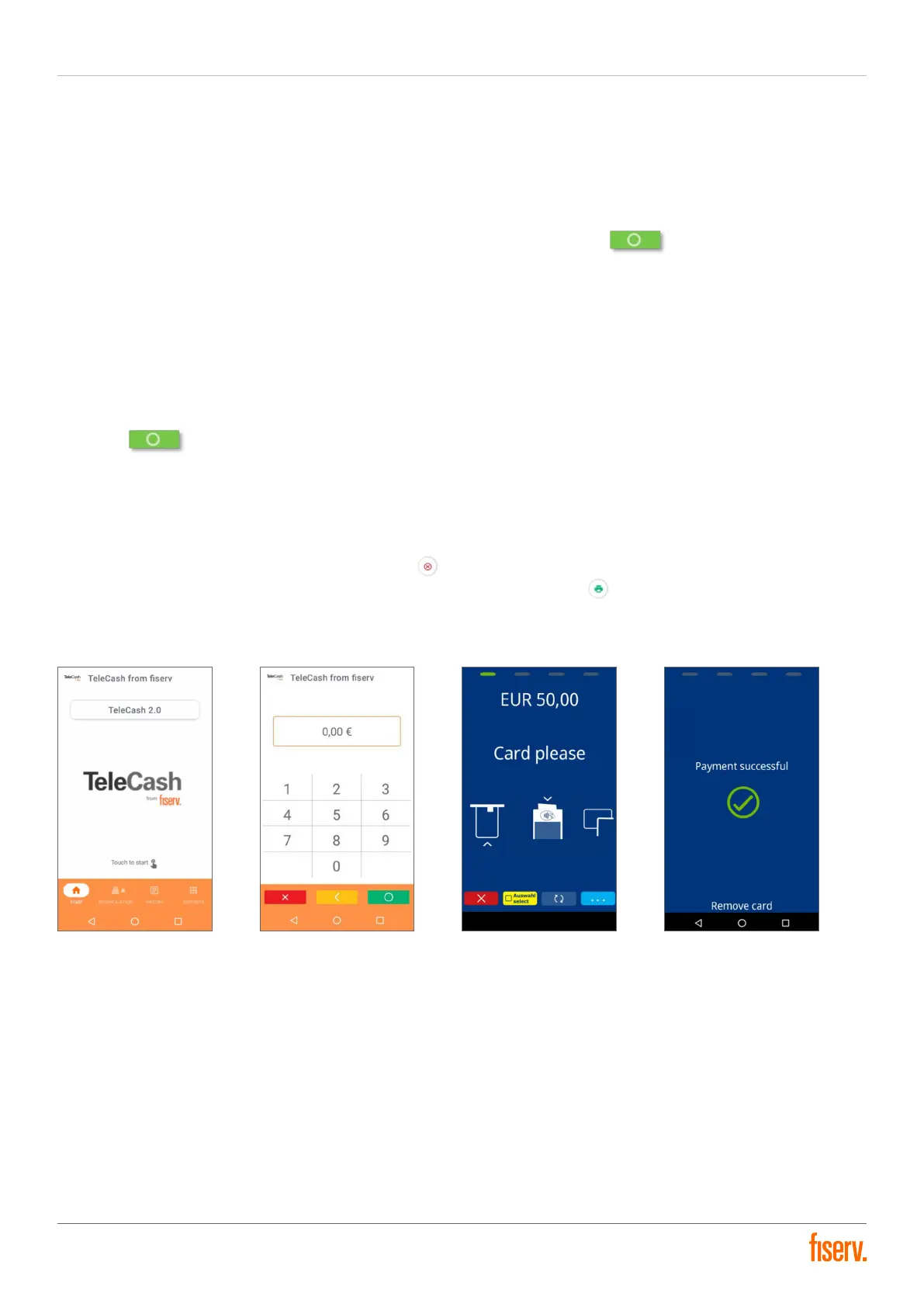
1. The payment process is initiated by tapping on the TeleCash logo or the starting area.
2. The amount to be paid is entered through the numeric keypad. The cent amounts should be entered without a
comma. The amount entry is completed by tapping on the green okay button .
3. The payment screen emerges with a request to present a payment card. There are several methods to read the
card data with the terminal:
a. Insert the chip card, with the chip rst, into the terminal from below
b. Present the card to the front, marked area through NFC
c. Swipe the card with the magnetic stripes through the upper card slot with the magnetic stripe reader
(forforeign credit cards)
4. In some cases, the PIN of the payment card must be inputted and conrmed with the green okay
button . In other cases, the card owner may have to sign on the bottom or the backside of the receipt
once it is printed. Depending on the transaction, these steps may be bypassed.
5. The display conrms the successful payment or presents an error message.
6. The display of the printing process for the merchant receipt.
7. The display shows the printing process for the customer document. In this case, the printing of the customer
receipt can be cancelled by tapping the red cross or the waiting time for the customer receipt can be ended by
immediately printing the receipt through pressing the green printer button .
8. The display shows the start screen.
Start screen Amount input interface Card prompt Conrmation


 To Next Page