23
Conrm and
set the se-
lected pa-
r a m e t e r .
Then press
to conrm
the setting
and auto-
matically
move on to
the next pa-
rameter, or turn knob B to select the desired parameter.
N.B The maximum adjustment value of the welding
current depends on the welding machine article.
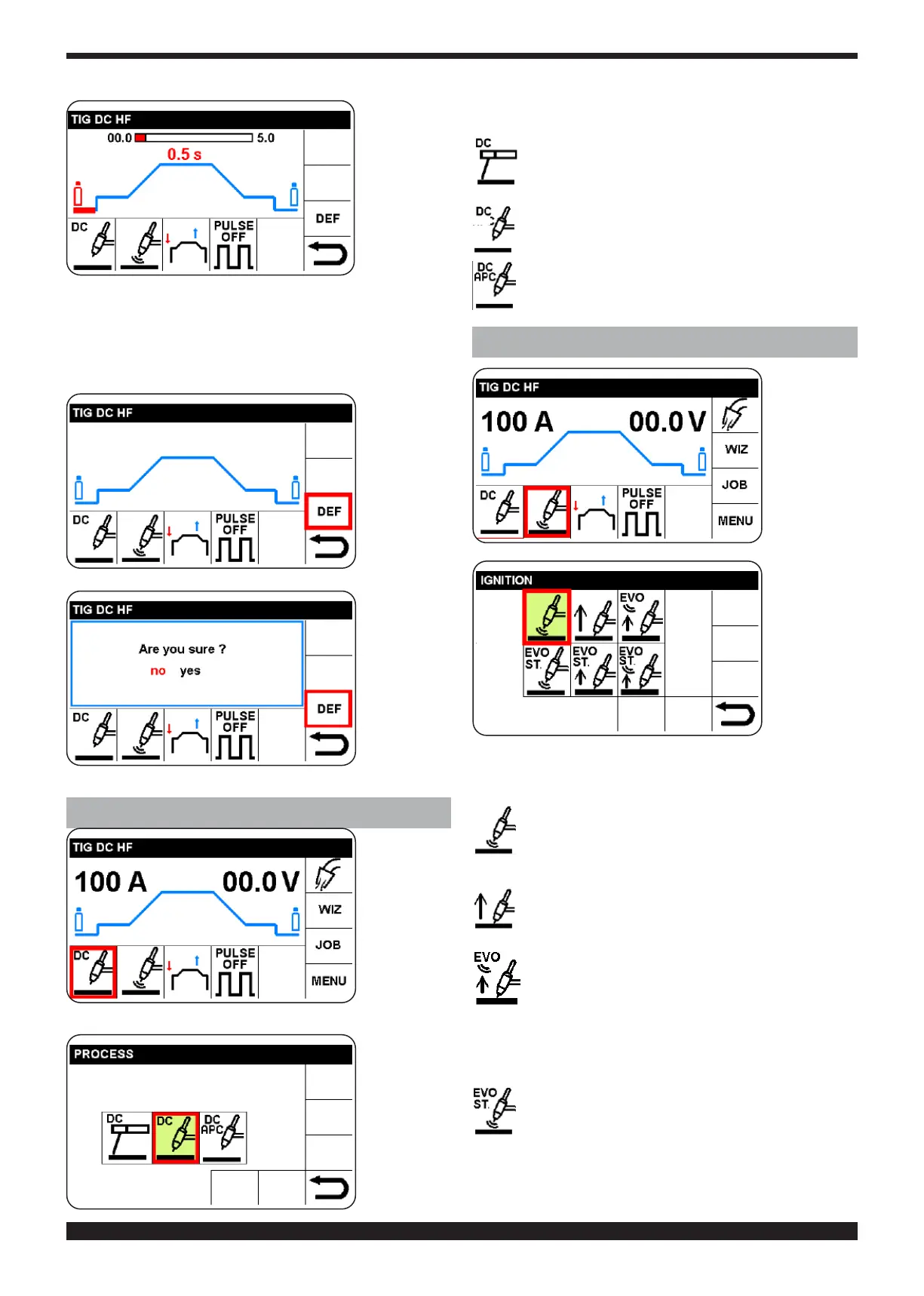
4.2.1 SETTING OF FACTORY VALUES (DEF)
To restore
the factory
parameters,
select and
conrm the
“DEF” SEC-
TOR
Confirm
choice
5 CHOICE OF WELDING PROCESS (SECTOR Q)
Select and
conrm Q
sector.
Select and
conrm the
welding pro-
c e s s . N . B .
the box for
the process
in use is
highlighted
in green and
boxed in red.
The processes available are as follows:
MMA Welding with covered electrodes (see
chapter 13))
TIG WELDING DC (see chapter 17)
TIG WELDING DC APC (Active Power Control,
See chapter 16)
6 CHOICE OF TYPE OF ARC IGNITION (P SECTOR)
Select and
conrm P
sector for
arc ignition.
Select and
conrmtype
of ignition.
N.B. the box
for the pro-
cess in use
is highlight-
ed in green.
By adopting this method, it is possible to select, modify
andconrmallthetypesofignitionpresentedbelow.
High frequency (HF) ignition, the arc ignites by
high frequency/voltage discharge.
Contact ignition, touch the workpiece with the
electrode tip, press the welding torch trigger and
raise the electrode tip.
EVO LIFT Touch the workpiece with the electrode
tip, press the welding torch trigger and raise the
electrode tip; as soon as the electrode is raised, a
high frequency/voltage discharge is generated which
lights the arc. Particularly suitable for precision spot
welding.
EVO START After the frequency/voltage dis-
charge, which lights the arc, the parameters are
set that favour joining of the edges of the material
tobeweldedduringtherststageofwelding.
The duration of the parameters mentioned above may be
adjusted from the main screen by selecting parameter
EVO ST. (see chapter 15).




 To Next Page