29
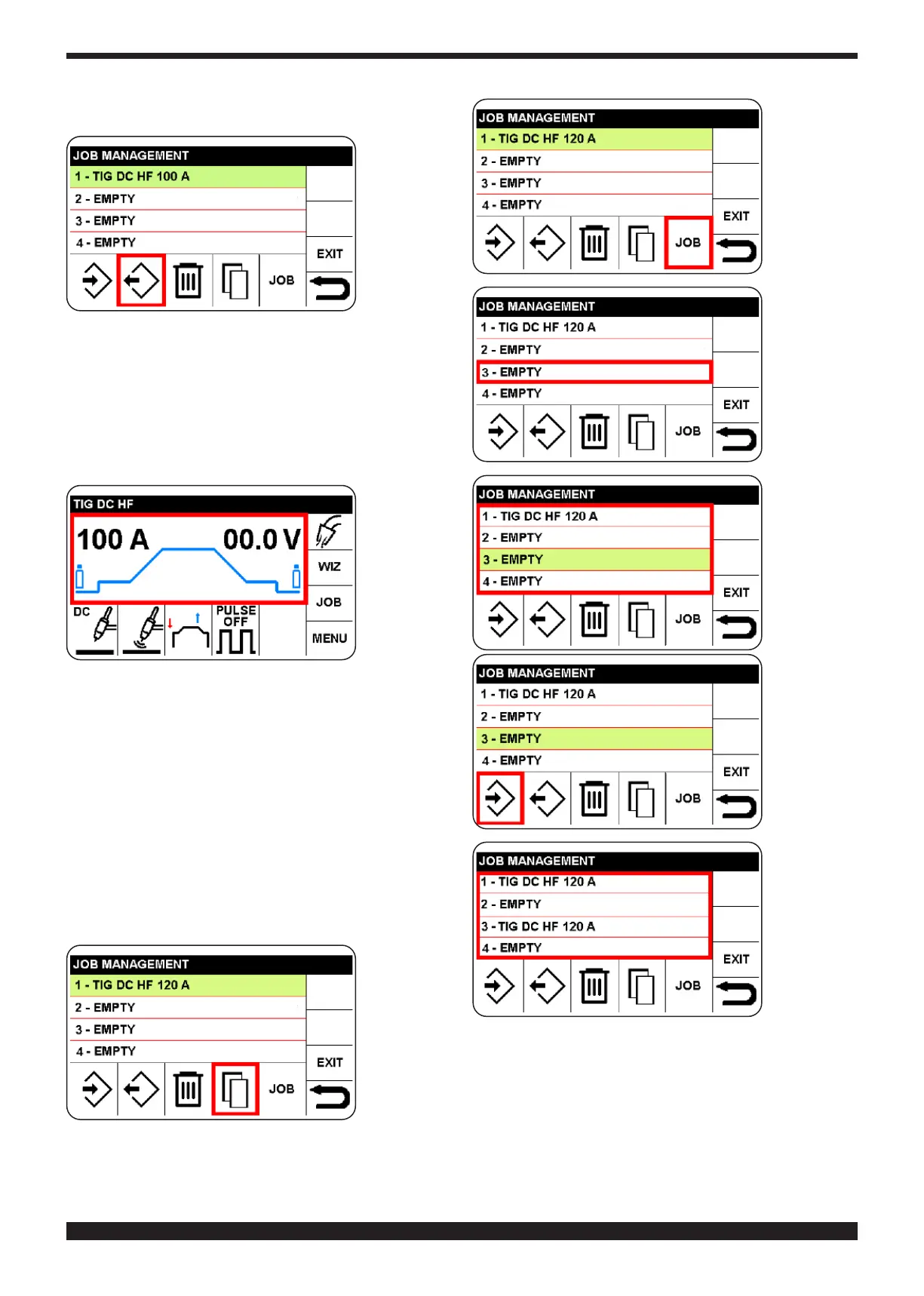
Select the
m e m o r y
number in
which the
copied JOB
is to be in-
serted
Conrm the
selected
m e m o r y ,
which turns
green
Select and
conrm the
icon save.
10.2 MODIFY A JOB
To modify or use a program, proceed as follows:
• Access the JOB menu as described in 10.1
•SelecttheJOBtobemodied
•Selectandconrmthesector,"retrieve"
To return to the main screen, press knob B (do not re-
lease immediately) (> 0.7 sec).
The program
is available
for welding.
• to modi-
fy welding
parameters,
proceed as
described in
chapter 4.2
and the fol-
lowing chapters. • to save once more, proceed as de-
scribed in paragraph 10.1.
10.3 DELETING A JOB.
To do so, proceed as follows:
• Access the JOB menu as described in 10.1
• Select the JOB to be deleted
•Selectthe"delete"iconandconrmchoice
10.4 COPYING A JOB
To do so, proceed as follows:
• Access the JOB menu as described in 10.1
• Select the JOB to be copied, then the sector: copy.











 To Next Page