EasyManua.ls Logo

cec BD-5200 - Manual Stylus Up;Down Adjustment; Turntable Shaft Mounting Position; Auto Return Mechanism Adjustment

cec BD-5200
12 pages
Print Icon
To Next Page IconTo Next Page
To Previous Page IconTo Previous Page
Loading...
Less
than
5mm
More
than
Turn
counter-clockwi
i
oe
ur
0
wise
Note:
Do
not
give
more
than
two
turns.
Turn
clockwise
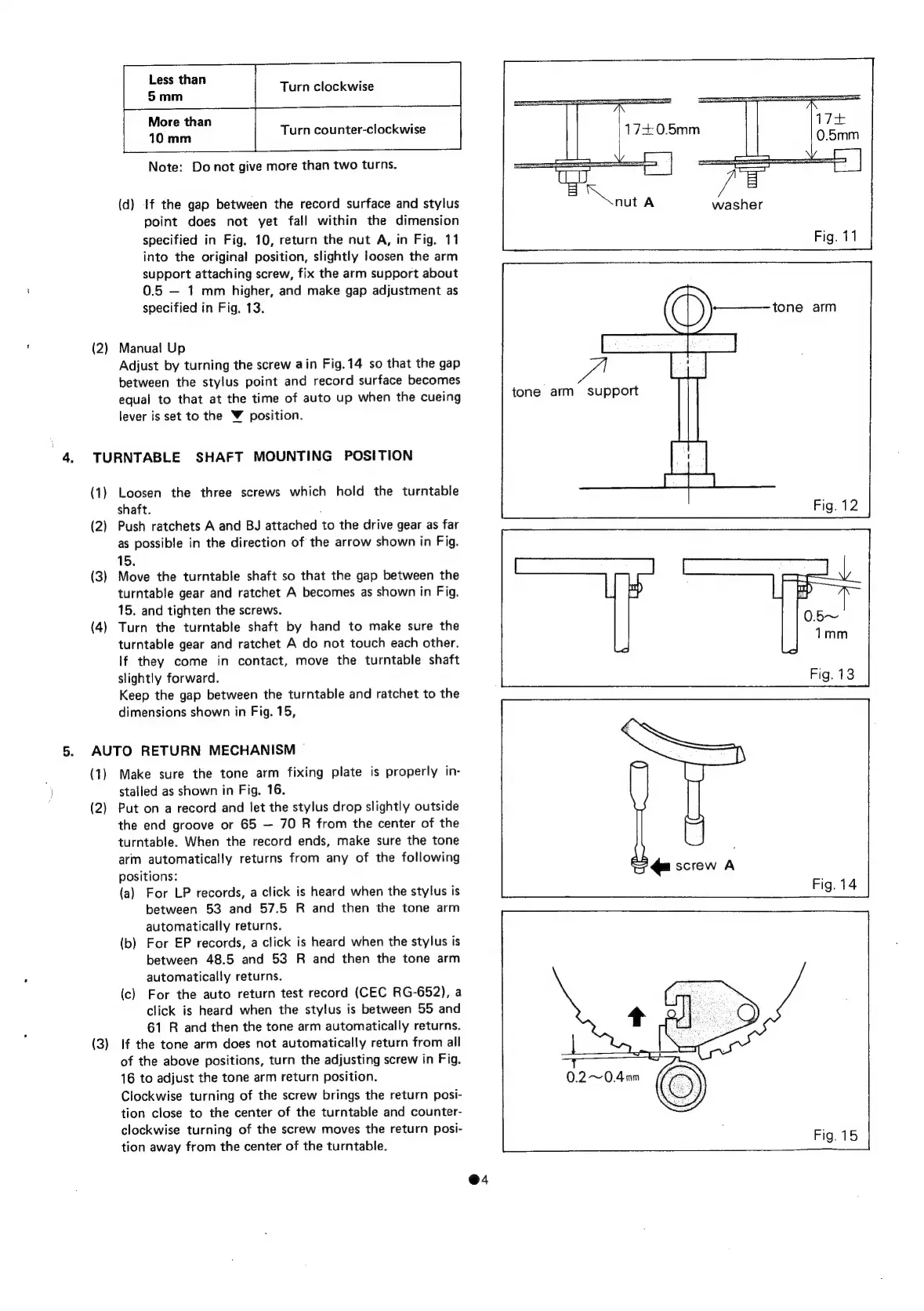
(d)
if
the
gap
between
the
record
surface
and
stylus
washer
point
does
not
yet
fall
within
the
dimension
specified
in
Fig.
10,
return
the
nut
A,
in
Fig.
11
into
the
original
position,
slightly
loosen
the
arm
support
attaching
screw,
fix
the
arm
support
about
0.5
1
mm
higher,
and
make
gap
adjustment
as
specified
in
Fig.
13.
—tone
arm
(2)
Manual
Up
Adjust
by
turning
the
screw
ain
Fig.14
so
that
the
gap
between
the
stylus
point
and
record
surface
becomes
equal
to
that
at
the
time
of
auto
up
when
the
cueing
lever
is
set
to
the
V
position.
tone
arm
support
TURNTABLE
SHAFT
MOUNTING
POSITION
(1)
Loosen
the
three
screws
which
hold
the
turntable
shaft.
.
(2)
Push
ratchets
A
and
BJ
attached
to
the
drive
gear
as
far
as
possible
in
the
direction
of
the
arrow
shown
in
Fig.
15.
(3)
Move
the
turntable
shaft
so
that
the
gap
between
the
turntable
gear
and
ratchet
A
becomes
as
shown
in
Fig.
15.
and
tighten
the
screws.
(4)
Turn
the
turntable
shaft
by
hand
to
make
sure
the
0.5~
turntable
gear
and
ratchet
A
do
not
touch
each
other.
If
they
come
in
contact,
move
the
turntable
shaft
slightly
forward.
Fig.
13
Keep
the
gap
between
the
turntable
and
ratchet
to
the
dimensions
shown
in
Fig.
15,
1mm
AUTO
RETURN
MECHANISM
(1)
Make
sure
the
tone
arm
fixing
plate
is
properly
in-
stalled
as
shown
in
Fig.
16.
(2)
Put
on
a
record
and
let
the
stylus
drop
slightly
outside
the
end
groove
or
65
70
R
from
the
center
of
the
turntable.
When
the
record
ends,
make
sure
the
tone
arm
automatically
returns
from
any
of
the
following
positions:
(a)
For
LP
records,
a
click
is
heard
when
the
stylus
is
between
53
and
57.5
R
and
then
the
tone
arm
automatically
returns.
(b)
For
EP
records,
a
click
is
heard
when
the
stylus
is
between
48.5
and
53
R
and
then
the
tone
arm
automatically
returns.
(c)
For
the
auto
return
test
record
(CEC
RG-652),
a
click
is
heard
when
the
stylus
is
between
55
and
61
R
and
then
the
tone
arm
automatically
returns.
(3)
If
the
tone
arm
does
not
automatically
return
from
all
of
the
above
positions,
turn
the
adjusting
screw
in
Fig.
16
to
adjust
the
tone
arm
return
position.
Clockwise
turning
of
the
screw
brings
the
return
posi-
tion
close
to
the
center
of
the
turntable
and
counter-
clockwise
turning
of
the
screw
moves
the
return
posi-
tion
away
from
the
center
of
the
turntable.
@4

Related product manuals