EasyManua.ls Logo

cec BD-5200 - Cueing Lever Adjustment; Turntable Speed Adjustment; Voltage Changeover

cec BD-5200
12 pages
Print Icon
To Next Page IconTo Next Page
To Previous Page IconTo Previous Page
Loading...
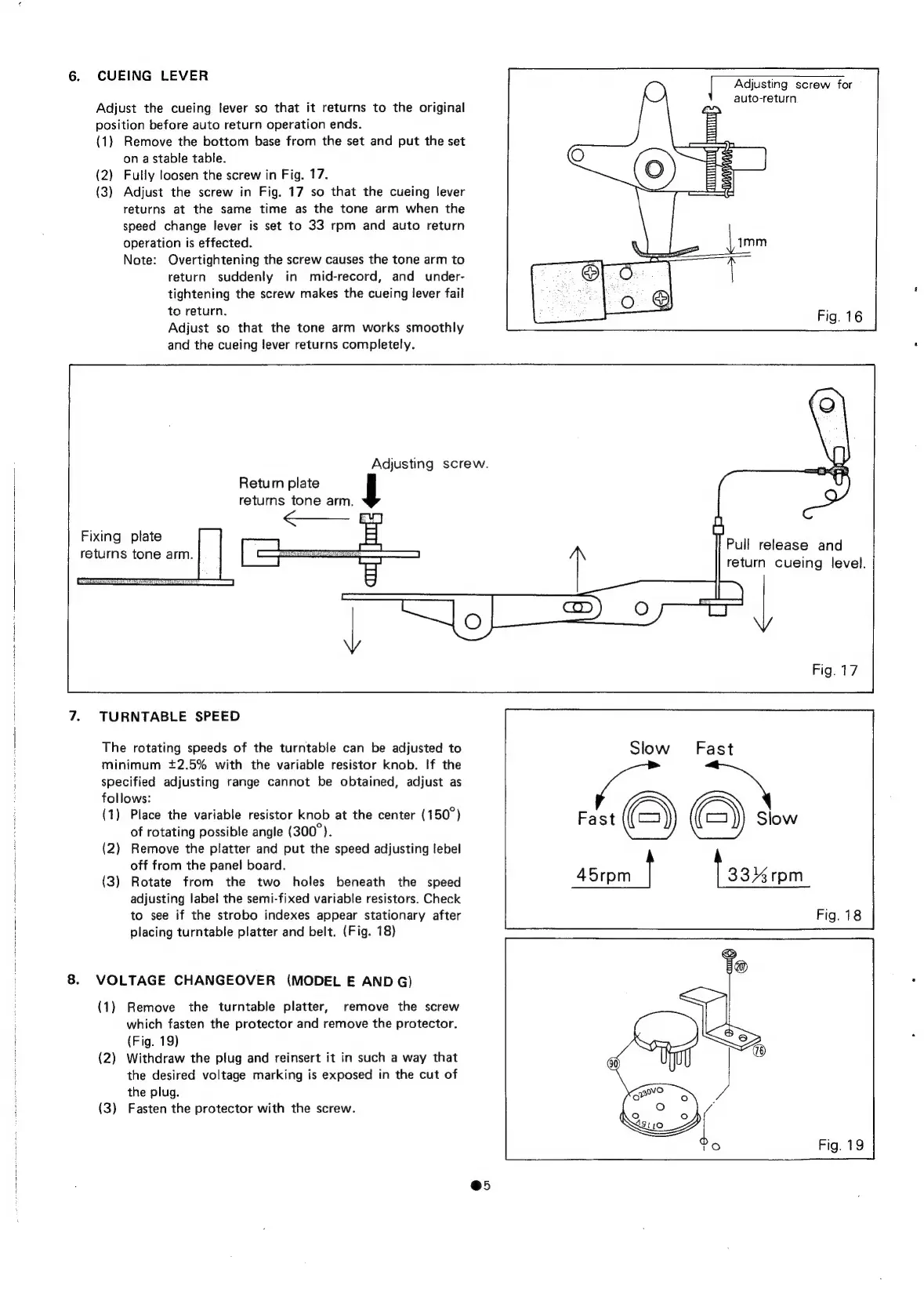
6.
CUEING
LEVER
Adjusting
screw
for
auto-return
Adjust
the
cueing
lever
so
that
it
returns
to
the
original
position
before
auto
return
operation
ends.
(1)
Remove
the
bottom
base
from
the
set
and
put
the
set
on
a
stable
table.
(2)
Fully
loosen
the
screw
in
Fig.
17.
(3)
Adjust
the
screw
in
Fig.
17
so
that
the
cueing
lever
returns
at
the
same
time
as
the
tone
arm
when
the
speed
change
lever
is
set
to
33
rpm
and
auto
return
operation
is
effected.
Note:
Overtightening
the
screw
causes
the
tone
arm
to
return
suddenly
in
mid-record,
and
under-
tightening
the
screw
makes
the
cueing
lever
fail
to
return.
Adjust
so
that
the
tone
arm
works
smoothly
and
the
cueing
lever
returns
completely.
Adjusting
screw.
Retum
plate
returns
tone
arm.
Fixing
plate
returns
tone
arm.
Pull
release
and
return
cueing
level.
7.
TURNTABLE
SPEED
The
rotating
speeds
of
the
turntable
can
be
adjusted
to
minimum
+2.5%
with
the
variable
resistor
knob.
If
the
specified
adjusting
range
cannot
be
obtained,
adjust
as
follows:
(1)
Place
the
variable
resistor
knob
at
the
center
(150°)
of
rotating
possible
angle
(300°).
(2)
Remove
the
platter
and
put
the
speed
adjusting
lebel
off
from
the
panel
board.
(3)
Rotate
from
the
two
holes
beneath
the
speed
adjusting
label
the
semi-fixed
variable
resistors.
Check
to
see
if
the
strobo
indexes
appear
stationary
after
placing
turntable
platter
and
belt.
(Fig.
18)
8.
VOLTAGE
CHANGEOVER
(MODEL
E
AND
G)
(1)
Remove
the
turntable
platter,
remove
the
screw
which
fasten
the
protector
and
remove
the
protector.
(Fig.
19)
(2)
Withdraw
the
plug
and
reinsert
it
in
such
a
way
that
the
desired
voltage
marking
is
exposed
in
the
cut
of
the
plug.
(3)
Fasten
the
protector
with
the
screw.
@5

Related product manuals