EasyManua.ls Logo

cecotec VQU11055+ - Turning On;Off the TV; TV Control & Operation

cecotec VQU11055+
Print Icon
To Next Page IconTo Next Page
To Previous Page IconTo Previous Page
Loading...
English - 7 -
Turning On/Off the TV
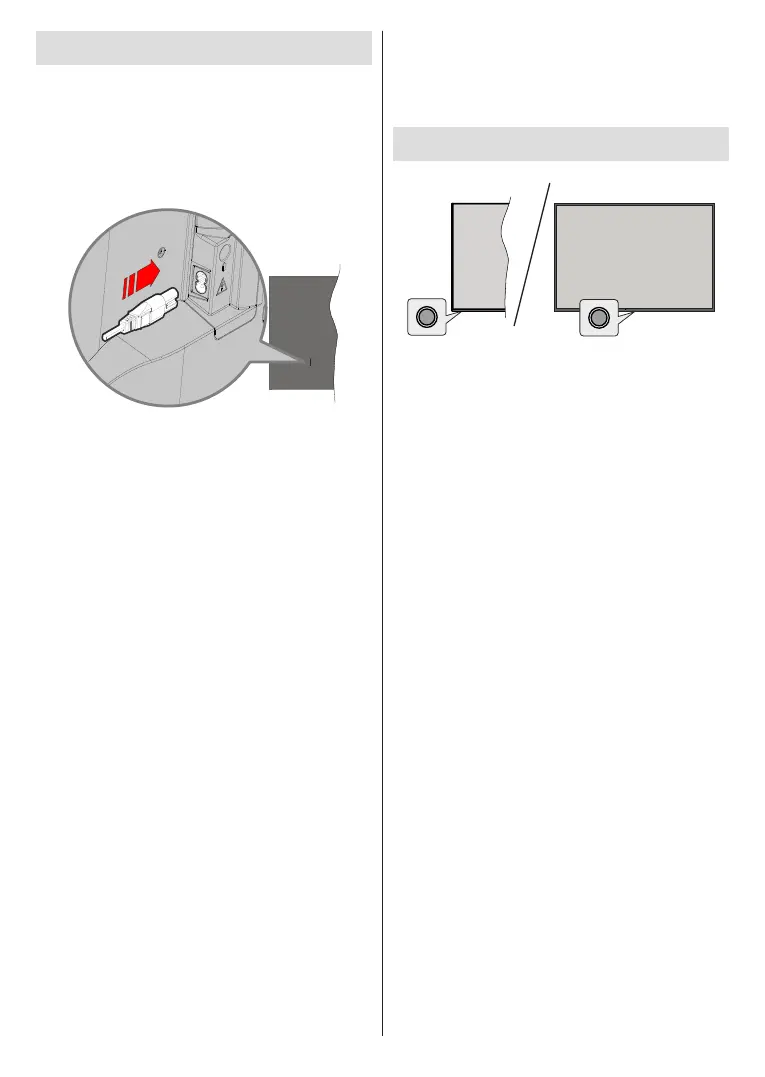
Connect power
IMPORTANT: The TV set is designed to operate on
220-240V AC, 50 Hz socket.


mains.
        
      
   


Note: The position of the power cord inlet may dier depending
on the model.
To switch on the TV from standby
 standby mode the standby LED lights

 Press the Standby button on the remote control.
 

To switch the TV into standby
        
control button. Press and hold the Standby button on
the remote control. 󰀨
the screen. Highlight OKOK button. The

󰀨

cord from the mains socket.
Quick Standby Mode
         
either;
 Press the Standby button on the remote.

 

mode.
        




TV Control & Operation
The control button allows you to control the Quick

Note: The position of the control button may dier depending
on the model.
󰀨 Press the control

    󰀨    
switched into standby mode via control button.
To turn on the TV:
will turn on.
Note: Live TV settings menu OSD in Live TV mode cannot be
displayed via the control button.
Operation with the Remote Control
Press the Menu button on your remote control to

Press Home


OK
       
Back/Return to return to the

Input Selection
Once you have connected external systems to your
󰀨
Source button on your remote control consecutively
OK
󰀨
mode. Or enter the Inputs
OK.
Changing Channels and Volume
        Volume
+/-
by using the Programme +/- buttons on the remote.