OPERATION
Power on/off
Switch the DNS 8 Live on by pressing the power button.
Switch it off by pressing and holding the power button for ve seconds. The
current settings will be stored during shutdown. If the unit is not shut down in this
manner, the settings will not be stored and corruption of the internal memory may
result. Refer to Setup/Options for further information.
SUMMARY VIEW
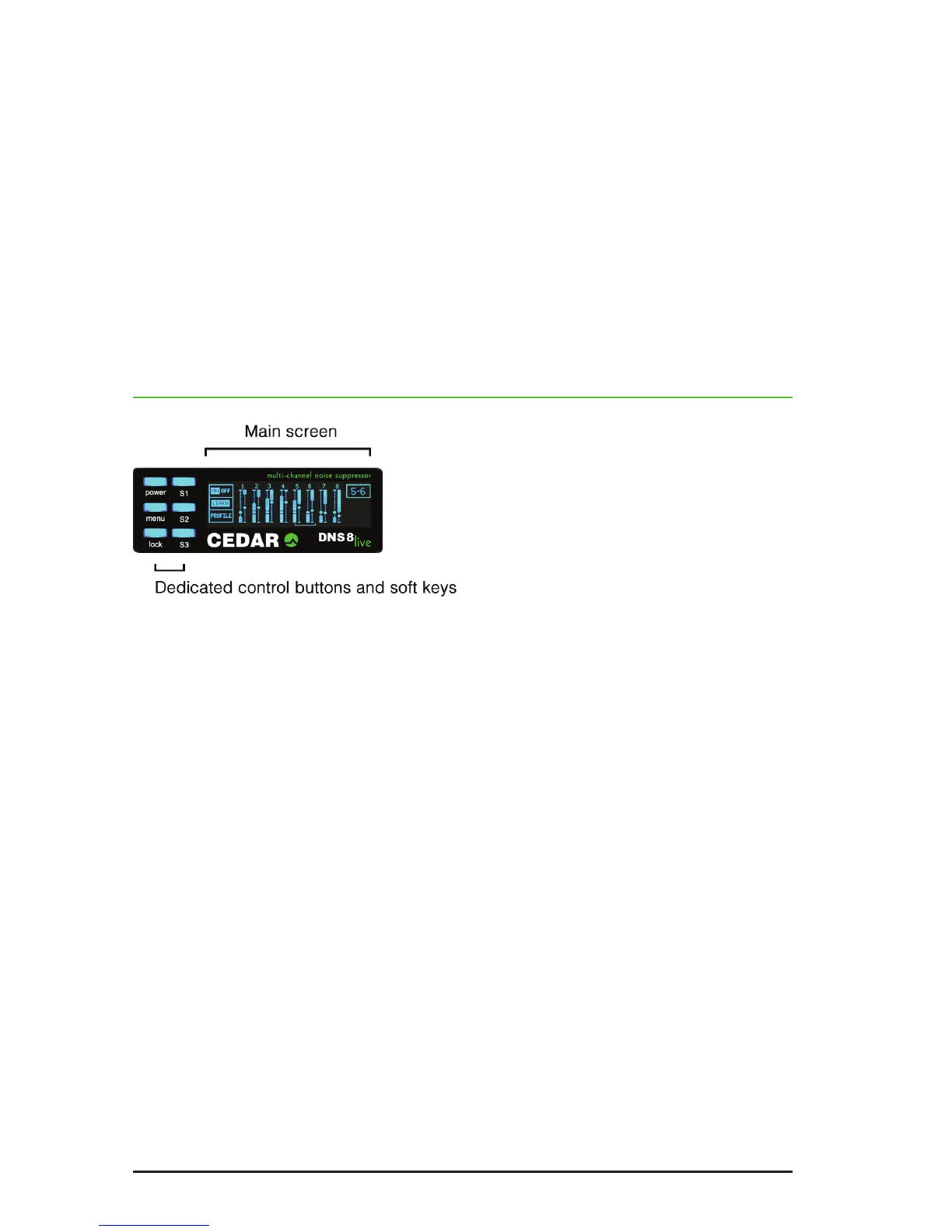
Upon startup, the main screen displays a summary of the setup of all eight
channels. The individual channel settings - the Level (“L”) and Gain (“G”)
parameters - are simultaneously displayed on the channel displays, and these are
overlaid on signal power and processing activity bargraphs. The focus of each
control knob is indicated by a lled-in circle in its associated display, and the
process on/off status is denoted by lled or hollow bargraphs (respectively).
■ Main screen
This provides visual feedback regarding the current operation of the unit as well as
displaying the menus and associated parameters.
■ Control buttons and soft keys
These provide access to the dedicated functions (power on/off and panel lock) as
well as allowing you to navigate around and edit the menus.
■ Lock
Press the lock button to lock the softkeys (S1, S2, S3), the menu button, and the
knobs. Double-click the same button to unlock the controls.
■ Menus
Press the menu button to enter the menu system for advanced operation.


 To Next Page