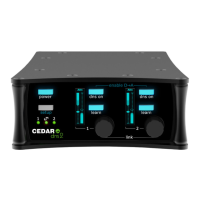
Need help?
Do you have a question about the Cedar dns 8 live and is the answer not in the manual?
A group delay of less than 10 samples (typically less than 1/200th of a frame) so there is no loss of lip-sync.
24-bit digital audio interfaces conforming to AES/EBU standards.
The ability to work anywhere in the world.
The latest, high resolution floating-point processors to ensure that it will handle the most complex processing requirements.
The ability to monitor and adjust all audio processing parameters using a range of common web browsers.
The DNS 8 Live must not be exposed to rain or moisture. Avoid condensation by allowing unit to reach ambient temperature.
Place on a flat, stable surface or rackmount. Avoid strong sunlight, dust, vibration, and heat sources.
Turn off the power to all equipment before making any connections.
Clean the DNS 8 Live only with a dry cloth. Never use abrasive pads or liquid cleaners.
Contains no user-serviceable parts. Return to qualified service agents for repair if damaged or exposed to liquids.
Maintain temperature between 5-30 Celsius, humidity 30-80% non-condensing, and avoid strong magnetic fields.
Features a universal AC power supply (85-260V) and a 12VDC input. Both can be connected simultaneously.
Offers two audio connection standards: Digital AES3 on XLR and AES3 on DB25. Unit locks to sample rates up to 96kHz.
Describes how to switch the DNS 8 Live unit on and off, emphasizing the importance of a proper shutdown procedure.
Provides visual feedback on current unit operation and displays menus and parameters.
Explains the function of control buttons and soft keys for navigation, editing, locking, and menu access.
Press the menu button to enter the menu system for advanced operation and configuration.
Toggle the current channel/group on/off, preview on/off, or toggle global on/off.
Start or stop learning on the current channel/group, or toggle global learn.
Toggle between Detail and default (summary) views, or preview detail on the main screen.
Use the Learn function (S2) to automatically set Level and Gain, either for a short period or permanently.
Manually set Level to remove noise, then adjust Gain to suppress noise without artefacts.
Group channels for identical settings and simultaneous adjustment. Channels in a group must be adjacent.
Configure system options like click time, brightness, and boot behavior.
Connect via Ethernet, enter IP address in browser, and log in with username/password.
Determine unit address from Status window and navigate to upload.cgi in a web browser.
 General
| Brand | Cedar |
|---|---|
| Model | dns 8 live |
| Category | Recording Equipment |
| Language | English |

 To Next Page