REMOTE CONTROL
The DNS 8 Live incorporates its remote control software in the form of an internal
web page, and you may connect to this using a suitable browser.
Connect the DNS 8 Live to your ethernet network and enter its address into
your browser’s address bar. (See note on previous page.) Enter the Username
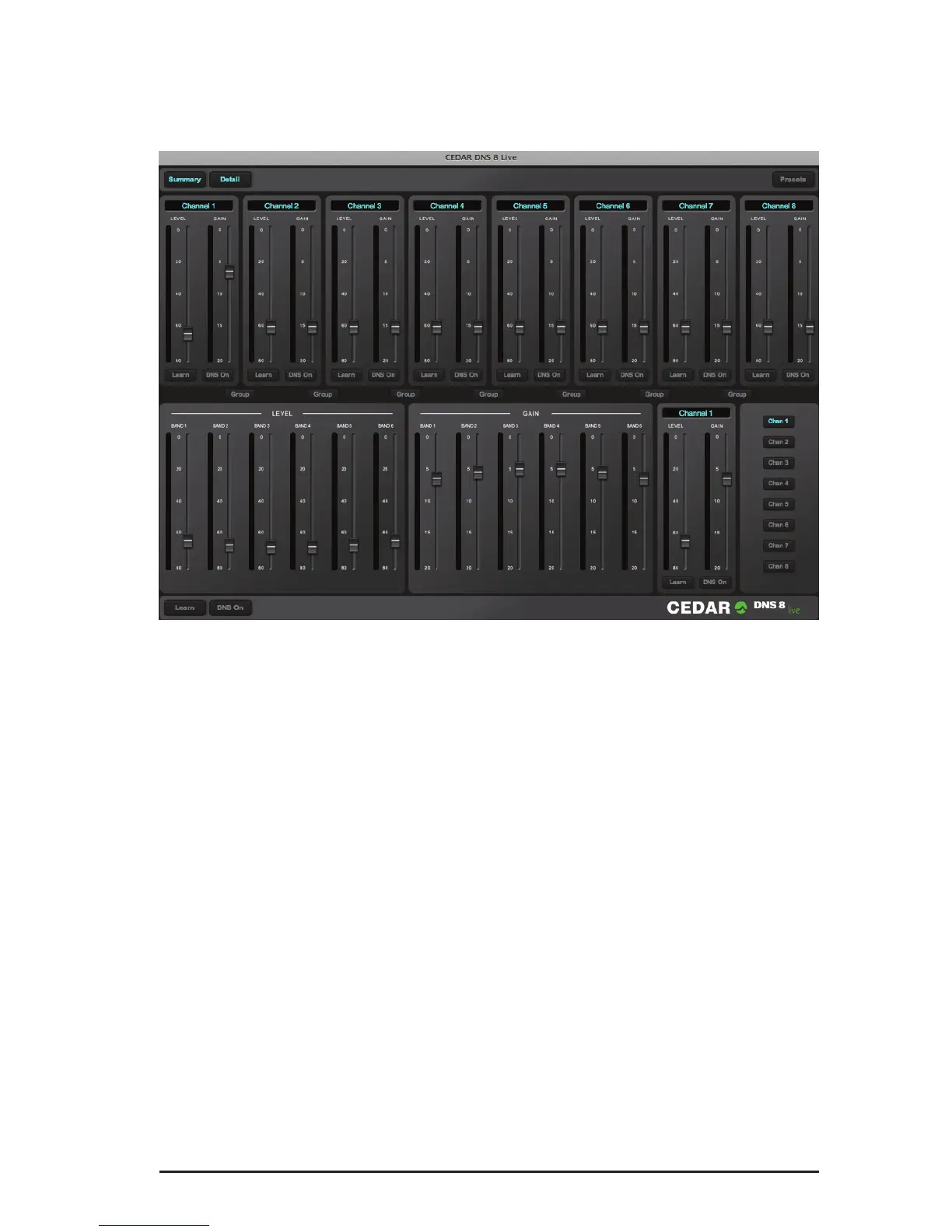
and Password for the unit and you will obtain two panels corresponding to the
Summary and Detail screens displayed on the DNS 8 Live itself. These panels
can be hidden and shown using the buttons in the upper left-hand corner of the
screen.
The Presets button (top right) provides access to the presets, and the Summary
panel displays Group buttons that allow you to group and ungroup channels. At
the bottom of the screen you will nd global DNS On/Off and Learn buttons.
Compatibility
At the time of writing, the DNS 8 Live is compatible with current versions of
Chrome, Explorer (v9 and higher), Firefox, Opera and Safari. It may be accessed
by multiple browsers simultaneously, and changes made on one browser will be
displayed on any others connected to the unit. However, the company does not
guarantee error-free use in this manner, and multi-client use is not supported by
CEDAR Audio Ltd.


 To Next Page