EasyManua.ls Logo

Celestron SS80 - Attaching the Standard Accessories.14

Celestron SS80
34 pages
Print Icon
To Next Page IconTo Next Page
To Previous Page IconTo Previous Page
Loading...
Attaching
the
Standard
Accessories
With
your
C90
attached
to
a
sturdy
mount,
as
described
earlier
in
this
manual,
you
are
ready
to
attach
the
standard
accessories.
To
do
this:
1.
Remove
the
plastic
covers
from
the
rear
cell
of
the
C90,
the
45®
Erect
Image
Diagonal,
and
the
eyepiece.
2.
Loosen
the
thumbscrew
on
the
rear
cell
of
the
C90
so
that
the
opening
is
unobstructed.
3.
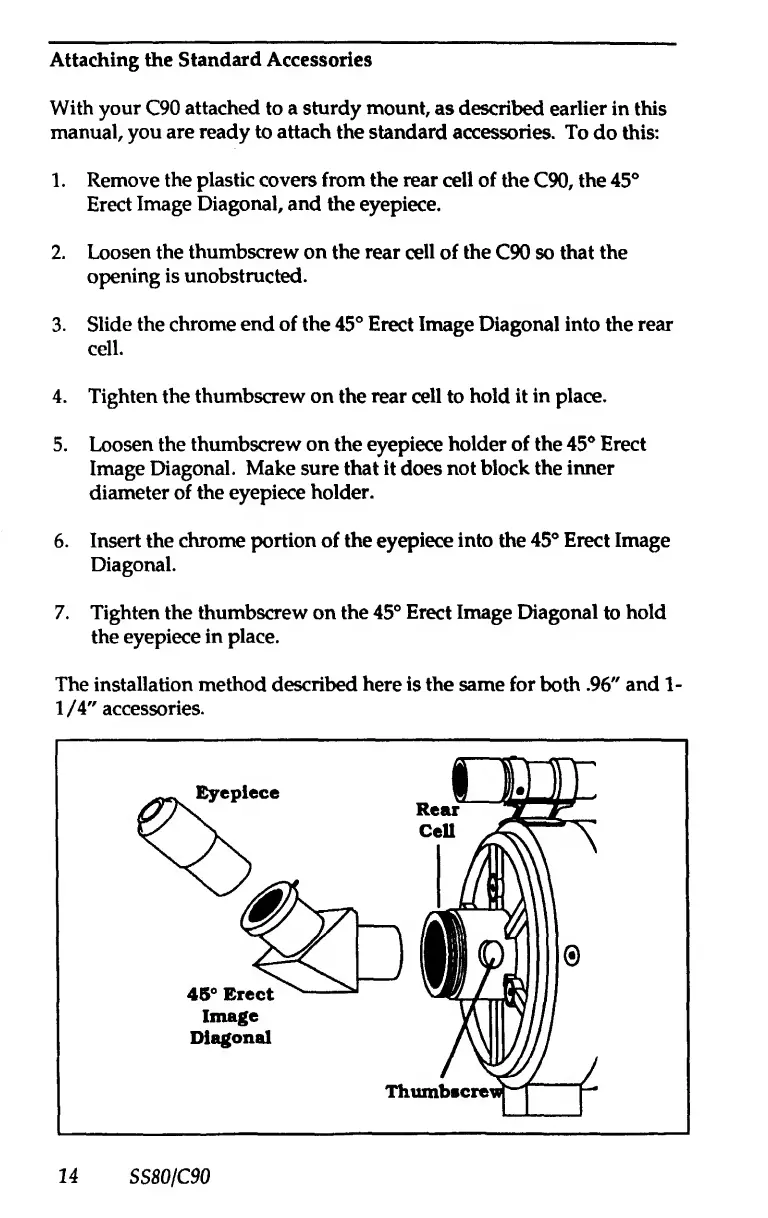
Slide
the
chrome
end
of
the
45®
Erect
Image
Diagonal
into
the
rear
cell.
4.
Tighten
the
thumbscrew
on
the
rear
cell
to
hold
it
in
place.
5.
Loosen
the
thumbscrew
on
the
eyepiece
holder
of
the
45®
Erect
Image
Diagonal.
Make
sure
that
it
does
not
block
the
inner
diemneter
of
the
eyepiece
holder.
6.
Insert
the
chrome
portion
of
the
eyepiece
into
the
45®
Erect
Image
Diagonal.
7.
Tighten
the
thumbscrew
on
the
45®
Erect
Image
Diagonal
to
hold
the
eyepiece
in
place.
The
installation
method
described
here
is
the
same
for
both
.96"
and
1-
1/4"
accessories.
14
SS80/C90

Related product manuals