ULT 072517
Page 20 | 1-855-235-5271
Ultimate Series
STANDARD
CONTROLLER
FUNCTIONS
If your unit is installed through the wall and
does not have a remote controller, you have the
standard controller.
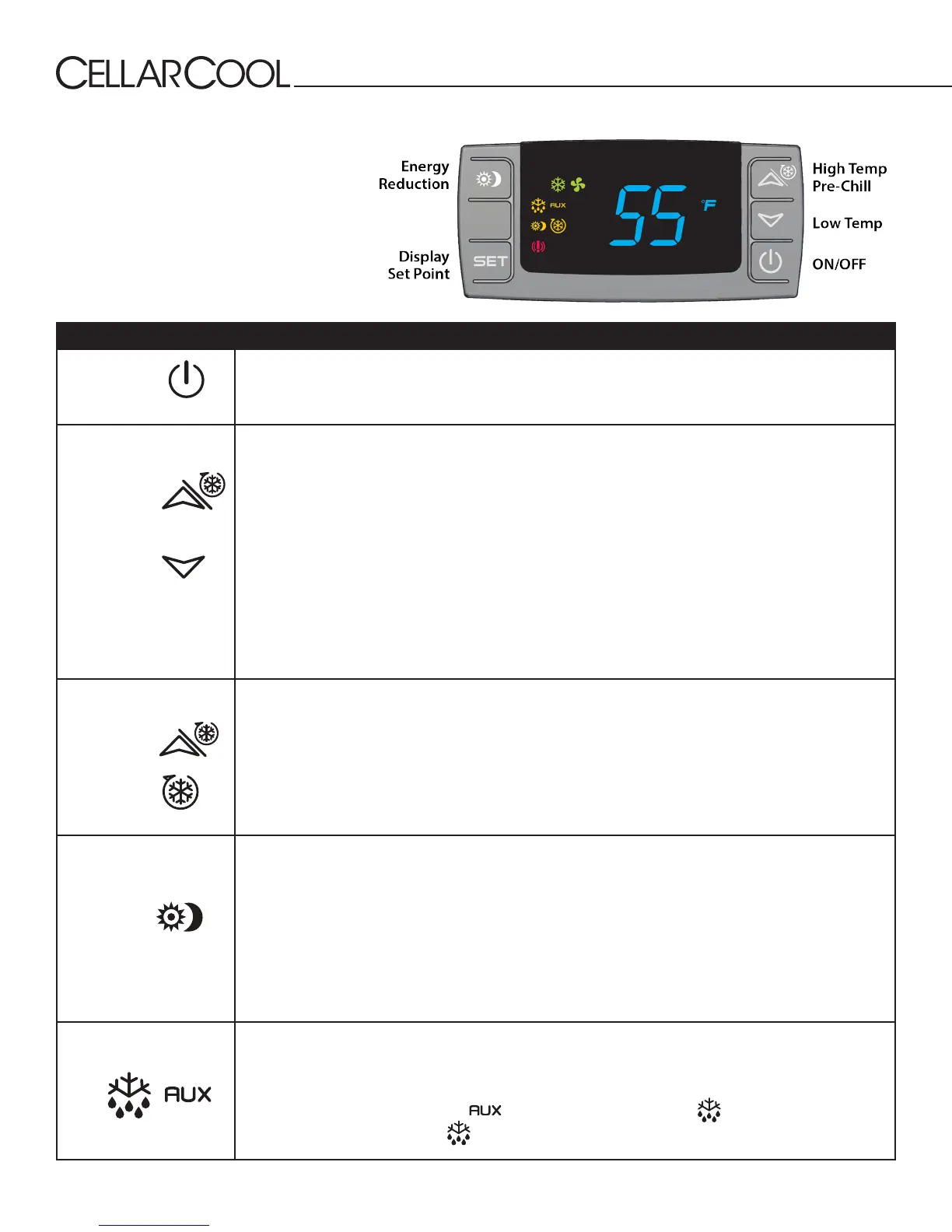
Button/Symbol Normal Functions
ON/OFF
The ON/OFF button allows the customer the convenience of turning the refrigeration unit ON or
OFF from the control panel. This feature does not disconnect power from the unit. In order for the
power to be shut o from the unit, the power cord must be unplugged from the wall outlet.
UP/DOWN ARROWS
Use these buttons to scroll through the CPSM (Customer Preference Selection Mode) menu. The
arrow buttons also display the highest and lowest temperatures sensed by the bottle probe. They
can be easily reset to reect current temperatures.
1. Press the UP ARROW or DOWN ARROW button once and the highest or lowest temperature (Hi/
Lo) sensed by the bottle probe will be displayed.
2. To reset the Hi/Lo, press and hold the SET button when the Hi/Lo value is displayed on the
display, continue to hold the SET button until “rSt” appears on the display and then blinks. This
will erase the past recorded temperature data history and start recording from the current time
and temperature.
3. The Hi/Lo feature should be reset at initial startup and after the cellar or cabinet has reached its
normal operating temperatures, generally 55°F.
CELLAR PRE-CHILL
(CPC)
Activate the CPC feature by pressing the UP ARROW button for 3–5 seconds until the CPC logo
appears on the display. The CPC feature can be terminated by pressing the UP ARROW button for
3–5 seconds. The feature will self-terminate after six hours.
The CPC feature may be used to pre-chill the cellar prior to loading it with warm product. The
feature will shift the set point down to a lower setting of 52°F, for the next 6 hours. After the six-
hour time period, the set point will automatically return to the original set point.
The CPC feature can be conveniently adjusted to the customer’s specic needs, by accessing the
CPSM (Customer Preference Select Mode). See CPSM Instructions on the following page.
ENERGY REDUCTION
(ER)
The ER feature is activated by pressing the ER button once. The ER symbol (a sun and a crescent
moon) will appear on the display. The ER feature reduces energy consumption by shifting the set
point up by four degrees. This allows cooling unit to run for shorter periods of time, resulting in a
reduction in energy cost. The ER feature allows for energy savings at any time — during periods of
high ambient temperatures, vacations or business travel.
To deactivate the ER feature, press the ER button one time, and the ER logo will turn o. The ER
feature can be conveniently adjusted to the customer’s specic needs. See CPSM Instructions on
the following page.
ANTI-FROST CYCLE
The Anti-Frost Cycle is automatically activated when the evaporator registers a temperature of 25°F
for a period of ve minutes. During this cycle the compressor and condenser fans will turn o while
the evaporator fans continue to run. Once the temperature of the evaporator gets back up to 40°F
the cycle will deactivate and the unit will revert back to normal operating conditions.
At the beginning of the cycle the symbol will display and the
symbol will ash. When
the cycle begins properly, the symbol will be steadily illuminated.



 To Next Page