C1924F Instruction Book
9
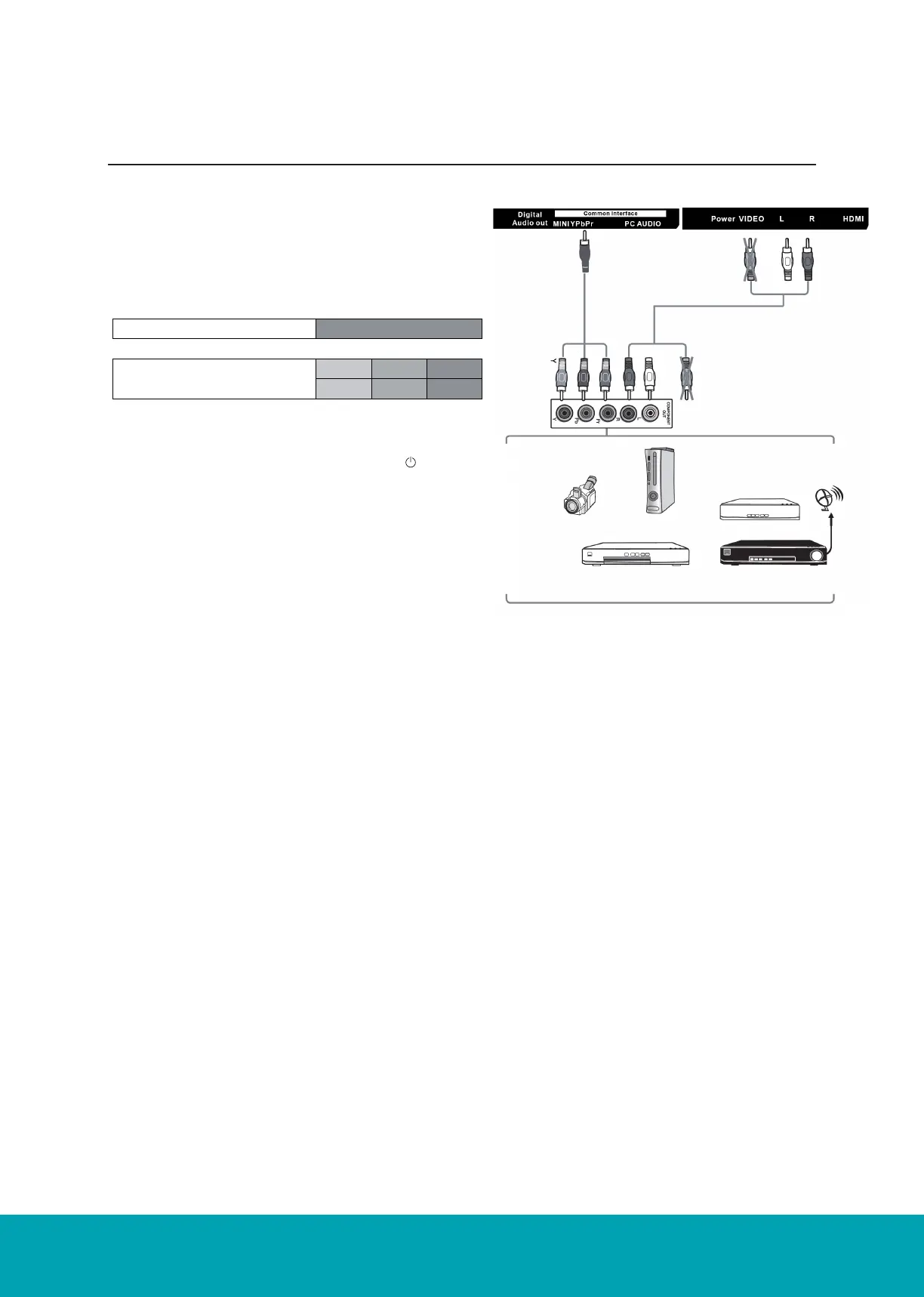
Connecting to an AV Device with a Component
(YPbPr) Cable
1. Use a component cable to connect the TV’s Mini YPbPr
input sockets to an external AV device’s component output
sockets.
2. Use an AV cable to connect the TV’s Mini AV input sockets
to the external AV device’s component audio output sock-
ets. (Audio Left = white, Audio Right = red)
3. Plug the connected devices into the main socket.
4. Press the STANDBY button on the TV or the button on
the remote control.
5.
6. Press the SOURCE button on the TV or the SOURCE
button on the remote control to display the Source List.
Use the ▲▼ buttons to select YPbPr and then Press the
OK button to confirm.
Component port of the TV
Video output ports on DVD
Player
Mini YPbPr
Y Pb Pr
Y Cb Cr
Rear View of TV
Component Cable
(not included)
AV Cable
(not included)
Video Camera Game Console
Set-top Box
Satellite
Antenna
cable
Satellite Receiver
Blu-ray Player/DVD
Player/Recorder
Yellow (Video)
White (L)
White (L)
Red (R)
Pr/Cr
Pb/Cb
Red (R)
Yellow (Video)



 To Next Page